
Gigabyte's i-RAM: Affordable Solid State Storage
- Posted in
- Storage
i-RAM's Limitations
Since your data is stored on a volatile medium with the i-RAM, a loss of power could mean that everything stored on the card would be erased with no hopes for recovery. While a lot of users may keep their computers on 24/7, there are always occasional power outages that would spell certain doom for i-RAM owners. In order to combat this possibility, Gigabyte outfitted the i-RAM with its own rechargeable battery pack.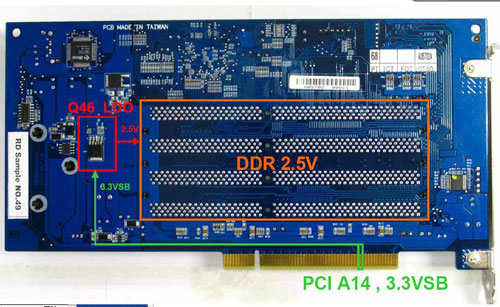
There are only three conditions where the i-RAM runs off of battery power:
1) When the i-RAM is unplugged from the PCI slot;For whatever reason, unplugging the i-RAM from the PCI slot causes its power consumption to go up considerably, and will actually drain its battery a lot quicker than the specified 16 hours. We originally did this to test how long the i-RAM would last on battery power, but then were later told by Gigabyte not to do this because it puts the i-RAM in a state of accelerated battery consumption.
2) When the power cable is unplugged from your power supply (or the power supply is disconnected from your motherboard; and
3) When the power button on your power supply is turned off.
For the most part, the i-RAM will always be powered. Your data is only at risk if you have a long-term power outage or you physically remove the i-RAM card.
If you run out of battery power, you will lose all data and the i-RAM will stop appearing as a drive letter in Windows as soon as you power it back up. You'll have to re-create the partition data and copy/install all of your files and programs over again.
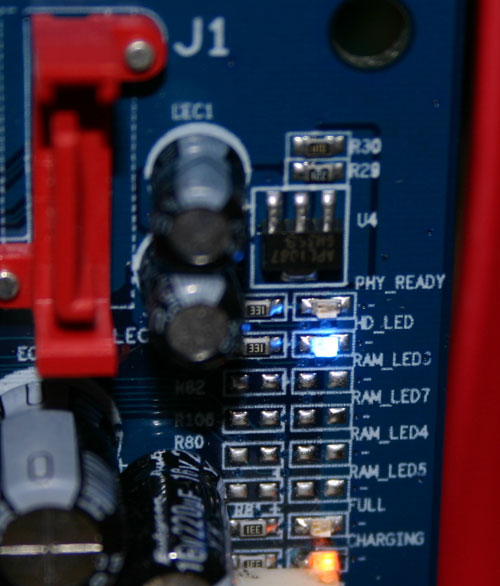
The card features four LEDs that indicate its status: PHY_READY, HD_LED, Full and Charging.
Originally published at https://www.anandtech.com/show/1742 (Wayback Machine).