
AnandTech Exclusive: CrossFire Benchmarks Revealed
- Posted in
- GPUs
Introduction
This week, we were very lucky to get our hands on a CrossFire motherboard and a CrossFire master card from Gigabyte.We have previously covered CrossFire, so please check out that article for more details. It all comes down to ATI's answer to SLI in the form of a master/slave card combination where the master card reconstructs the data produced by both cards and outputs it to the display. Communication between cards is done over PCI Express and a dongle that plugs into the slave card's DVI port. And today, we have the pleasure of talking about performance.
While we did get the chance to take an early look at CrossFire during Computex, we recently learned that what we saw wasn't actually full CrossFire. This time, we have an actual master card in our hands and we'll put ATI's answer to SLI to the test. Of course, due to the very prerelease nature of these products, our tests were not without some bumps and detours.
We had some trouble getting CrossFire set up and running due to a combination of factors. The first monitor that we tested doesn't work on the master card dongle with drivers installed. We weren't exactly sure in which slot the master card needed to be (we hear that it shouldn't make a difference when the final product is released), and we didn't know into which DVI port on the slave card to plug the dongle. After a bout of musical monitors, slots, and ports that finally resulted in a functional setup, we still needed to spend some time actually wrestling the driver into submission.
After getting the driver issues squared away, we got down to testing. Our first disappointment came along when we realized that the CrossFire AA modes were not quite finished. Enabling these modes drops performance much more than what we would expect and looks like the frames that each GPU renders are out of sync with the other card. We can't be totally sure what's going on here, but it's clear that there still needs to be some work done.
One thing that works well right now is SuperTiling. Except for some random display corruption when switching modes, SuperTiling looked alright and ran with good speed.
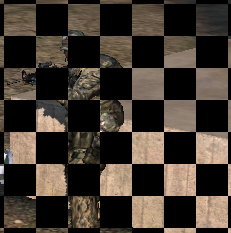
Note that each GPU will render 32x32 pixel blocks (256 adjacent quads for those keeping track).
The only random quirk that we would expect to find in prerelease hardware, which ended up getting in our way, is the fact that setting standard AA modes in the control center didn't seem to actually enable antialiasing. Games that made use of in game AA adjustments seemed to work well. Not being able to use a good CRT monitor, we had to resort to our 1600x1200 LCD for testing, limiting our max resolution. Below 16x12, many games are not GPU limited under CrossFire. Even at 16x12 with no AA, we see some games that could be pushed much further.
This brings up a point that we will be making more and more as GPUs continue to gain power. Large LCDs are very expensive and CRTs are on their way out. Buying more than one 6800 Ultra, and soon adding a CrossFire master to an X850, doesn't make much sense without being able to run more than 1280x1024. And we would really recommend being able to run at least 1600x1200 for these kinds of setups.
Let's take a closer look at the setup before we get to benchmarks.
Originally published at https://www.anandtech.com/show/1739 (Wayback Machine).