
Apple's Mighty Mouse: The Move to Multi-Button
- Posted in
- Mac
About a year ago, I put all prejudices aside, cast away all of my prior experiences with the platform, and I tried a Mac for a month.
The experiment, as I called it back then, was very much a success. I've integrated the Mac platform into my regular computer usage, using it for a lot of my work, while also continuing to be an avid PC user. Giving Macs a chance for the first time last year wasn't all that hard, except for one major issue on which I would not budge: the mouse.
One of the defining Mac vs. PC arguments has always been the mouse argument; more specifically, Macs had one-button mice, while PCs had two. More recently, PCs grew a few more buttons and wheels on their mice, all the while Apple refused to move beyond the one. There are many justifications thrown about for the use of a one-button mouse, just as there are many for the use of a multi-button mouse, but regardless of what they are, they have been here for a couple of decades now.
Back during the planning days of my Mac experiment, I knew that in order to give the platform a fair chance, I couldn't use that mouse. I'd spent my mousing-life with two buttons and having to give one of them up would be too much to ask, if I were to be as objective as possible. As time went on, I began to see both sides of the argument and truth be told, today, I can actually get by with a one-button mouse on a Mac just fine. I still prefer to have a multi-button mouse, but it's not the deal breaker for me that it once was.
Of course, now that it's no longer a problem for me, Apple finally broke tradition and launched their first multi-button mouse for USB enabled Macs, and it's called the Mighty Mouse and it retails for $49.99.
Apple's one button mice in the past haven't really had a button; rather, the entire surface of the mouse acts as the primary mouse button. Pushing it down makes the mouse click and acts as a left or primary click. The Mighty Mouse works the same way, but there are now touch sensors below the left and right halves of the mouse that sense whether or not you are trying to left or right click. So, although a left and right click mechanically trigger the same button, the sensors below the surface of the mouse determine the sort of a click that you're trying to perform. I'll get to whether or not this actually works well in a moment.
Apple has effectively built the world's first multi-button mouse that's designed to look and work primarily like a one-button mouse. And now it's time to find out if they did a good job in doing so...
The experiment, as I called it back then, was very much a success. I've integrated the Mac platform into my regular computer usage, using it for a lot of my work, while also continuing to be an avid PC user. Giving Macs a chance for the first time last year wasn't all that hard, except for one major issue on which I would not budge: the mouse.
One of the defining Mac vs. PC arguments has always been the mouse argument; more specifically, Macs had one-button mice, while PCs had two. More recently, PCs grew a few more buttons and wheels on their mice, all the while Apple refused to move beyond the one. There are many justifications thrown about for the use of a one-button mouse, just as there are many for the use of a multi-button mouse, but regardless of what they are, they have been here for a couple of decades now.
Back during the planning days of my Mac experiment, I knew that in order to give the platform a fair chance, I couldn't use that mouse. I'd spent my mousing-life with two buttons and having to give one of them up would be too much to ask, if I were to be as objective as possible. As time went on, I began to see both sides of the argument and truth be told, today, I can actually get by with a one-button mouse on a Mac just fine. I still prefer to have a multi-button mouse, but it's not the deal breaker for me that it once was.
Of course, now that it's no longer a problem for me, Apple finally broke tradition and launched their first multi-button mouse for USB enabled Macs, and it's called the Mighty Mouse and it retails for $49.99.
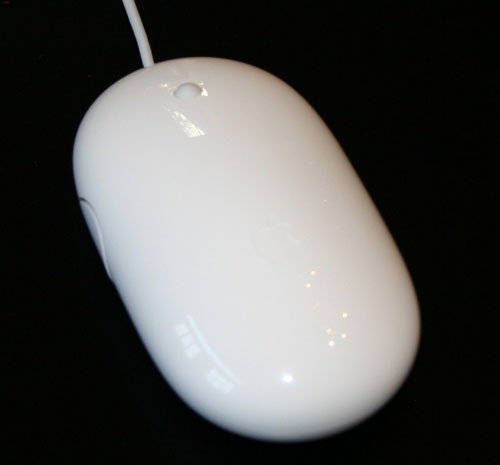
The Mighty Mouse
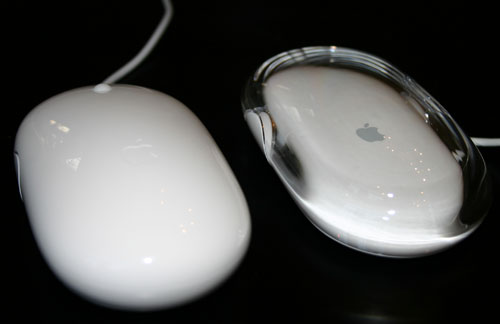
Mighty Mouse (left) vs. Apple Optical Mouse (right)
Apple's one button mice in the past haven't really had a button; rather, the entire surface of the mouse acts as the primary mouse button. Pushing it down makes the mouse click and acts as a left or primary click. The Mighty Mouse works the same way, but there are now touch sensors below the left and right halves of the mouse that sense whether or not you are trying to left or right click. So, although a left and right click mechanically trigger the same button, the sensors below the surface of the mouse determine the sort of a click that you're trying to perform. I'll get to whether or not this actually works well in a moment.
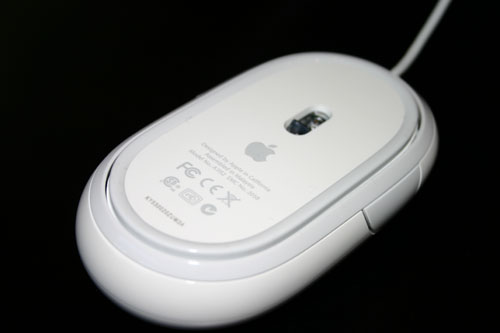
The underbelly of the Mighty Mouse
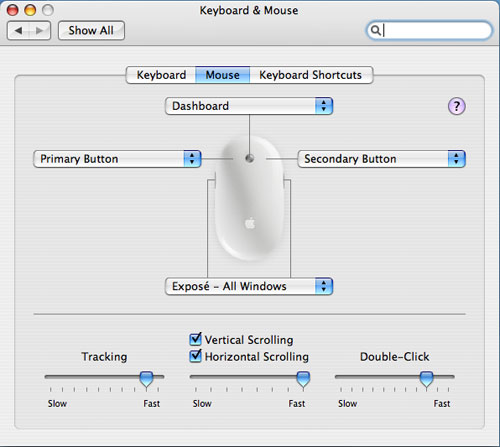
Apple has effectively built the world's first multi-button mouse that's designed to look and work primarily like a one-button mouse. And now it's time to find out if they did a good job in doing so...
Originally published at https://www.anandtech.com/show/1747 (Wayback Machine).