
QNAP TS-853 Pro 8-bay Intel Bay Trail SMB NAS Review
Miscellaneous Aspects and Final Words
In order to keep testing consistent across all 8-bay units, we performed all our expansion / rebuild testing as well as power consumption evaluation with the unit configured in RAID-5. The disks used for benchmarking (Western Digital WD4000FYYZ) were also used in this section. The table below presents the average power consumption of the unit as well as time taken for various RAID-related activities.
| QNAP TS-853 Pro RAID Expansion and Rebuild / Power Consumption | ||
| Activity | Duration (HH:MM:SS) | Avg. Power (W) |
| Single Disk Init | 00:02:51 | 30.34 W |
| JBOD to RAID-1 Migration | 08:32:42 | 39.72 W |
| RAID-1 (2D) to RAID-5 (3D) Migration | 23:07:23 | 50.41 W |
| RAID-5 (3D) to RAID-5 (4D) Expansion | 01:00:29 | 59.69 W |
| RAID-5 (4D) to RAID-5 (5D) Expansion | 01:50:43 | 71.01 W |
| RAID-5 (5D) to RAID-5 (6D) Expansion | 01:57:20 | 81.57 W |
| RAID-5 (6D) to RAID-5 (7D) Expansion | 02:08:18 | 91.9 W |
| RAID-5 (7D) to RAID-5 (8D) Expansion | 01:59:59 | 101.88 W |
| RAID-5 (8D) Rebuild | 10:56:15 | 101.62 W |
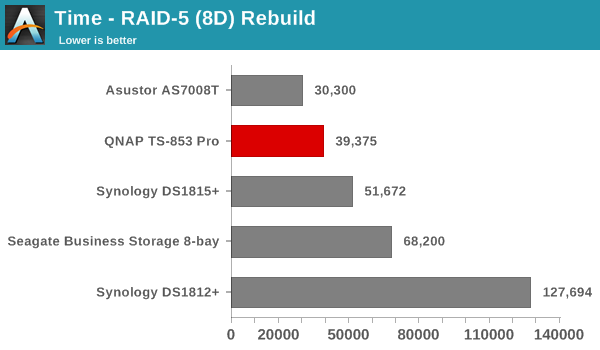
The graphs below show the power consumption and rebuild duration when repairing a RAID-5 volume for the various 8-bay NAS units that have been evaluated before.
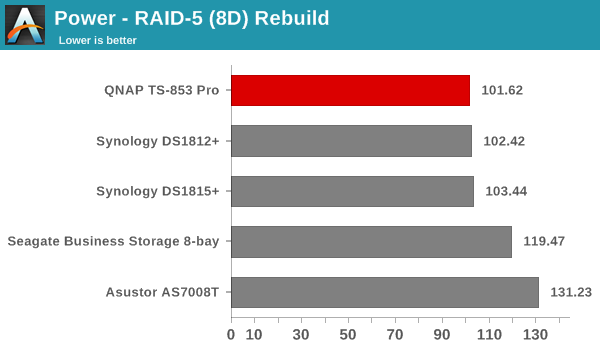
QNAP's RAID rebuild times have consistently been great (even with the bitmap feature turned off). We see that the duration is beat only by Asustor's AS7008T. However, power consumption is quite a bit lower for the TS-853 Pro. In fact, the TS-853 Pro is the most power efficient of the lot when it comes to RAID-5 rebuild.
Concluding Remarks
Coming to the business end of the review, we are in a good position to discuss the merits of various 8-bay solutions for the mid-range SMB market. The main tussle is between the Synology DS1815+ and the QNAP TS-853 Pro. When it comes to home and power users / low-end SMBs, the TS-853 Pro can be easily recommended. The real-time transcoding and media serving capabilities as well as the QNAP suite of mobile apps get the job done without much ado. Virtualization Station is an awesome differentiating feature - something that the competition is yet to match. Applications for VMs are numerous - home automation controllers, casual software development machines - the list goes on. We also tested out system migration by moving disks from our TS-451 sample under long term testing to the TS-853 Pro, and the new system was up and running with all data / user details intact immediately.
However, when it comes to the actual target market - mid-range SMBs, it looks like the TS-853 Pro has missed the mark with the current version of QTS. One of the most glaring shortcomings is the absence of the Storage Pool feature - something available in the higher end units such as the TS-EC1279U-RP. The other aspect is the limited iSCSI LUN configuration capabilities. Synology really hits a home run with their iSCSI feature set. Fortunately, QNAP indicated that both of these aspects are being addressed in QTS 4.2, slated to go public in the next few months.
The final verdict is that if you are a home / SOHO user looking for a powerful NAS solution, the TS-853 Pro should be your go-to solution if you can afford a mid-range SMB price. Business users should wait for QTS 4.2 to become public before making a firm decision in favor of the TS-853 Pro. [ UPDATE: QNAP's QTS 4.1.2 update brings block-based LUNs as well as storage pools support to the TS-853 Pro ].
Originally published at https://www.anandtech.com/show/8799/qnap-ts853-pro-8bay-intel-bay-trail-smb-nas-review (Wayback Machine).