
HGST Deskstar NAS 6 TB Review
Introduction and Testbed Setup
The traditional market for hard drives (PCs and notebooks) is facing a decline due to the host of advantages provided by SSDs. However, the explosion in the amount of digital content generated by the households and businesses has resulted in the rapid growth of the SMB / SOHO / consumer NAS market. Hard drive vendors have jumped on to this opportunity by tweaking the firmware and manufacturing process of their drives to create lineups specifically suited for the NAS market.
We have already had comprehensive coverage of a number of 4 TB NAS drives and a few 6 TB ones. Earlier this month, Seagate also introduced their WD Red Pro competitor, the Enterprise NAS HDD. We reviewed the 6 TB version and it turned out to be a great performer, albeit a bit costly for regular consumers. HGST aims to fill that space with the 6 TB Deskstar NAS. It falls in the same market category as the WD Red. However, the HGST Deskstar NAS drives have a 7200 RPM rating and the 5 / 6 TB variants come with 128 MB of DRAM cache. This is expected to make them perform closer to the Seagate Enterprise Capacity v4 and Enterprise NAS HDD drives. In the remainder of the review, we will try to determine whether that is the case.
The correct choice of hard drives for a NAS system is influenced by a number of factors. These include expected workloads, performance requirements and power consumption restrictions, amongst others. In this review, we will discuss some of these aspects while comparing the HGST Deskstar NAS against other drives targeting the NAS market. The list of drives that we will be looking at today is listed below.
- HGST Deskstar NAS (HDN726060ALE610)
- Seagate Enterprise NAS HDD 6 TB [ ST6000VN0001-1SF17Z ]
- Western Digital Red 6 TB [ WDC WD60EFRX-68MYMN0 ]
- Seagate Enterprise Capacity 3.5 HDD v4 6 TB [ ST6000NM0024-1HT17Z ]
- HGST Ultrastar He6 6 TB [ HUS726060ALA640 ]
Prior to proceeding with the actual review, it must be made clear that the above drives do not target the same specific market. For example, the WD Red and the HGST Deskstar NAS units are for 1- 8 bay NAS systems in the tower form factor. The Seagate Enterprise NAS HDD is meant for rackmount units up to 16 bays, but is not intended to be a replacement for drives such as the Enterprise Capacity v4. The Ultrastar He6 is targeted towards datacenters where its storage density and power efficiency lead to a lower overall TCO.
Testbed Setup and Testing Methodology
Our NAS drive evaluation methodology consists of putting the units to test under both DAS and NAS environments. We first start off with a feature set comparison of the various drives, followed by a look at the raw performance when connected directly to a SATA 6 Gbps port. In the same PC, we also evaluate the performance of the drive using some aspects of our direct attached storage (DAS) testing methodology. For evaluation in a NAS environment, we configure three drives of each model in a RAID-5 volume and process selected benchmarks from our standard NAS review methodology. Since our NAS drive testbed supports both SATA and SAS drives, but our DAS testbed doesn't, only SATA drives are subject to the DAS benchmarks.
We used two testbeds in our evaluation, one for benchmarking the raw drive and DAS performance and the other for evaluating performance when placed in a NAS unit.
| AnandTech DAS Testbed Configuration | |
| Motherboard | Asus Z97-PRO Wi-Fi ac ATX |
| CPU | Intel Core i7-4790 |
| Memory | Corsair Vengeance Pro CMY32GX3M4A2133C11 32 GB (4x 8GB) DDR3-2133 @ 11-11-11-27 |
| OS Drive | Seagate 600 Pro 400 GB |
| Optical Drive | Asus BW-16D1HT 16x Blu-ray Write (w/ M-Disc Support) |
| Add-on Card | Asus Thunderbolt EX II |
| Chassis | Corsair Air 540 |
| PSU | Corsair AX760i 760 W |
| OS | Windows 8.1 Pro |
| Thanks to Asus and Corsair for the build components | |
In the above testbed, the hot swap bays of the Corsair Air 540 have to be singled out for special mention.
They were quite helpful in getting the drives processed in a fast and efficient manner for benchmarking. For NAS evaluation, we used the QNAP TS-EC1279U-SAS-RP. This is very similar to the unit we reviewed last year, except that we have a slightly faster CPU, more RAM and support for both SATA and SAS drives.
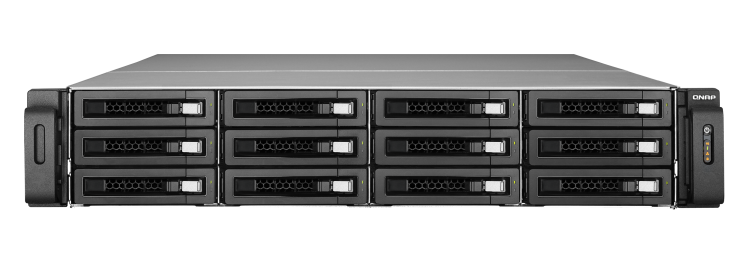
The NAS setup itself was subjected to benchmarking using our standard NAS testbed.
| AnandTech NAS Testbed Configuration | |
| Motherboard | Asus Z9PE-D8 WS Dual LGA2011 SSI-EEB |
| CPU | 2 x Intel Xeon E5-2630L |
| Coolers | 2 x Dynatron R17 |
| Memory | G.Skill RipjawsZ F3-12800CL10Q2-64GBZL (8x8GB) CAS 10-10-10-30 |
| OS Drive | OCZ Technology Vertex 4 128GB |
| Secondary Drive | OCZ Technology Vertex 4 128GB |
| Tertiary Drive | OCZ Z-Drive R4 CM88 (1.6TB PCIe SSD) |
| Other Drives | 12 x OCZ Technology Vertex 4 64GB (Offline in the Host OS) |
| Network Cards | 6 x Intel ESA I-340 Quad-GbE Port Network Adapter |
| Chassis | SilverStoneTek Raven RV03 |
| PSU | SilverStoneTek Strider Plus Gold Evolution 850W |
| OS | Windows Server 2008 R2 |
| Network Switch | Netgear ProSafe GSM7352S-200 |
Thank You!
We thank the following companies for helping us out with our NAS testbed:
- Thanks to Intel for the Xeon E5-2630L CPUs and the ESA I-340 quad port network adapters
- Thanks to Asus for the Z9PE-D8 WS dual LGA 2011 workstation motherboard
- Thanks to Dynatron for the R17 coolers
- Thanks to G.Skill for the RipjawsZ 64GB DDR3 DRAM kit
- Thanks to OCZ Technology for the two 128GB Vertex 4 SSDs, twelve 64GB Vertex 4 SSDs and the OCZ Z-Drive R4 CM88
- Thanks to SilverStone for the Raven RV03 chassis and the 850W Strider Gold Evolution PSU
- Thanks to Netgear for the ProSafe GSM7352S-200 L3 48-port Gigabit Switch with 10 GbE capabilities.
Originally published at https://www.anandtech.com/show/8794/hgst-deskstar-nas-6-tb-review (Wayback Machine).