
The Neophyte's Custom Liquid Cooling Guide: How To, Why To, What To Expect
- Posted in
- Cases/Cooling/PSUs
- Systems
- G.Skill
- Corsair
- Gigabyte
- Haswell
- Water Cooling
- Plextor
- NVIDIA
- Overclocking
- Swiftech
The last part of our objective testing is in measuring noise levels, thermals, and power consumption. All of these theoretically go up due to increased voltages on the CPU and graphics cards as well as just the overhead in running the liquid cooling system. Remember that we've added a water pump and essentially increased the number of case fans from three to six.
As I mentioned in my initial review of the Corsair Carbide Air 540, noise levels for the case itself aren't particularly stellar but they're not horrible either. Where we do benefit from the Gigabyte G1.Sniper 5 motherboard is its spacing between the two graphics cards; the board is designed to support four cards, so there's plenty of room for both cards to breathe.
First, we'll take a look at thermals.
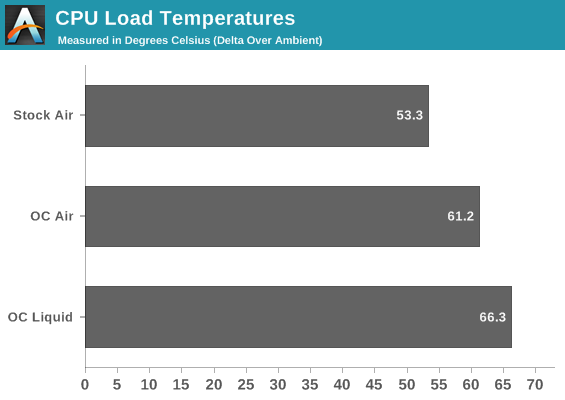
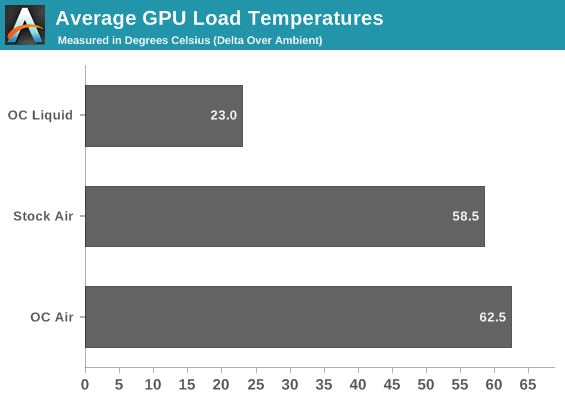
What should be striking is the increase in temperatures on the CPU going from air to water, but remember that we also were able to add a substantial amount of voltage in the process to hit 4.4GHz. Doubly striking is the way the load temperatures on the 780s are more than halved.
Despite the GPUs drawing substantially more power (and thus generating more heat) than the CPU, they also have much higher surface area and less overall heat density. We also benefit from direct contact between the heatsink and the GPU die, while Intel uses poor quality glue and thermal paste to bond the 4770K's die to the heatspreader. Ultimately it becomes too difficult to transfer heat off of the 4770K fast enough.
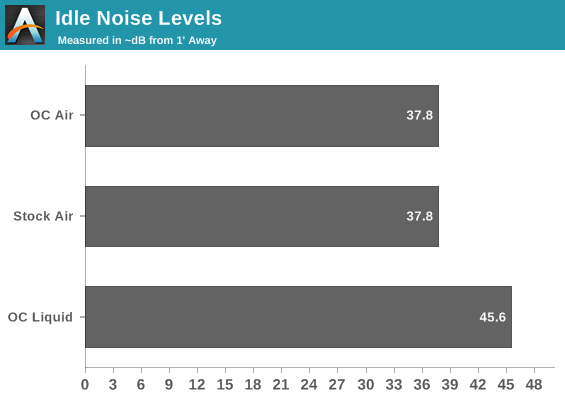
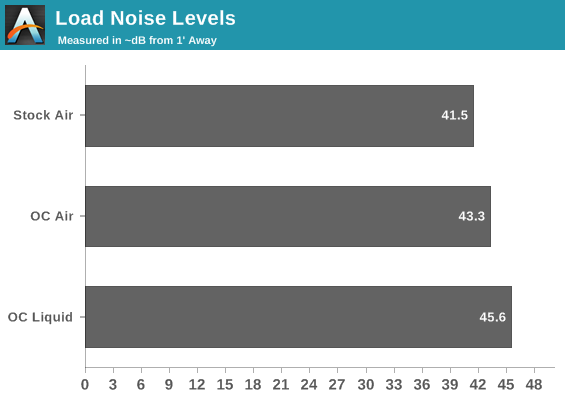
The reality is that none of these noise results are particularly uplifting, but there is a silver lining. If you shift down to 4.3GHz and lose all that voltage that was needed to hit 4.4GHz, you can also reduce the speeds on all of the fans and at least get your noise levels down substantially. Idle noise drops to about 31dB, with load noise closer to 35db or 36db. It's a lot more tolerable.
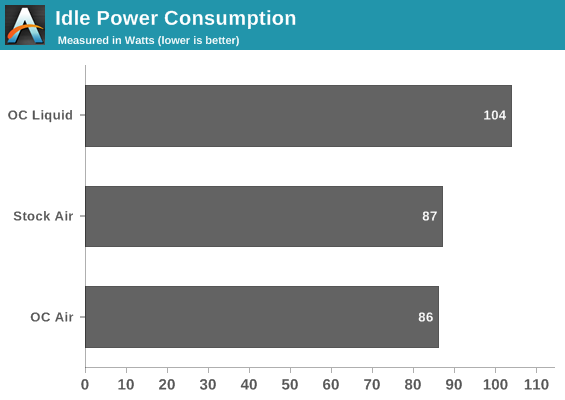
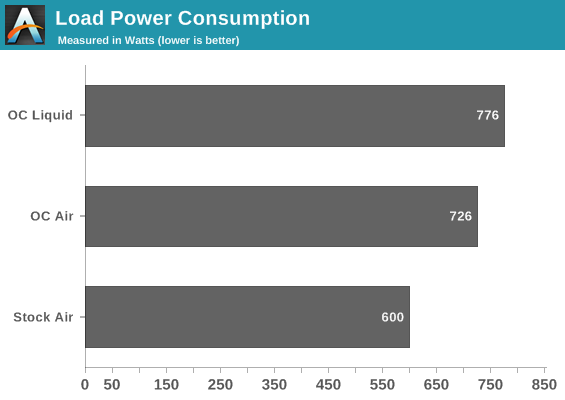
Given the way idle voltages are handled by Haswell and Kepler, it's reasonable to suggest the liquid cooling system adds about 15-20W of overhead as opposed to air cooling. Subtract 20W for the loop, and you're looking at our modest overclock tacking another 30W of power consumption on over the air cooling system. I'm at least a little nervous about what will happen when I flash the BIOSes of the GTX 780s to unlock a small voltage boost down the road.
Originally published at https://www.anandtech.com/show/7363/the-neophytes-custom-liquid-cooling-guide-how-to-why-to-what-to-expect (Wayback Machine).