
ASUS PQ321Q UltraHD Monitor Review: Living with a 31.5-inch 4K Desktop Display
Uniformity is tested by using 25 locations across the screen and measuring the color checker chart at each of them. From there we can pull out contrast, black and white uniformity, and color uniformity. This review is the first to utilize the newest measurement available in CalMAN 5.1.2: dE From Center. Now instead of measuring the dE2000 at every location, we measure it relative to the center measurement.
This gives us a true uniformity measure. I could measure the left side and the right side of the monitor and get a dE2000 of 2.0 for each side. What that doesn’t tell me is that the left side might be red tinted, and the right side blue tinted, while the center might be green tinted. In this case they could all measure the same dE2000, but look totally different. By comparing the measured values to the center, we get an actual measurement of if one area of the screen will look the same as another area. Since we always use the center of the screen as our calibration target, which is why everything is measured relative to that.
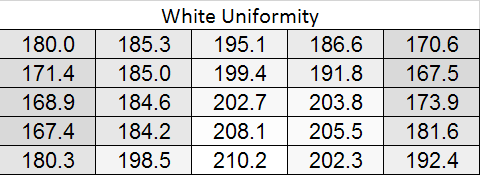
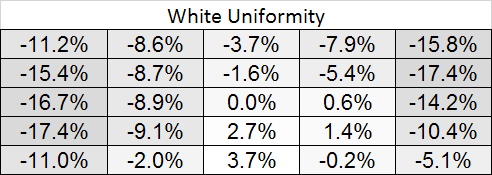
Starting out with White Uniformity, we see decent but not amazing results. The panel stays within +/- 10% for the center, but falls down to a 17% variation at the edges. The light fall-off is relatively high, and makes me wonder if the look of the panel, and its thin design, might place a bit of emphasis on style over substance.
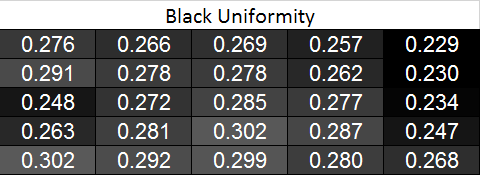
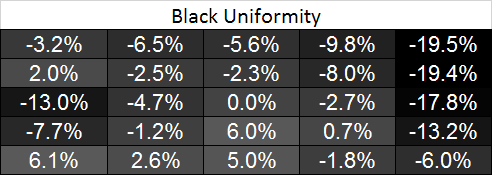
With the black level charts we see similar results. The middle of the panel is +/- 10% again, but the edges fall off to a nearly 20% difference. There is a curious rise in black level in one measure where there was a fall-off in white level, but otherwise the results between the two measurements are similar.
Looking at the resulting contrast, the numbers here are much closer to 100%, which we expect to see. Areas with light fall-off affect the white and black levels almost equally, so the contrast ratios are very similar all across the screen. That gives us a 700:1 expected contrast ratio for the screen as a whole.
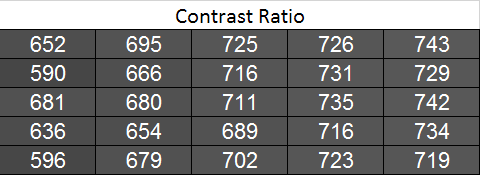
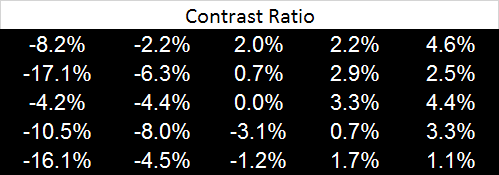
Now we can see the new dE2000 From Center data. The issues here crop up at the outsides of the screen, where we see the backlighting issues earlier. Uneven lighting is the issue most likely to cause color issues on the screen, and that is certainly backed up here. In the center of the screen, you are going to not see a difference in colors when you look directly at the screen. With a light loss of less than 10%, and a color dE2000 of <2 for most of the center screen, everything will look identical. As you get to the extreme edges you will run into more issues. I will need more monitors to be tested with this new method, but I think this is going to wind up as a good result in the end.
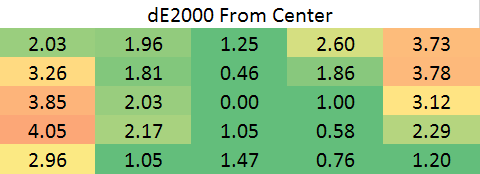
Going with an LED lighting system, and not a backlit array one, is always a bit of a concern for me. Overall the PQ321Q does well for uniformity for using one, and it avoids some of the massive issues we have seen with some LED systems before. But we are looking for near-perfection from the ASUS and it can’t quite do that. The center 60% of the screen is excellent overall, and for most people that will mean you may not notice these issues at all, but they are there.
Originally published at https://www.anandtech.com/show/7157/asus-pq321q-ultrahd-4k-monitor-review (Wayback Machine).