
LG 29EA93 Monitor Review - Rev. 1.25
With the first revision of the 29EA93, I didn’t pull any punches when it came to using the display as a video display and not a computer monitor. With the HDMI inputs I found that there was visible blocking of high-contrast areas, color tints to white in most modes, and that the CMS system was inherently broken with controls that didn’t work or provided worse results.
Well, lets just say those issues are all gone, and look at how this has been remedied. The blocking of the clouds that occurred in the Disney WOW disc has been completely fixed. No longer do high contrast areas like this, or on the Art of Flight Blu-ray, cause posterization type errors, but instead remain distinct and clear. This was really an issue that isn’t acceptable to see in a display, and the removal of it is a clear improvement.
The CMS system previously didn’t work right and caused me to have worse image performance after using it. It led to very visible banding and posterization of the image, and I couldn’t recommend using the CMS system in comparison to the preset modes. Now with the updated CMS I did a complete calibration to see if those issues had been addressed.
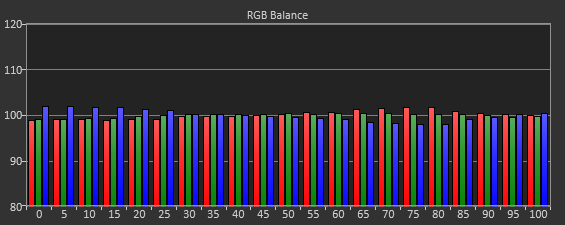
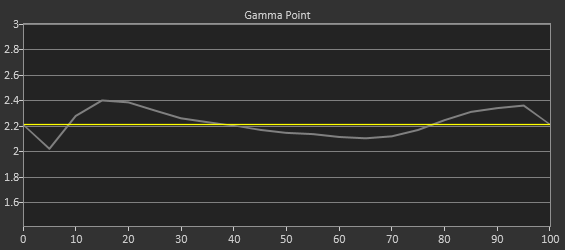
After calibration, we get a contrast ratio of 986:1, which is below what we saw when used as a computer display. This is to be expected since the video range is only 16-235 and not 0-255, losing some range because of this. There is only a single white-balance point control, which I used to adjust the white level at 70% to get as close to a neutral white balance as possible. The end result is pretty good, with a CCT of 6682 and an average grayscale dE2000 of 1.13 across the range. The gamma has an average of 2.22, but as you can see in the chart is isn’t linear across the range. Having a 2-point or 10-point white balance control would enable some fine-tuning of this, but those are both relatively expensive to build into a display in comparison to the 1-point control.

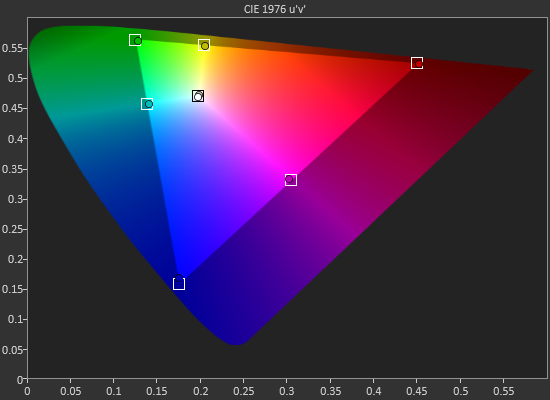
The grayscale was always acceptable on the 29EA93, but what caused issues before was the gamut. Utilizing the 6-point, 2D CMS controls (Hue and Saturation, no Lightness control) I was able to get the points on the CIExy diagram dialed in very well. Thankfully the luminance levels were good as well, since there is no control for them, but the average dE2000 for the gamut is a much-improved 0.87. This is a huge improvement from the early revision of this display, where the Cyan error was very large.

Far more important are the color checker and saturation charts, and they are also much improved. Our color checker dE2000 average is now only 1.26 after calibration, and the saturations dE2000 is only 1.30. Whereas before adjusting Blue or Green controls would cause huge changes in the Cyan results, now those operate correctly and Cyan is affected by those controls, but in the way that you would expect. Dialing in Blue and Green correctly cause the Cyan secondary to be more accurate, and then you can adjust it with its own controls to fine-tune it.
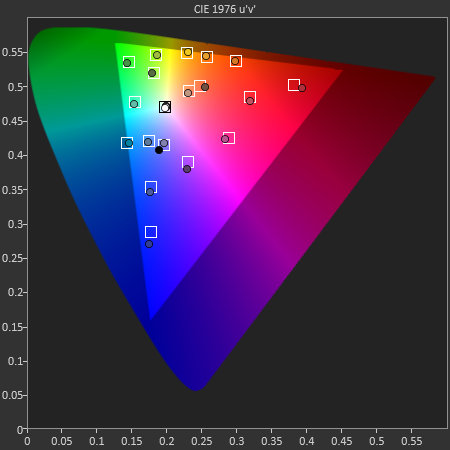
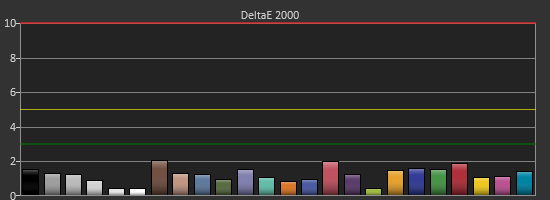
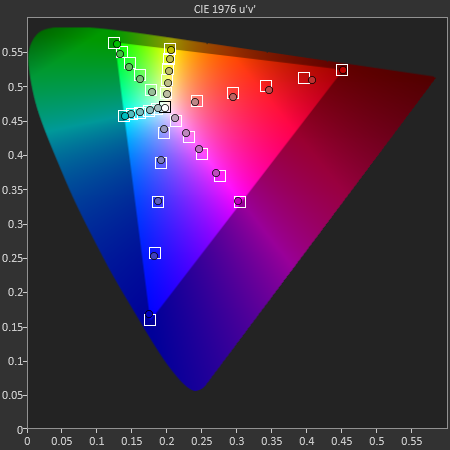
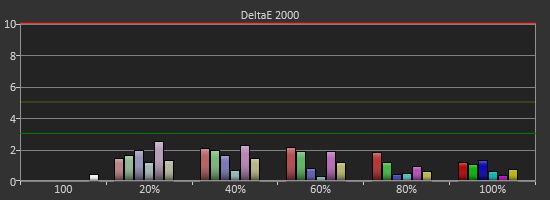
What’s impressive here is that the CMS system allows you to bring in the saturation of the primary and secondary colors that caused issues with PC calibrations. The video numbers aren’t quite as good as the PC numbers due to the less linear grayscale and gamma, but if I review this only as a TV, I would say the color performance is excellent, and the grayscale performance is very good.
Watching content on it shows this off. Drive previously had banding issues in night scenes, but now it is very detailed and not flawed at all. Even more impressive is the Blu-ray of Samsara, shot in 70mm and transferred over at 8K resolution before being sampled down for Blu-ray. With bright, vivid colors and amazing detail, the ultra-wide aspect of the LG is completely filled by the image and it really shows off both the monitor and the film itself.
Since the 29EA93 is meant to be used for both video and PC work, the CMS not working previously left a sour taste in my mouth. The updated video performance is a complete revelation in comparison, and it now makes for a fantastic video display with an amazingly detailed image.
Originally published at https://www.anandtech.com/show/6741/lg-29ea93-monitor-review-rev-125 (Wayback Machine).