
LG 29EA93 Monitor Review - Rev. 1.25
LG also offers its own hardware and software calibration package for the 29EA93. Using a custom designed colorimeter, the hardware and software only work with LG monitors but are scheduled to sell for less than competing products from XRite and Datacolor. I mentioned earlier in the review that colorimeters are prone to errors on displays with LED backlights like the LG. This is a general rule, but since LG knows the spectral response of their displays they can program that into their own colorimeters, leading to much better results than a generic colorimeter. It usually won’t be as good as a meter profiled with a spectrometer due to sample variations, but it will be much better than without.
Using their own software and probe, I calibrated the display to the same settings I use: 200 cd/m² and a gamma of 2.2. An sRGB gamma curve is not supported, nor are colorspaces larger than sRGB with this version, but on their professional monitors with a more advanced meter, different colorspaces are supported. The process is very simple: You choose your targets, it will pop up a spot for the calibration puck on screen, and then you let it run the calibration. The process locks the monitor OSD controls as it adjusts it automatically, and then at the end it will create an ICC profile for you and install it.


To evaluate this profile, I again used CalMAN and used the same set of images that we use for our smartphone and tablet testing. Using the automated test pattern generator in CalMAN wasn’t possible, as it would attempt to load its own ICC profile and change the setting in the display. On first look, we see 197.3 cd/m² of light output and 0.19 cd/m² on a black screen for a contrast ratio of 1039:1. This wasn’t as good as I was able to achieve using CalMAN, which might indicate that it is obtaining the peak-white level differently. With CalMAN I could use the Contrast and Brightness controls to get just above 200 cd/m², allowing maximum headroom to adjust the curves to get accurate color. The LG software might not bring these down as much, and then bring down the RGB curves even more, which would lower headroom compared to the other method.
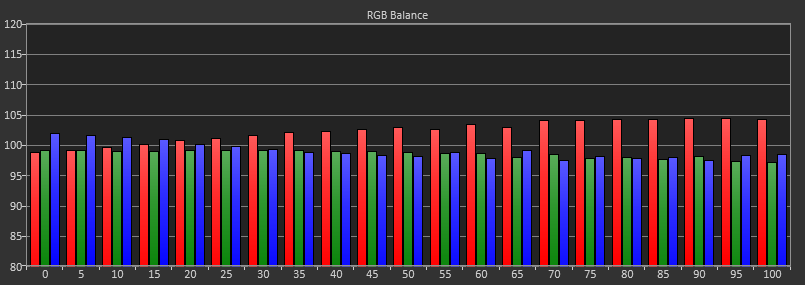
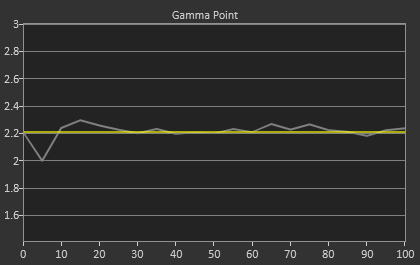
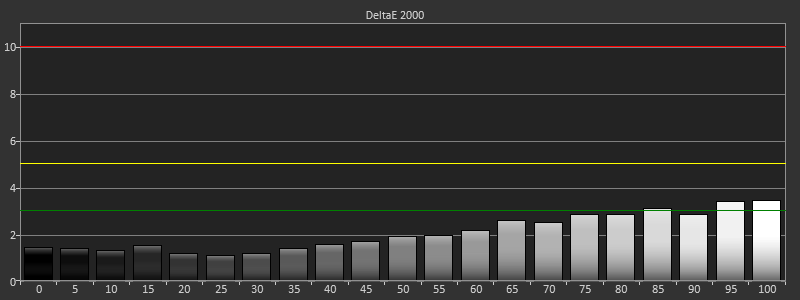
Our CCT average is 6415, but a look at the RGB balance shows that it starts out very good but then drifts a little towards the warmer, redish tint that the CCT reflects. Gamma is almost spot on at 2.21, save for a dip at 5% that most people won’t catch as they only measure in 10% increments. The dE2000 values follow the RGB balance as well, starting out very low but eventually drifting up to a level where a reddish tint will be slightly visible. The average dE2000 for the grayscale is 2.09, a number that is decent but not as good as CalMAN was able to achieve.
Looking at the Saturations and Color Checker charts, we see improvements but not to the degree that CalMAN allows. Our Color Checker dE2000 is 1.96, but with higher grayscale errors as well as larger errors in the over-saturated colors of red, yellow, and green. Blues also exhibit a bit of over-saturation as well, indicating that the LG sensor isn’t quite as sensitive as the C6 colorimeter, since blue is harder to read.
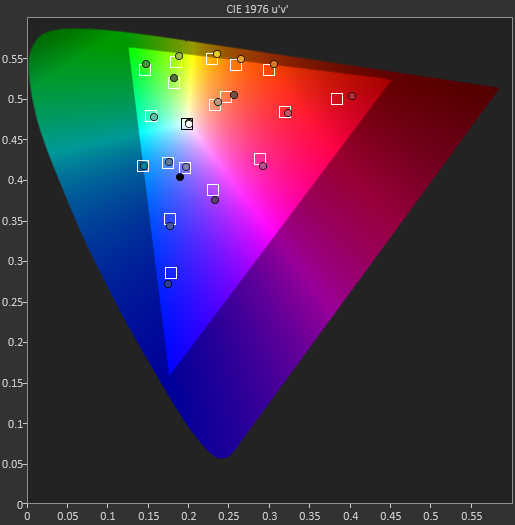
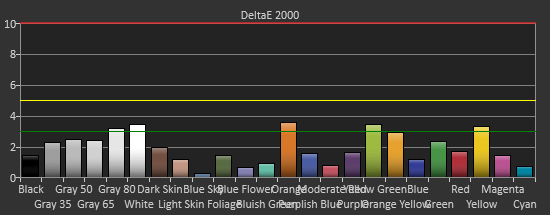
On the saturations data, we see that the Red/Yellow/Green side of the triangle has larger and larger errors as those colors get more saturated. With the over-saturated gamut, this is what we expect to see. Unfortunately none of the calibration software seems to be able to fully pull those points in and correct the over-saturated gamut there, leaving a bit of an error. The overall error is still fairly low, and with most colors not being fully saturated, that over-saturated error isn’t really bad, but better results were obtained with the CalMAN software.
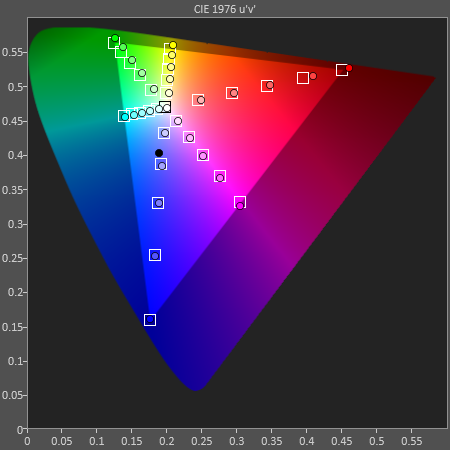
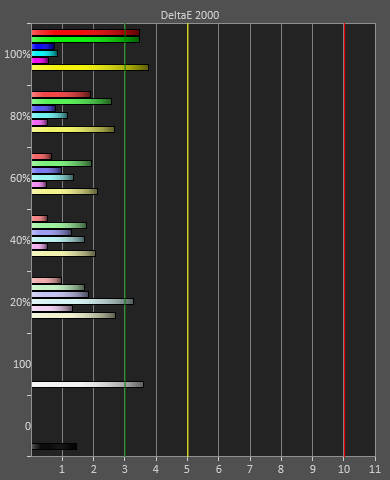
Overall the LG software and hardware solution does do a decent job, but it can’t compete with what is possible using CalMAN with better hardware. Of course, the CalMAN solution with a C6 and i1Pro meter retails for closer to $2,000 than $100, so they are very different spectrums of performance. For $100, I would say the LG results are quite good and will satisfy those that aren’t graphics or video professionals most likely. Just the superior gamma will make a large difference when viewing thanks to the superior dynamic range.
Originally published at https://www.anandtech.com/show/6741/lg-29ea93-monitor-review-rev-125 (Wayback Machine).