
LG 29EA93 Monitor Review - Rev. 1.25
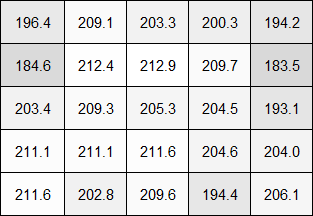
The initial revision of the LG 29EA93 was very uniform overall, where I remarked, “For white uniformity, the 29EA93 is truly a cut above.” Despite this, LG was unhappy about the performance of the corners and went back and tightened the tolerances of assembling the screen to get better performance out of it. Unlike before, no areas drop below 180 cd/m² of light output, keeping the whole screen uniform within 10% when using the same 5x5 ANSI test pattern as before.
Light Output in cd/m2
Output Deviation Relative to Center
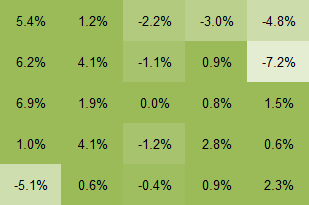
There are two points on the side that are slightly darker, in the same location as before, but the light loss in those areas is less than before. Overall the white uniformity manages to maintain its reputation of being great.
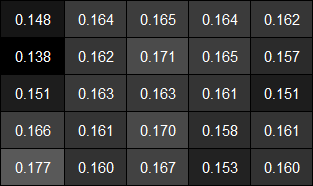
Black Uniformity is what had the issue before, with the corners having a lot more light creeping into the corners. This time that condition no longer exists. The only actual error that you can see is that one of the dimmer areas from the white uniformity is very dim in the black uniformity screen as well, but something being darker rather than lighter is a good thing.
Light Output in cd/m2
Output Deviation Relative to Center
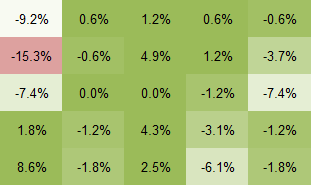
Now looking at contrast uniformity, we see the most impressive result for the 29EA93 yet. The average contrast value here is 1267:1, and the corners maintain a contrast level of 1252:1. This is now the best display I’ve seen in terms of contrast uniformity, with no areas of the screen that are a cause of concern to me at all. I really hope other manufacturers see what LG was able to do here with better quality control and bring that to their displays to provide similar results.
Contrast Ratio
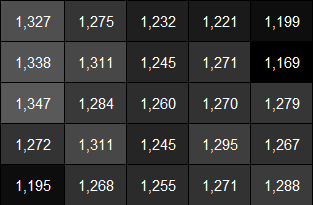
Contrast Ratio Deviation Relative to Center
For dE uniformity, I used the Uniformity tool available in CalMAN that can measure up to 45 points on the screen. For this display I used 21 points, in a 7x3 grid, which was a perfect match to the 21:9 ratio of the screen. The Uniformity tool isn’t completely finished yet, which is why I didn’t use it for brightness yet, but the dE uniformity is close to what we used to do, only with more data. Once the Uniformity tool is finished it’ll provide even better data, and I can go back to this review and update the graphs to match.
As you can see the center of the screen has very good color quality that we saw earlier. The extreme corners exhibit a bit of color drift with dE values that are a little worse, but only the upper-right corner moves past the 3.0 value that would indicate a color change that we can see. In comparison to the contrast numbers the color quality is only very good, but as this is the first display to be tested this way, it wouldn’t surprise me if this is the best display we see for a while and this method only accentuates the errors.
Colorchecker dE Uniformity

The LG 29EA93 was already a very good performer when it came to uniformity, and the improvements that LG made only increase that performance. The extra attention paid to make sure that the assembly of the extra-wide panel is done right has served to produce the most uniform consumer display that I’ve seen so far.
Originally published at https://www.anandtech.com/show/6741/lg-29ea93-monitor-review-rev-125 (Wayback Machine).