
From Mango to Apollo: The HTC Windows Phone 8X on the Daily
Essentials: The Phone
While the actual telephone part of a modern cell phone isn't necessarily the most important part anymore, it's worth noting that Microsoft has actually changed the interface here a little bit. In Windows Phone 7.5, the number keys were sizable and easy to use, but if you're in a call, the number keys switch to being half-height instead. This is one of those places where I feel like having big number keys that you can mash your idiot fists on is actually more useful, and I was sad to see it change.
That said, failing anything else, the clean Modern UI produces a very functional and easy to use phone.
Essentials: Contacts
I've been spectacularly bullish on the contact management of Windows Phone 7.5 and now 8. Windows Phone does a wicked job of integrating contacts across multiple different platforms, and it does it in a way that feels intuitive and makes migrating between phones much easier than it has been in the past.
If you've been an Android user, you'll be pleased to note that Windows Phone easily imports all of your Google contacts without a fuss. But Windows Phone can also pull contacts from Facebook, LinkedIn, Twitter, Hotmail, Yahoo, and Outlook.com, and it integrates them all into your contact list. If you have one person in multiple places, you can easily link their different networking profiles under a single heading; typically their photo winds up being whatever they're using in Facebook, which trumps whatever you've assigned before under your Microsoft account or under Google.
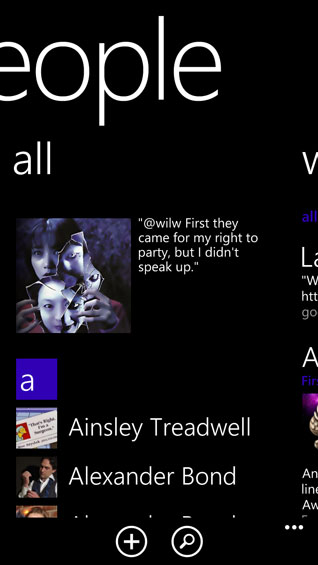
With 8, though, you can also group people under...well...Groups, oddly enough. On that tab there's also the Rooms functionality, which allows individuals within a Rooms group to share photos and calendars. It can work with other platforms, but it strikes me as the kind of feature that's too parasitic to really justify itself. Groups, on the other hand, allows you to assign individuals to specific groups and thus allow you to only see the social networking feeds of the people you've assigned to those groups.
Where I think Microsoft could stand to simplify the interface a bit more, though, is by integrating the "Me" section with the "People" (contacts) section. People handles your contact list, your Groups, and your social networking feeds, while "Me" shows you your own social networking feed, gives you the option of posting something to the social networks you've entered into the phone, and lists notifications of who's tweeted you or replied to one of your posts on Facebook.
Essentials: Messaging
The Messaging section has gone completely unchanged from Windows Phone 7. There are two pages here: one for text messaging, and one for online chat services. Unfortunately, the "Online" pane really only supports Facebook chat or MSN Messenger; support for additional protocols would be appreciated tremendously. Really this should be closer to a multi-protocol desktop application like Trillian.
The text messaging threads are easy enough to navigate, though. If you receive a text from a number you haven't assigned to a contact, it's also easy to tap the number and add it either to an existing contact or to a new contact entry.
Originally published at https://www.anandtech.com/show/6692/from-mango-to-apollo-the-htc-windows-phone-8x-on-the-daily (Wayback Machine).