
Acer Aspire S7 Ultrabook: Acer’s Best Foot Forward
Battery Life and Thermals
With the performance aspects out of the way, let's turn to battery life. I have to say, I've run more battery tests on the Acer S7 than perhaps on any other laptop in recent history. It's not that it needed extra testing, but as the first Windows 8 laptop in our labs I wanted to look at changing some of the tests. We discussed things among the various editors, and I worked to come up with some redesigned, hopefully better battery life tests.
First on the chopping block is the idle battery life test; rarely do people use workloads that are so light that it's meaningful to look at pure idle battery life, and going to the extreme of muting the volume and turning off WiFi is more than most are willing to do. We've decided to move to our Internet test as the baseline measurement, since it's representative of a moderate workload that conceivably might be used while running a laptop on battery power. With moderate Internet surfing (we load four pages every minute, simulating time for reading) as our light workload, for our heavy workload we crank up the frequency of page loads (the same pages, only loading every 10 seconds now) and add in playback of a bunch of 128kbps MP3 audio files. Finally, for our heavy workload we keep the Internet portion of the moderate testing but add in looped playback of a 1080p H.264 encoded video and have a constant 1Mbps download running from a local server.
With this being the first laptop to use our new Windows 8 test suite, we're in a bit of a state of flux so I've run both the new battery tests along with the old Windows 7 era tests (only with IE10 instead of IE8/9). I also ran a few other battery life tests just for reference: the three PowerMark tests. We're a little hesitant to use PowerMark as a standard, simply because it's limited to Windows platforms and has the potential to encourage optimizations for a benchmark as opposed to general optimizations; as you'll see, however, there's plenty of overlap between our tests and the results from PowerMark.
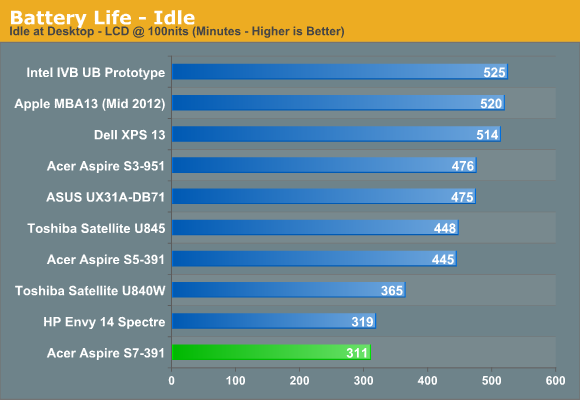
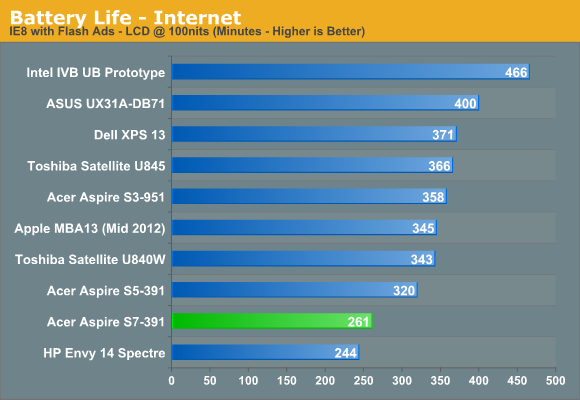
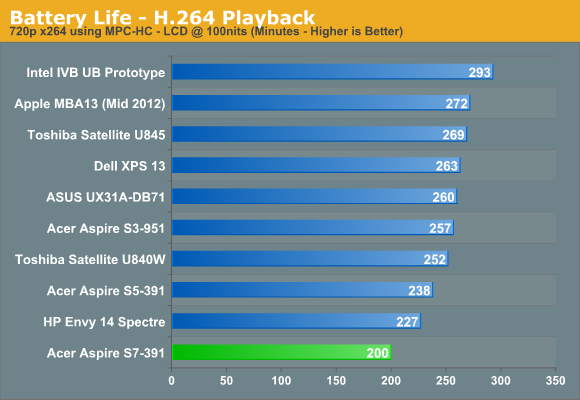
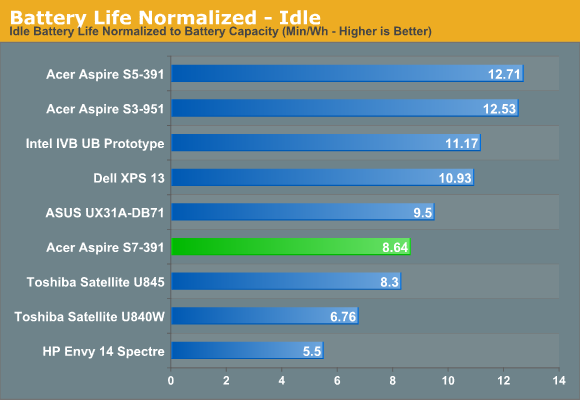
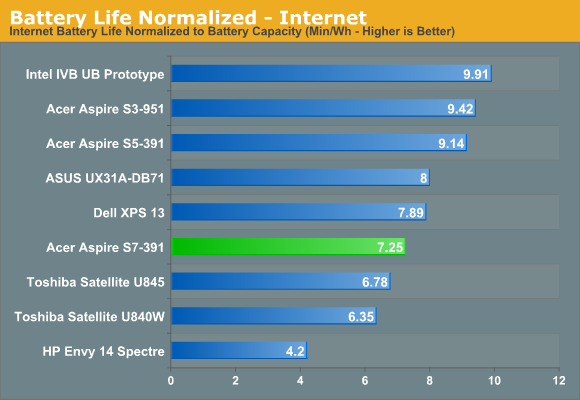
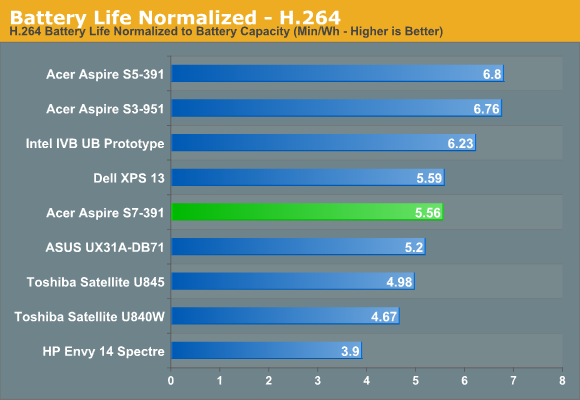
Starting with our older 2012 battery benchmarks, the Aspire S7 has a pretty poor showing. The 35Wh battery is the same capacity as the previous generation Aspire S5, and yet battery life is down substantially in all three tests. Whatever Acer (or Microsoft) has done in the past six months has not been helpful in this area. Normalizing for battery capacity does improve the situation a bit, but where it’s enough to move Acer past the two Toshiba Ultrabooks and the HP Envy 14, that’s not saying a lot—and higher battery capacities do count for something. The bottom line is that best-case, we were able to get just over five hours of running time out of the Aspire S7. Let’s look at some other results.
| Acer Aspire S7 Additional Battery Tests | ||
| Battery Test |
Run Time (Minutes) |
Normalized (Min/Wh) |
| AnandTech 2013 Light | 240 | 6.86 |
| AnandTech 2013 Medium | 173 | 4.94 |
| AnandTech 2013 Heavy | 137 | 3.91 |
| PowerMark Productivity | 255 | 7.29 |
| PowerMark Balanced | 201 | 5.75 |
| PowerMark Multimedia | 172 | 4.91 |
Note that in the above tests, we’re using 200 nits for our 2013 test suite while PowerMark specifies 110 nits as their desired brightness level. Our Light test result is down 21 minutes from our previous Internet test result, most likely due to the increased LCD brightness. Elsewhere, our new Medium test drops us below the three hour mark, and our Heavy test is getting close to lasting only two hours. It’s not really realistic to expect a full day of use from a laptop when you’re going full-tilt the whole time, but considering the CPU load is only around 10-35% even in our Heavy test, we’re not pushing things that hard.
Originally published at https://www.anandtech.com/show/6535/acer-aspire-s7-ultrabook-acers-best-foot-forward (Wayback Machine).