
Acer Aspire S7 Ultrabook: Acer’s Best Foot Forward
Windows 8 Tablet Performance
As noted on the previous page, I’m going to run some of our hybrid laptops like the Aspire S7 through the tests we’re using on tablets. Much ado has been made about the performance of the latest ARM-based SoCs, and I think it’s good to put things in perspective. There are two major items of note: first is that battery life is quite a bit worse with Ivy Bridge compared to Atom and ARM SoCs; the second is that performance is nearly an order of magnitude faster in many tests.
For the tests below, note that I used the same Internet benchmark that we use for tablets, which is far less strenuous than our laptop Internet testing. In fact, the difference in battery life between our “webtest4d” and our idle battery life test is only a few minutes. Display brightness also seems to have a relatively minor impact on battery life with the S7, as it only gains an extra 5-20 minutes going from 200 nits to 100 nits brightness (depending on the test).
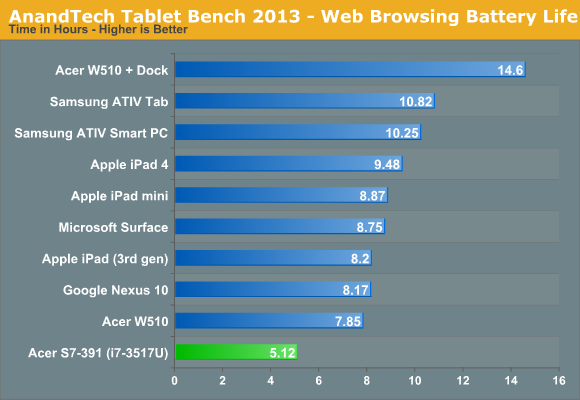
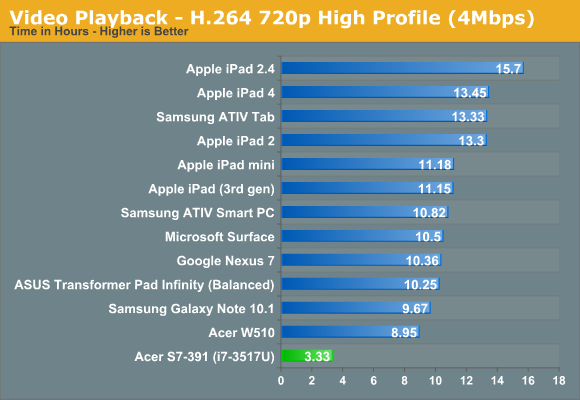
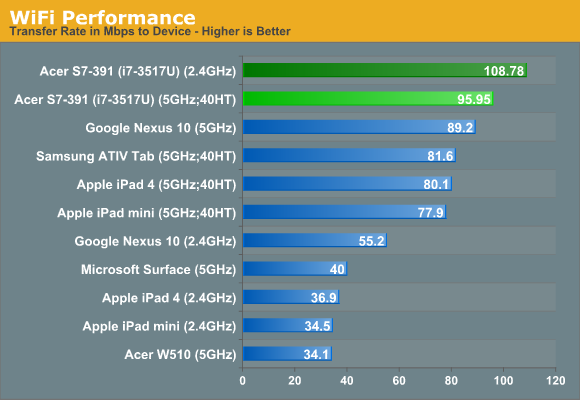
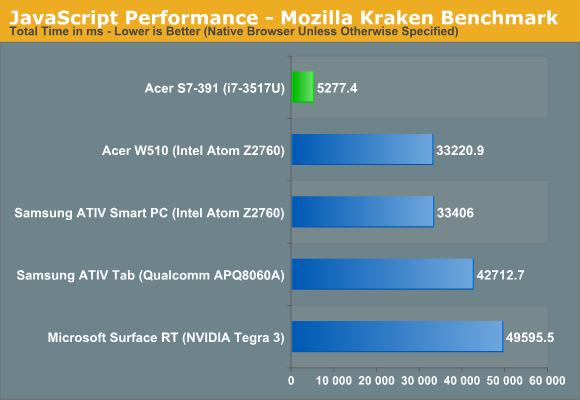
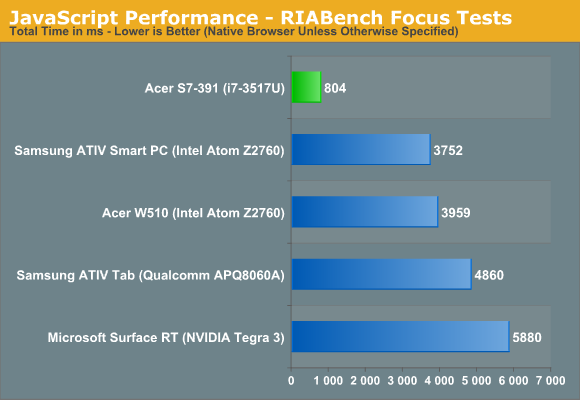
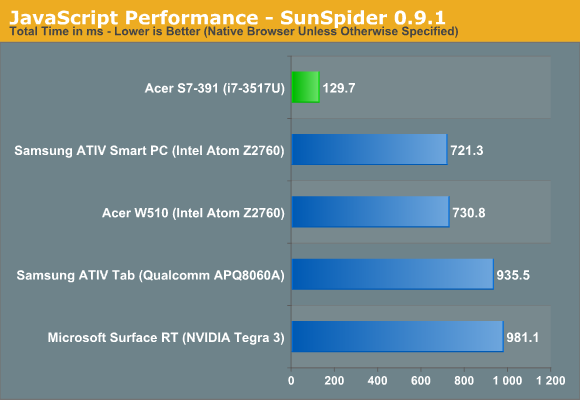
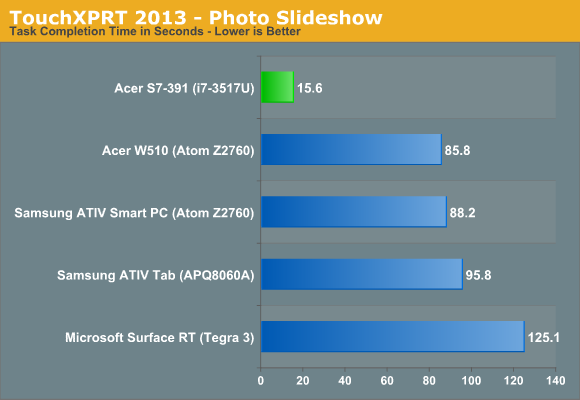
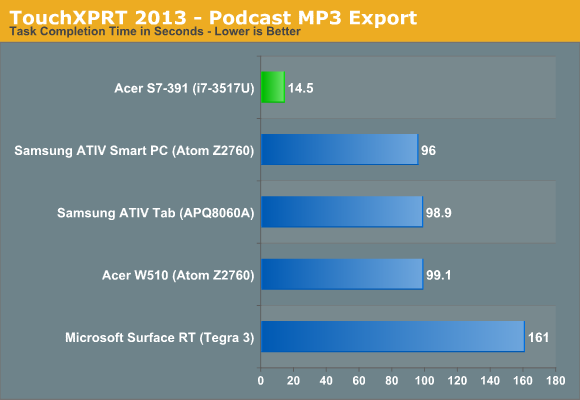
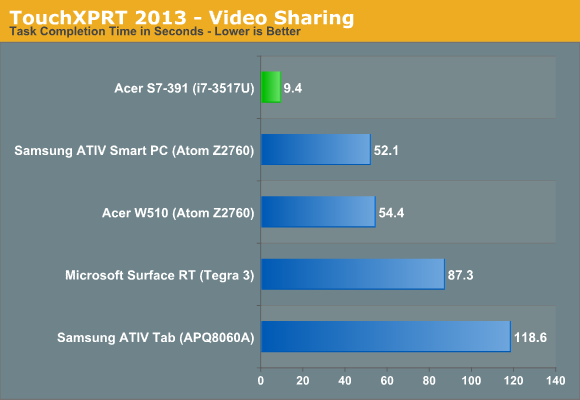
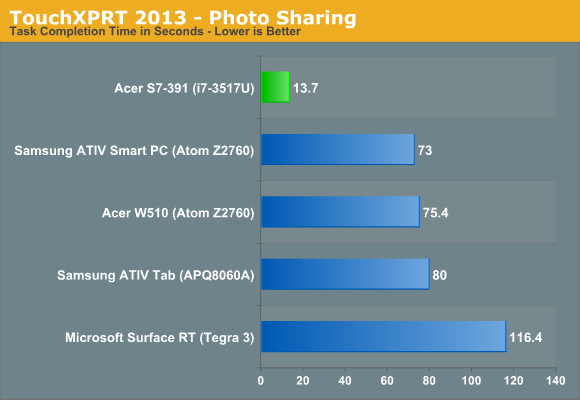
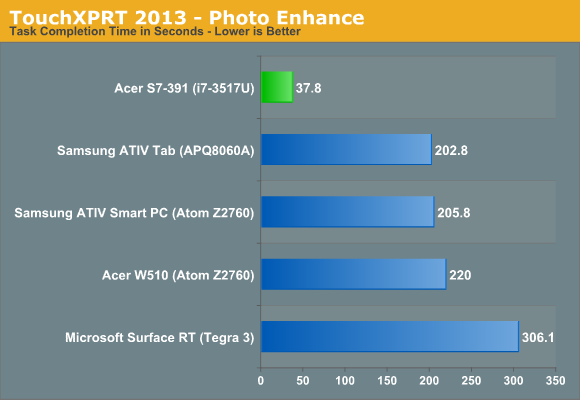
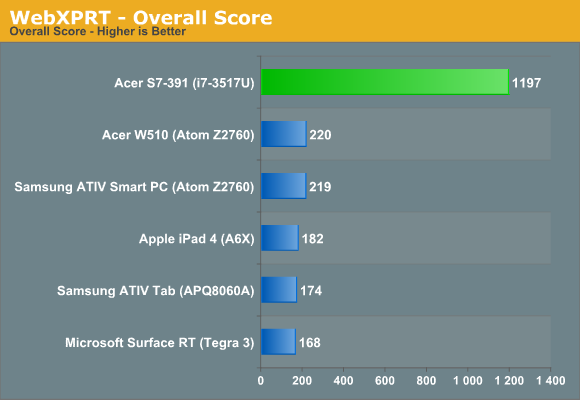
When people say that tablets are taking over for laptops, this is where we continue to fall short, and we’re not even talking about top-end laptop performance here. Bring in Haswell in the next few months and we might even see much of the battery life deficit disappear. Simply stated, ARM tablets will need much more than a doubling of performance to come anywhere near the performance level of Intel’s current ULV processors. Again, depending on what Intel manages with Haswell, it’s much more a question of whether tablets can become “fast enough” than whether they can actually catch Intel any time soon.
In terms of performance, the Aspire S7 is over 6x faster than the closest tablet in Kraken, 4.5x faster in RIABench, 5.5x faster in SunSpider, and basically 5.5x faster an all of the TouchXPRT/WebXPRT tests. In most tests, we’re looking at the Atom Z2760 as the runner up, but let’s focus on Tegra 3 just for a moment. There, Core i7-3517U is anywhere from 7-11x faster; Wayne needs to get here sooner rather than later.
It should go without saying that browsing in the Windows modern UI is smooth on the S7—though interestingly, while the touch screen interface scrolls nicely, using the touchpad to scroll around has some odd stuttering when you “coast”. Considering we have a laptop with four times as much RAM, a substantially faster SSD setup, and all that processing power, the Modern UI never appears to have a problem even on HD 4000. That’s going to make things a bit interesting for the folks at AMD and NVIDIA, depending on how the new UI and apps catch on. Then again, that new UI deserves some commentary.
Thoughts on the Windows 8 UI Experience
At best, I have serious concerns with Windows 8's new UI, at least from a laptop/desktop perspective. I said as much several months ago, and the final release has done virtually nothing to assuage my concerns. Using a touch screen to browse around works well enough, sure, but reaching across the keyboard to do so feels awkward at best. Then there’s the crazy switch between the Modern UI and the Classic Desktop UI, and the touch screen feels all but useless in the latter.
For tablets and smartphones, I think the Windows 8 UI makes tons of sense, but as soon as you slap a keyboard and touchpad in front of the user, it’s a different experience. Windows CE and earlier iterations of Windows Phone felt like Microsoft was trying to cram a full-blown desktop OS onto a handheld device without doing proper optimizations. Windows 8 feels like they’re now going the other way.
As for the Aspire S7, it does okay at straddling the line between the tablet and laptop worlds, but while I thought it was somewhat novel at first, when I got time with a Dell XPS 12 I really started to feel the faults with the S7 approach. Dell’s XPS 12 is much thicker, true, but even though the weight makes for a less than ideal tablet experience, it’s still a better tablet than the S7. Lenovo’s Yoga is another alternative, but I’m still iffy on the idea of having the keyboard exposed in tablet mode—I understand the keys all deactivate, but it just seems like a great way to get a lot of extra dirt into your keys over time. Acer has decided that instead of trying to make a true tablet-like experience, they would allow you to open the hinge 180 degrees and lay the S7 flat. I guess that can work, but in reality I almost never put a tablet flat on a table/desk; I hold it in my hands while I lounge on the couch, and the S7 doesn't feel natural in that environment.
Originally published at https://www.anandtech.com/show/6535/acer-aspire-s7-ultrabook-acers-best-foot-forward (Wayback Machine).