
Acer Aspire S7 Ultrabook: Acer’s Best Foot Forward
Display Quality
Now we get to the one area where so many laptops fall short: the display. I’m a bit torn on the overall LCD experience, because on the one hand it’s the best LCD I’ve ever seen in an Acer laptop, but on the other hand there’s still room for improvement. Let’s start with the good news first: Acer is using a 1080p IPS touch screen, which means great viewing angles (which are necessary for any tablet-like experience). Contrast and maximum brightness are also good.
So what’s the problem? The problem is that there’s a reddish cast to the display and the color gamut as well as color accuracy—even after calibration—are not as good as we would like. Apple is still the company to beat for out-of-box color accuracy, and area they’ve greatly improved on with their latest devices.
We’ve been talking about LCD quality in mobile devices for over six years, and finally it looks like companies are heading in the right direction, but we want to get there faster. The ideal would be to have every display calibrated at the factory to provide relatively accurate colors, but barring individual calibration of panels, we’d be happy with the general LCD family targeting a 6500K white point with a sub-3.0 average DeltaE on the Gretag MacBeth color chart. That might sound like we’re asking for professional display quality, but let me point out that: 1) it’s now 2013 and professionals have had the tools to do this for over two decades; 2) we’re looking at a minimum $1400 MSRP laptop, so this isn’t a budget-friendly device to begin with.
Most consumers wouldn’t recognize accurate colors in the first place, and sadly when you’re at the store and a salesperson has two displays next to each other in the bright retail lights, many people will prefer the less accurate but brighter colors that the S7 currently delivers. Even without perfect colors, however, the Acer S7’s AU Optronics B133HAN03.0 v1 panel is pleasing to use. Here are the numbers.
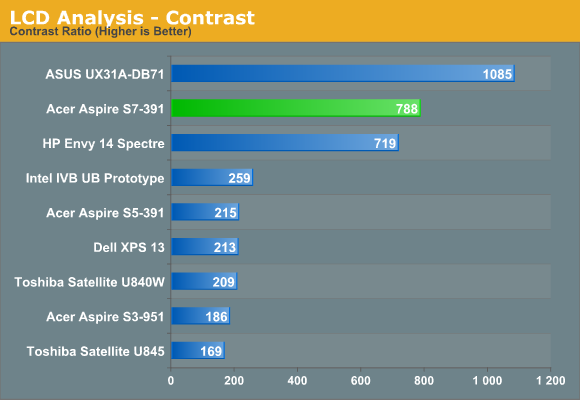
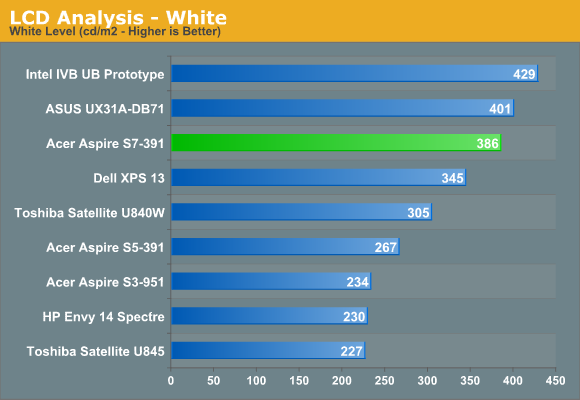
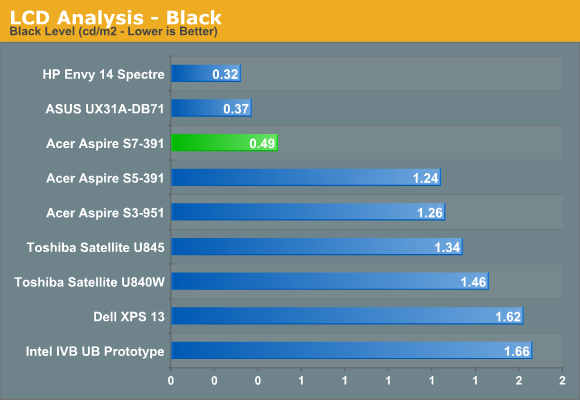
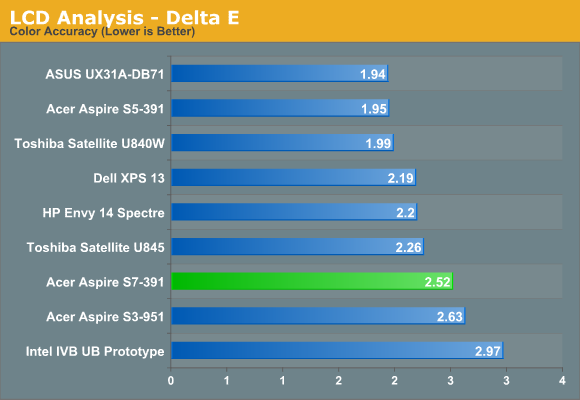
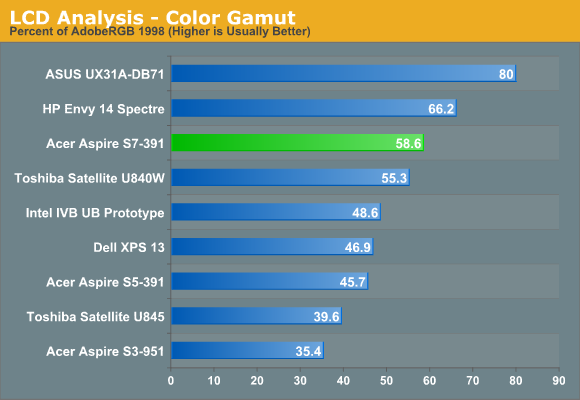
Contrast and brightness are good, though we’ve seen better. As I noted above with the colors being somewhat off before calibration, that carries over post-calibration with an average DeltaE that’s still around 2.5—ideally we’d like to see well under 2.0 for a quality display. The 58.6% color gamut is also less than what we’d like to see, which at a minimum would be the full sRGB color space (around 69%). What’s more, we chose the best calibration result for the above charts; with some of the other targets, the color gamut is a dismal 36%. If you’re okay with the native white point, you get a higher gamut, but if you want to target 6500K or D65, expect to see less than ideal results.
Originally published at https://www.anandtech.com/show/6535/acer-aspire-s7-ultrabook-acers-best-foot-forward (Wayback Machine).