
ASUS Republic of Gamers and X79 ROG Review – Rampage IV Gene, Formula and Extreme
- Posted in
- Motherboards
- Asus
- X79
- ROG
Test Setup
| Processor |
Intel i7-3960X (6C/12T, 3.3 GHz) Intel i7-3930K (6C/12T, 3.2 GHz) |
| Motherboards |
ASUS Rampage IV Gene ASUS Rampage IV Formula ASUS Rampage IV Extreme |
| Cooling |
Intel All-In-One Liquid Cooler Corsair H-100 with Delta Fans (Overclocking) |
| Power Supply | OCZ 1250W Gold ZX Series |
| Memory | GSkill RipjawsZ 4x4 GB DDR3-2400 9-11-11 Kit 1.65 V |
| Memory Settings | XMP |
| Video Cards |
ASUS 7970 3GB GDDR5 ECS GTX 580 1536MB |
| Video Drivers |
Catalyst 12.3 NVIDIA Drivers 296.10 |
| Hard Drive |
Corsair Force GT 60GB Micron RealSSD C300 256GB |
| Case | Open Test Bed - CoolerMaster Lab V1.0 |
| Operating System | Windows 7 64-bit |
| SATA Testing | Micron RealSSD C300 256GB |
| USB 2/3 Testing | OCZ Vertex3 240GB |
Many thanks to...
Despite this being a critical analysis of the ASUS high end products, I must give thanks to ASUS for their time in answering my questions, as well as providing some of the hardware in order to showcase their products.
Power Consumption
Power consumption was tested on the system as a whole with a wall meter connected to the OCZ 1250W power supply, while in a dual 7970 GPU configuration. This power supply is Gold rated, and as I am in the UK on a 230-240 V supply, leads to ~75% efficiency > 50W, and 90%+ efficiency at 250W, which is suitable for both idle and multi-GPU loading. This method of power reading allows us to compare the power management of the UEFI and the board to supply components with power under load, and includes typical PSU losses due to efficiency. These are the real world values that consumers may expect from a typical system (minus the monitor) using this motherboard.
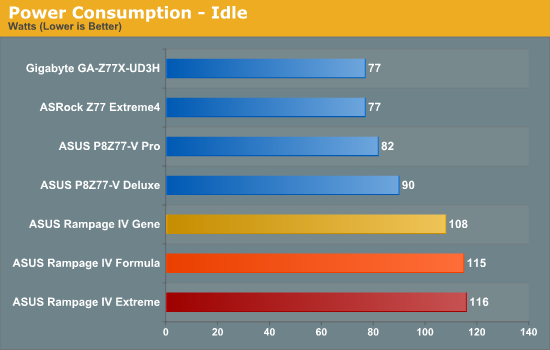
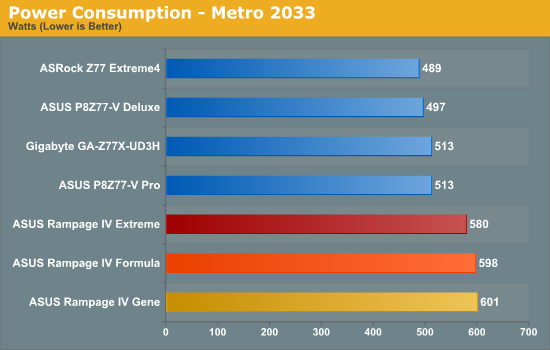
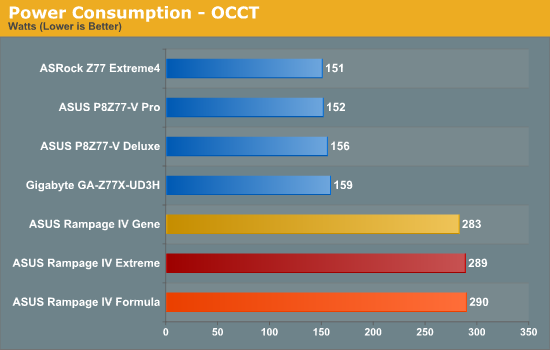
As expected, the X79 systems draw significantly more power than any of the Z77 systems we have tested on our recent testbed update. What could perhaps be surprising is the 140W difference during an OCCT test. Part of this difference will be a change in PSU efficiency, but even if that knocks it back to 100W difference, that is a lot between what is a 77W processor and a 135 W processor (58W difference). This would suggest that the power delivery also plays a part in the power usage of the motherboards at load, significantly more so for the X79 platform.
It should also be noted that the ROG boards are tailored by default to be more beneficial for overclocking by invoking a manual voltage rather than an offset. This has repercussions for power consumption, especially when overclocked - if the settings are adjusted to offset VIDs, power consumption should reduce (in comparison to manually setting the voltages).
POST Time
Different motherboards have different POST sequences before an operating system is initialized. A lot of this is dependent on the board itself, and POST boot time is determined by the controllers on board (and the sequence of how those extras are organized). As part of our testing, we are now going to look at the POST Boot Time - this is the time from pressing the ON button on the computer to when Windows starts loading. (We discount Windows loading as it is highly variable given Windows specific features.) These results are subject to human error, so please allow +/- 1 second in these results.
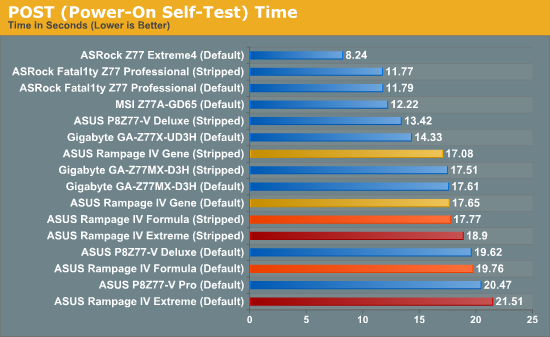
As expected, the boot times for ROG boards are on the higher end, especially compared to Z77. A large part of this is the internal system management ASUS use in the BIOS, to ensure that all the onboard sensors are appropriately initialized, a well as all Auto BIOS settings are configured properly. On the Formula and Extreme, disabling features such as Audio and NICs in our stripped timings removes a good couple of seconds apiece.
Overclocks
Here at AnandTech we want to provide quick and easy ways to determine if a board is good for you (with in-depth analysis of course). So here is a quick round up of our overclocking results. Overclocks are tested for stability with PovRay and OCCT - while these may not be the most strenuous of stability tests, it does offer a quick check for memory errors under high load (and also balances testing time with getting the next board on for review!).
Gene: 50x @ 1.500 V, default LLC, shows 1.456 V at load, 80C PovRay, 83C OCCT
Formula: 50x @ 1.550 V, default LLC, shows 1.520 V at load, 83C PovRay, 85C OCCT
Extreme: 50x @ 1.500 V, default LLC, shows 1.456 V at load, 81C PovRay, 84C OCCT
The limiting factor with our ROG overclocks seemed to be the temperature of either the CPU or the VRMs. Anything above 87 degrees Celsius on the CPU caused the processor to reduce the multiplier in order to ensure that parts of the motherboard were not damaged. So we can safely say that performance in the ROG products is there for any advanced water cooling system you will have at hand.
Originally published at https://www.anandtech.com/show/6082/asus-republic-of-gamers-and-x79-rog-review-rampage-iv-gene-formula-and-extreme (Wayback Machine).