
A Tale Of Two Thunderbolt Storage Devices: Seagate's GoFlex Desk and Western Digital's Thunderbolt Duo
- Posted in
- Thunderbolt
- Seagate
- WD
- Western Digital
My initial assumption had been that WD put a hardware RAID controller between the Thunderbolt interface and the two SATA HDDs, akin to what Promise had done with the Pegasus, and as has also been the case with any number of other dual-drive enclosures I've tested and otherwise used over the years. The fact that the Thunderbolt Duo didn't have configuration switches (an O/S-agnostic and otherwise convenient means of setting the RAID mode in hardware versus via a software utility) gave me pause, but not all hardware RAID controller-based enclosures I've used have had them.
However, after powering up the Thunderbolt Duo for the first time, I happened to fire up Mac OS X's built-in Disk Utility and received clear indication that the enclosure was (as with the LaCie Little Big Disk) instead leveraging Mac OS X's native software RAID facilities:
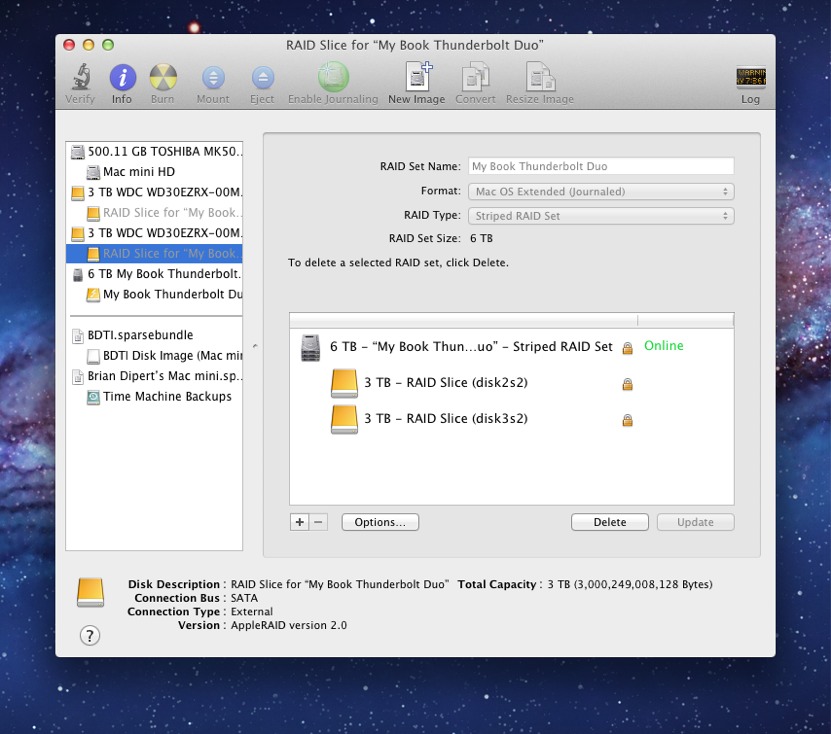
As previously mentioned, I promised my WD PR contact that I wouldn't take the enclosure apart. But I'm guessing that, akin to the LaCie Thunderbolt eSATA Hub that Anand saw at CES 2012, WD has built into the Thunderbolt Duo a Thunderbolt to dual SATA controller. Such a feature allows the system-side Thunderbolt controller to "see" each Thunderbolt Duo as a single bus peripheral, thereby enabling WD to accurately claim that you can daisy-chain numerous drives to each other and the system before you violate Apple's six-max specifications.
WD includes the installer for WD Drive Utilities, a status-and-configuration program, right on the Thunderbolt Duo, although I found (and downloaded, installed and used instead) an updated version of the utilities at the company's support website:


However, I found myself using Mac OS X's Disk Utility in this study instead, for several reasons (and with WD's official sanction, as it turns out). For one thing, Disk Utility offers the auto-rebuild-on-error option for RAID 1 (mirrored), a setting that isn't exposed in the WD program. Also left unexposed in the WD utility are the five block-size options (16KB, 32KB, 64KB, 128KB and 256KB) that Disk Utility supports for both RAID 0 and RAID 1; I'm assuming (but don't know for sure) that WD's program uses Mac OS X's 32KB default block size setting.
WD's program offers the "JBOD" ability to use the two HDDs as discrete drives, even optionally putting HFS+ on one and exFAT on the other, which is convenient for dual-O/S-booting purposes. However, surprisingly, the WD utility does not expose Disk Utility's 'Concatenate' option, which combines the two drives in a non-striped fashion. Although SPAN (i.e. BIG) is not an official RAID mode, it's commonly supported by RAID utilities. And curiously, although the WD utility doesn't support configuring the drives in SPAN mode, it correctly identifies a two-drive array that's already been concatenated via Disk Utility:


One historical reason (of many) for going with hardware RAID is that (versus software RAID) it didn't excessively burden the CPU, with both resultant system battery life and performance impacts. Thankfully, if my experiments are indicative of a broader conclusion, those days are over. Note that the kernel_task process reports using only around 6% of one core of the CPU during heavy use of the Thunderbolt Duo in RAID 0 mode, and that the system reports four cores (thanks to HyperThreading virtualization):

Given that kernel_task typically consumes 3-4% of a CPU core under normal operating conditions, an extra few-percent load for heavily utilized software RAID is, in my opinion, quite acceptable.
Originally published at https://www.anandtech.com/show/5797/a-tale-of-two-thunderbolt-storage-devices-seagates-goflex-desk-and-western-digitals-thunderbolt-duo (Wayback Machine).