
ECS X79R-AX (Black Extreme) Review
- Posted in
- Motherboards
- ECS
- X79
Test Setup
| Processor |
Intel Sandy Bridge-E i7-3960X 6 Cores, 12 Threads, 3.3 GHz (3.9 GHz Turbo) |
| Motherboards | ECS X79R-AX (Black Extreme) |
| Cooling | Intel All-In-One Liquid Cooler, made by Asetek |
| Power Supply | Silverstone 1000W 80 PLUS Silver |
| Memory | G.Skill RipjawsZ DDR3-2400 CL9 11-11-31 4x4 GB Kit 1.65V |
| Memory Settings | XMP |
| Video Cards |
XFX HD 5850 1GB ECS GTX 580 1536MB |
| Video Drivers |
Catalyst 11.8 NVIDIA Drivers 285.62 |
| Hard Drive | Micron RealSSD C300 256GB |
| Optical Drive | LG GH22NS50 |
| Case | Open Test Bed - CoolerMaster Lab V1.0 |
| Operating System | Windows 7 64-bit |
| SATA Testing | Micron RealSSD C300 256GB |
| USB 2/3 Testing | Patriot 64GB SuperSonic USB 3.0 |
Power Consumption
Power consumption was tested on the system as a whole with a wall meter connected to the power supply, while in a dual GPU configuration. This method allows us to compare the power management of the UEFI and the board to supply components with power under load, and includes typical PSU losses due to efficiency. These are the real world values that consumers may expect from a typical system (minus the monitor) using this motherboard.
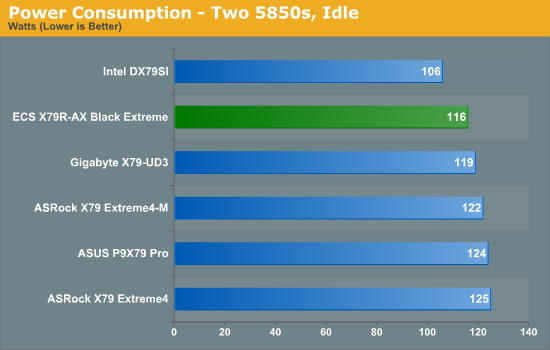
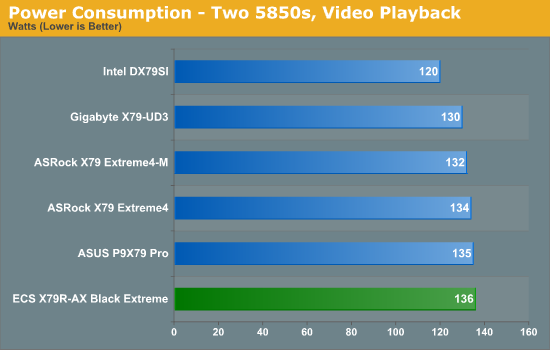
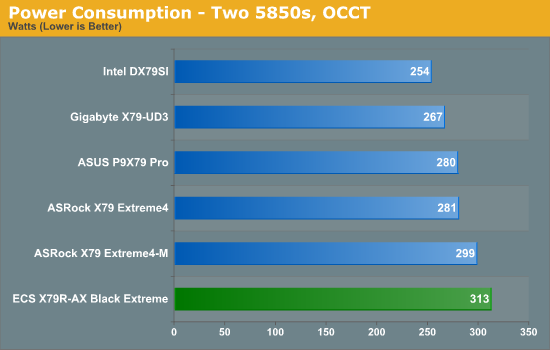
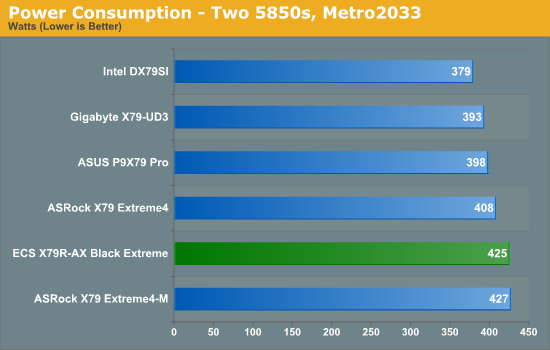
Overall, power usage on the ECS X79R-AX tends to be on the high side compared to other boards we have tested.
CPU Temperatures
With most users’ running boards on purely default BIOS settings, we are running at default settings for the CPU temperature tests. This is, in our outward view, an indication of how well (or how adventurous) the vendor has their BIOS configured on automatic settings. With a certain number of vendors not making CPU voltage, turbo voltage or LLC options configurable to the end user, which would directly affect power consumption and CPU temperatures at various usage levels, we find the test appropriate for the majority of cases. This does conflict somewhat with some vendors' methodology of providing a list of 'suggested' settings for reviewers to use. But unless those settings being implemented automatically for the end user, all these settings do for us it attempt to skew the results, and thus provide an unbalanced 'out of the box' result list to the readers who will rely on those default settings to make a judgment. CPU Temperatures are not really indicative of quality or performance, even though one would postulate that worse parts may produce higher temperatures. However, if a manufacturer uses more conductive material in the power plane, this reduces resistance and increases the voltage at the CPU, causing a higher temperature but potentially better stability.
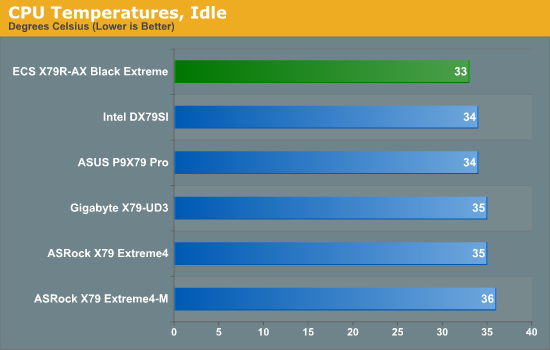
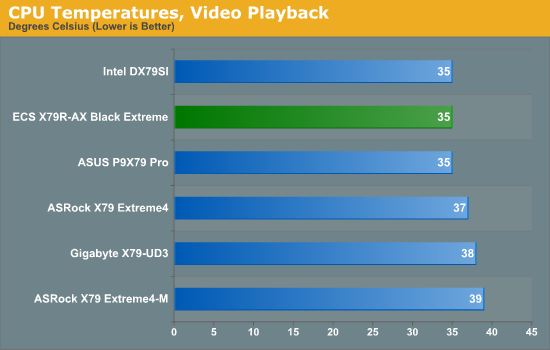
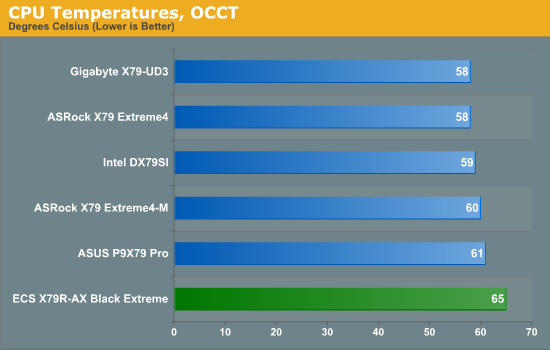
The OCCT temperature result is significantly higher than the other boards we have tested, which may be related to the larger peak power consumption.
Originally published at https://www.anandtech.com/show/5360/ecs-x79rax-black-extreme-review (Wayback Machine).