
ECS X79R-AX (Black Extreme) Review
- Posted in
- Motherboards
- ECS
- X79
In The Box
The box bundle, while substantial, has positive points and negative points. What we have in the box is 12 SATA cables (two with right angled heads), a USB 3.0 front or rear panel with room for an SSD, a long flexible SLI connector, and the usual internals such as IO panel, driver CD and manuals. Two things to note - other competitors usually include more SLI connectors, and the USB 3.0 front panel cable isn't that long, such that in dual GPU mode it would only be suitable for the bottom of the front of the case, or as a rear USB 3.0 panel.
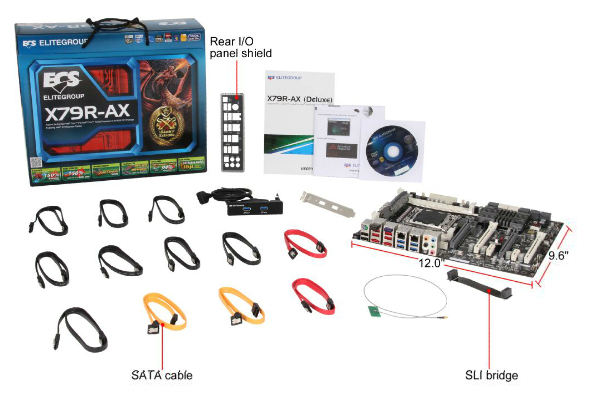
Image courtesy of Newegg
Board Features
| ECS X79R-AX (Black Extreme) | |
| Size | ATX |
| CPU Interface | LGA2011 |
| CPU Support | Intel Second Generation Core i7 Sandy Bridge E |
| Chipset | Intel X79 |
| Base Clock Frequency | 99.8 MHz |
| Core Voltage | Default, -300 mV to +700 mV |
| CPU Clock Multiplier | Auto, 12x to 1000x |
| DRAM Voltage | Auto, -300 mV to +500 mV |
| DRAM Command Rate | Auto, 1N to 3N |
| Memory Slots |
Four DDR3 DIMM slots supporting up to 32 GB Up to Quad Channel Support for DDR3, 1067-2400 MHz |
| Expansion Slots |
2 x PCIe Gen 3 x16 2 x PCIe Gen 3 x8 2 x PCIe x1 |
| Onboard SATA/RAID |
2 x SATA 6 Gbps, Support for RAID 0, 1, 5, 10 4 x SATA 3 Gbps, Support for RAID 0, 1, 5, 10 4 x SATA 6 Gbps (labelled SAS), support for RAID 0, 1, 5, 10 |
| Onboard |
4 x SATA 3 Gbps (PCH) 8 x SATA 6 Gbps (2 PCH, 4 'SAS', 2 Controller) 5 x Fan Headers 1 x 4-pin Molex CFX/SLI Power Connector 1 x SPDIF Out Header 1 x Front Panel Header 1 x Front Panel Audio Header 2 x USB 2.0 Headers 1 x USB 3.0 Header 1 x COM Header 1 x Clear CMOS header Power/Reset Buttons + Debug LED |
| Onboard LAN | Dual RealTek RTL 8111E Gigabit Lan |
| Onboard Audio | Realtek ALC892 |
| Power Connectors |
1 x 24-pin ATX connector 1 x 8-pin 12V connector 1 x 4-pin Molex CFX/SLI Power Connector |
| Fan Headers |
2 x CPU Fan Header (4-pin) 1 x SYS Headers (3-pin) 2 x PWR Headers (3-pin) |
| IO Panel |
1 x PS/2 Mouse and Keyboard Port 1 x Wireless LAN 1 x Bluetooth 6 x USB 2.0 4 x USB 3.0 2 x eSATA 6 Gbps 2 x Gigabit Ethernet Audio Jacks |
| BIOS Version | 26/12/2012 |
| Warranty Period | 3 Years |
Again, the ECS has a few positive and negative points with the board features as well. While we have dual gigabit Ethernet, some users may not enjoy they fact that they are Realtek, rather than the Intel NICs we see on almost all the major competitor boards. One other point of contention is that there are only four DIMM slots for one per channel, rather than eight DIMM slots for two per channel, or that the board uses the Realtek ALC892 rather than the ALC898 that all the other boards at this price range use. But I really like the fact that for this price, we can get an X79 board with onboard WiFi, Bluetooth, dual NICs, and twelve SATA ports and still enough space for dual/quad GPUs. It's a combination you will not see on many other products.
Software
Ever since I started reviewing ECS boards, such as P67 and Fusion, there has not been much change in the software available, thus I won't go into detail on many of the specifics, but the package includes at least one gem in their fan controls.
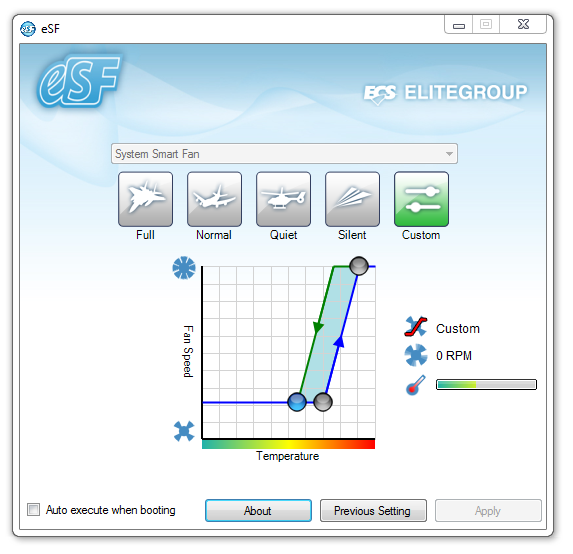
eSF (SF for Smart FAN) controls the SYS headers on the board, allowing for hysteresis in the fan settings. This is a feature we don't see on other boards (ASUS controls are pretty good in comparison for multi-point curves, but don't do hysteresis), and it definitely worked for ECS when I tested it.
Other software onboard is eOC (OC for OverClock), which gives user control of the BCLK and the voltages. This is still software used for older chipsets, as we don't have access to changing the CPU multiplier, or that modern CPUs go into various power states and voltages depending on load, meaning that the CPU voltage selections in eOC can fluctuate wildly. I wouldn't touch the voltages with this tool if I were an end user, in case I accidentally set 1.4 V in an idle state and it then added another +300 mV for a loaded state.
The two other parts of the package are eBLU, a BIOS Live Update tool, and eDLU, a tool which links to the webpage with all the latest drivers.


Originally published at https://www.anandtech.com/show/5360/ecs-x79rax-black-extreme-review (Wayback Machine).