
Apple iOS 5 Review
iPhone 3G users may remember what using iOS 4.0 was like on those phones when it was first released - it reduced performance to the extent that fixing this slowness merited a bullet point during Apple's iOS 4.1 reveal, and we found that even that didn't fix all of the problems. Will iOS 5 make the older devices on the support list similarly slow, or can we upgrade without worrying?
iPhone 3GS and Third Generation iPod Touch
The iPhone 3GS came out just over two years ago, and while it's getting a little long in the tooth its performance under iOS 5 is pleasantly surprising. Generally speaking the 3GS seems to be running just as quickly as it did with iOS 4.3, and it’s missing just a handful of features included on higher-end devices: Location-based Reminders (on the 4 and 4S), WiFi Personal Hotspot (introduced for the Verizon iPhone 4 and extended to the GSM iPhone 4 in iOS 4.3, no doubt because the 3GS uses a BCM4325 for WiFi and the iPhone 4 uses a BCM4329), and Siri (an iPhone 4S exclusive) are among the most notable. 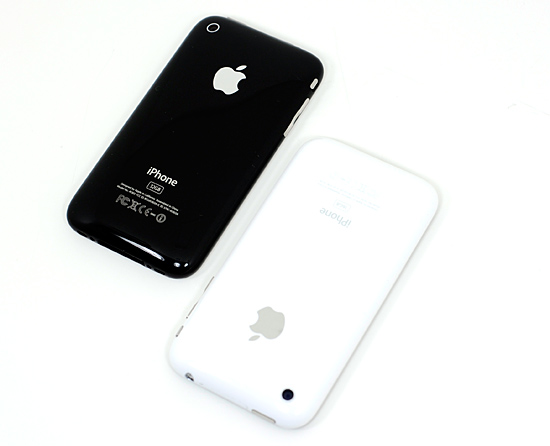
The big stuff is there, though, and it’s because the performance and feature gap between the 3GS and the rest of Apple’s lineup isn’t nearly as wide as the gap between the 3G and the then-current lineup at the time of iOS 4’s release. The 3GS’s Cortex A8 uses the same ARMv7 instruction set as the later A4 and A5 chips, while the 3G used the same ARMv6-capable Samsung S5L8900 SoC as the original iPhone. The 3GS has 256MB of RAM, the same as the original iPad and the currently-shipping fourth-gen iPod Touch, while the 3G had only 128MB. You get the picture - the 3GS’s upgrades relative to the 3G (which impressed us when the phone was originally released) has given it longer legs than its predecessor (and we’ll probably be saying similar things about the 4S in a couple of years).
We've already seen that JavaScript performance in Safari is better in iOS 5, but app launch times are another important metric. To get these numbers, we went back to our iOS 4.1 performance evaluation and repeated the same tests under the newer version. The phone was loaded with a fresh iOS 5 install, and all apps had been cleared from the multitasking tray. Our tests found that, most of the time, app launch speed was as fast or a bit faster than under iOS 4.1.
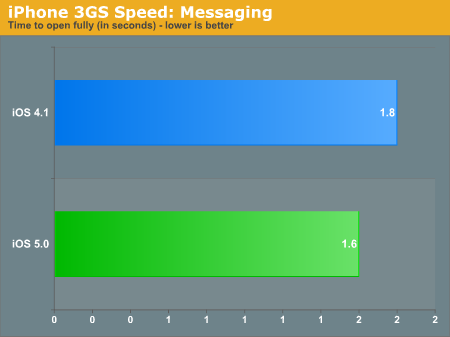
This is the time between when the Messages app was launched and when the app was ready for text entry. iOS 5 just edges out iOS 4.1 in this case.
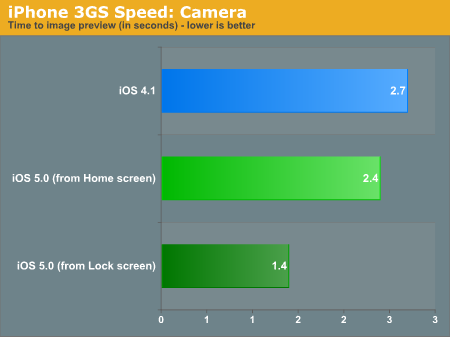
This is the time between when the Camera app was launched and when you could actually take pictures with it. From the Home screen, iOS 5 edges out iOS 4.1, and the time is consistently reduced by almost half when launched from the Lock screen - in order to reduce launch times, iOS 5 apparently does some preloading when the Home button is tapped twice (I also found this to be true on a fourth gen iPod Touch, though the difference was less pronounced).
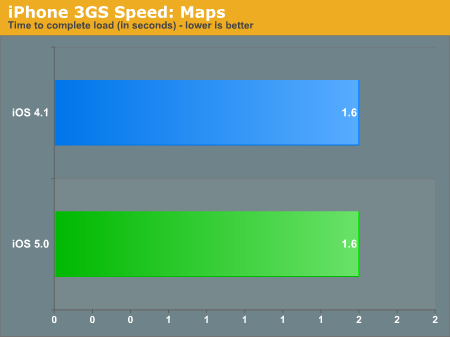
No changes here - the Maps app launches and is ready for input in the same amount of time as in iOS 4.1.
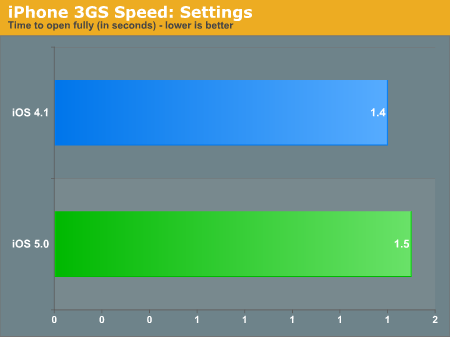
The Settings app launched slightly more slowly in iOS 5 than in iOS 4.1, but it's a change you'll notice only if you're timing it with a stopwatch.
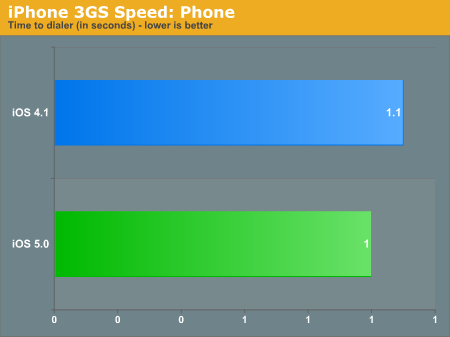
Another small variance from iOS 4.1 - in practice, the Phone dialer is ready to use pretty much instantaneously.
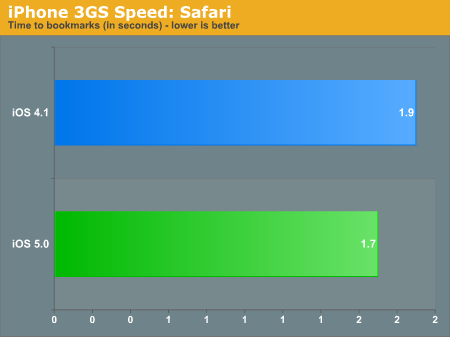
This is the amount of time between the launch of the Safari app and when the Bookmarks list popped up. iOS 5 brings a small improvement over iOS 4.1.
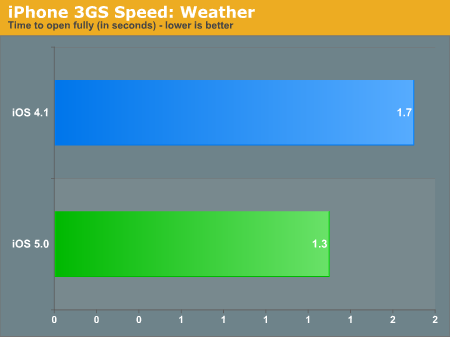
iOS 5 brings up Cupertino's weather marginally more quickly than in iOS 4.1.
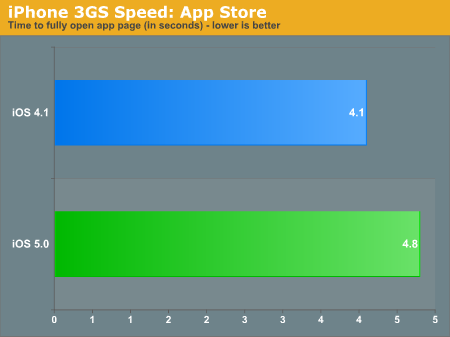
For this test, we looked up an app that had already been installed to the phone, closed the App Store, cleared it from the multitasking tray, re-opened the app, and waiting for the app's page to load again. It should be noted that while most other tests timed pretty consistently across multiple runs, we encountered the most variance between runs in this test - results were as low as 4.0 seconds and as high as 6.1 seconds. To get a reasonably representative number here, we did ten runs and averaged the results. The majority of the time, you're looking at a slight slowdown in the App Store compared to iOS 4.1.
If you've bought an iPhone 3GS since the iPhone 4 was introduced (or if you’re getting one for free now), you're not going to get burned the way that people who bought a 3G in the spring of 2010 did. The 3GS lacks the processing oomph of newer handsets, but is still mercifully responsive to user input. Apps launch quickly. Text entry is lag-free. The 3GS’s hardware and the extra time that Apple has had to optimize iOS 5 make upgrading easy to recommend, and the app launch and JavaScript benchmarks relative to iOS 4 back that up.
First generation iPad
The original iPad has the same Apple A4 SoC as the iPhone 4, but like the 3GS and third and fourth gen iPod Touches, it has only 256MB of memory. This doesn’t really hold it back though - iOS 5 seems to be pretty similar to iOS 4 from a hardware requirement standpoint, unlike the jump from iOS 3 to iOS 4.
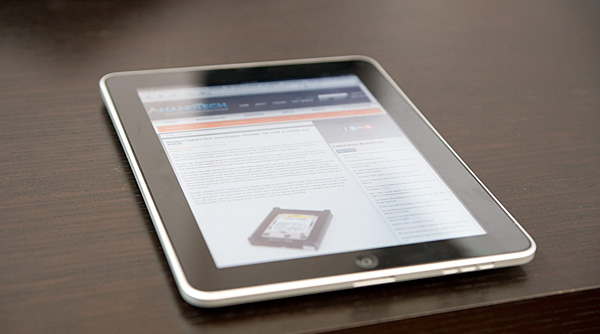
Basically everything that’s been updated in the iPad 2 version of iOS 5 makes the jump back to legacy; the notifications center, iMessage, iCloud, updated versions of Safari, Mail and Music, etc. Things that don’t make it include the camera and FaceTime updates (for obvious reasons), the new four-finger multitouch gestures (though other single finger swipe-based gestures still work), AirPlay mirroring (due to hardware requirements), and the ability to play 1080p video (also due to hardware requirements).
All of Apple’s devices running Cortex/ARM v7 processors are supported by iOS 5, and based on our findings with the iPhone 3GS and the original iPad, they’re more than capable of running it well.
Originally published at https://www.anandtech.com/show/4956/apple-ios-5-review (Wayback Machine).