
Apple iOS 5 Review
Find My Friends
Yet another feature, that Apple’s included under iCloud’s umbrella is called Find My Friends. It is a standalone app that allows you to share your current location with other iOS users without any further interaction on your behalf. One a friend is allowed access to your location information (by "following" you) he/she can request your current location at any time. The process is simple: you submit a follow request through the Find My Friends app, and your friend either accepts or declines your request.
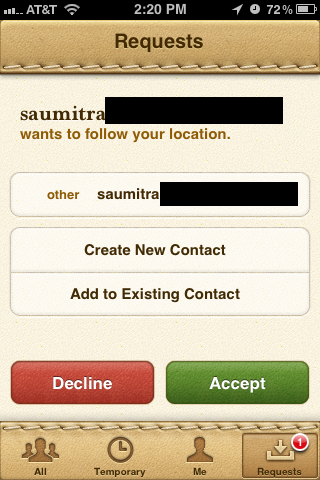
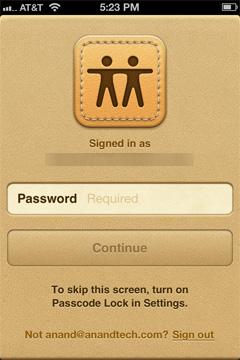
Once accepted, there's nothing more for you to do. Note that the process isn't automatically two-way: just because you let someone follow you it doesn't mean you can follow them, you have to initiate a request and be accepted to follow anyone - period. Access can be revoked at any time as well. If you don't have a passcode set on your phone you'll also be required to type in your password every time you launch the app. Requiring authentication at launch guarantees that no one can simply pick up your phone and spy on the locations of your friends. Despite the obvious scariness of the idea, it seems like the FMF app is a reasonable way to share your current location with people you trust.
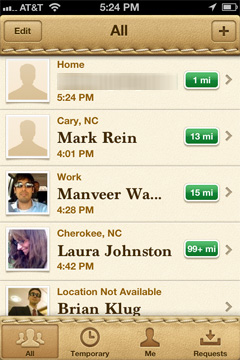

The app is invariably tied to your Apple ID, which is currently the only means to find an invite other people. It is nice to see Apple steadily increasing the number of services that are tied to an Apple ID. With Find My Friends, it brings the grand total to 7 with the iTunes Music Store, App Store, iBookstore, Home Sharing, iMessage and iCloud, if we consider it as one service.
Find My Friends has several built-in privacy settings that let users control whether they can receive follow requests. A “Hide from Followers” option lets users snoop around without advertising their locations; sort of like an incognito mode if you don’t want to let your gym instructor know you were at McDonald’s. The temporary sharing feature allows you to share your location with a group of people, (who don’t necessarily have to be your followers), only for a specified period of time. Once the set deadline has elapsed, your location is no longer shared, and life returns to a state of normalcy.
The app also lets users assign labels to frequently visited places, so your followers don’t rack their brains too hard trying to figure out where you are. Currently, the only way to add friends is to manually type their email addresses, a la Mail or Messages. It would be great if Apple could let the app scan your contacts and automatically invite people with email addresses. There are also built-in parental controls, which can be accessed from Restrictions under General Settings. The app has a slick interface, much like the new Address Book in Lion. It is tightly integrated with Maps, Contacts and iMessage.
Maps

The biggest improvement to the Maps app in iOS 5 is that you can finally choose between multiple routes, same as in the Google Maps web app. It still doesn't display some of the useful information you can get from Google directly - for example, which roads have tolls and which do not? - but it's handy if you come up against traffic or closed roads on your way from Point A to Point B.
Spellcheck and Autocorrect

The iOS spellchecker can now suggest multiple words to correct your misspellings, similar to spellcheckers in most word processors and web browsers on the desktop. The pop-up you use to make these corrections is also slightly larger than before, allowing for easier tapping.


Originally published at https://www.anandtech.com/show/4956/apple-ios-5-review (Wayback Machine).