
Back To School Technology Buyer's Guide
Printers
The second peripheral every college student should consider buying is a printer. You might have easy access to a printer in your dorm, or the nearest campus lab might be a hike from your apartment. And you might not finish your paper until 3am, and it might be the end of December and your northern campus is getting hammered by a snowstorm—doing that once was enough to motivate me to save up enough money for a printer!
Printers come in three basic types: laser, inkjet, and all-in-ones. All-in-ones combine a copier, scanner, and printer (either a laser or inkjet) into one device. Inkjet printers are usually the least expensive initially, but the cost of printing (the ink cartridges) is usually higher per page than laser printers. Laser printers can sometimes be quite inexpensive, and while toner cartridges cost more than ink cartridges, they last much longer. The majority of printing done by college students is black and white text, and for that reason, I recommend laser printers over inkjet printers. However, if you won’t be printing that much (say, less than 100 pages per month), an inkjet printer is a viable solution. I particularly like all-in-ones because they often aren’t that much more expensive than dedicated printers and being able to copy and scan at home means fewer trips to the computing center or library—and not getting nickle and dimed for those services, as most colleges charge a per-page fee for them.

Canon's PIXMA ip2702 is an inexpensive inkjet at $34 that can handle occasional printing with ease. Spending more money on a dedicated inkjet printer can yield additional features like wireless printing and higher quality picture printing, but durability and reliability general don't start to improve until you shell out $200+ on a prosumer or commercial grade inkjet. For mostly black and white text, cheaper inkjets are just as good as cheap inkjets.
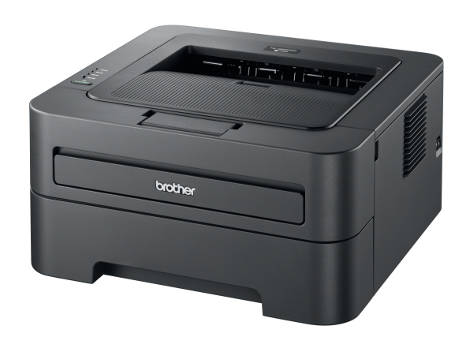
If you'll be printing out hundreds of pages of text per month, Brother's HL-2240D and Samsung's ML-2525 are great budget options. Both can occasionally be found on sale for $50 or less. Neither of these models are built like tanks, but if you take care of them, they'll last for years (I still use a Samsung ML-2010 that I bought in 2006). Like inkjets, spending more money on a laser printer might mean faster printing, wireless printing, and/or more capacious toner cartridges, but again, these features are not necessary for most college students.
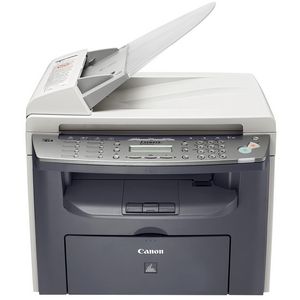
Finally, Canon's PIXMA MP495 and imageCLASS MF4350d are inkjet and laser (respectively) all-in-ones. The MP495 is compact in size and also features wireless printing, while the MF4350d is physically larger (though its footprint is not terribly large, unlike many dedicated scanners). The MP495 is currently on sale for less than $60, so unless you're very budget-conscious, the added scanning and copying capabilities are definitely worth the $20 extra compared to the PIXMA ip2702. At less than $100, the MF4250d is very competitively priced compared to other laserjet all-in-ones. Regardless of whether you use a dedicated inkjet or laser printer, or some sort of all-in-one, keep in mind that you can dramatically lower printing costs by refilling ink and toner cartridges.
If you'd rather read papers, book chapters, and assignments on a portable device than printing out sheet after sheet of paper, we cover tablets and ereaders on the next page.
Originally published at https://www.anandtech.com/show/4556/back-to-school-technology-buyers-guide (Wayback Machine).