
Back To School Technology Buyer's Guide
Tablets and Ereaders
The last few years, and especially the last year, have seen an impressive diversification in the field of tablet computers and ereaders. While tablets can be used as ereaders, and some ereaders can be modified to be more tablet-like in functionality, the two markets remain largely distinct. Essentially, if you want to read ebooks and pdfs, and long battery life, you want an ereader. If you want an experience closer to using a computer—browsing the web, watching videos, listening to music—you want a tablet. Many tablets also come with note-taking software so with the addition of a stylus, they can be used as notetaking devices.
Tablets
The tablet everyone knows about is Apple's iPad, now on its second generation. Anand, Brian, and Vivek reviewed the iPad 2 a few months ago. While there are many non-Apple, non-iOS alternatives to the iPad, I think the ASUS Eee Pad Transformer has risen to the top of the field with its combination of features and pricing. Anand thoroughly reviewed it in April and then re-visited it, with the Android 3.1 OS installed, at the end of May. Comparing the iPad 2 with the Eee Pad, the Eee Pad has a slightly physically larger screen with a higher resolution, is slightly physically larger and heavier, and has twice as much memory. Both the Eee Pad and iPad 2 come with 16GB of internal storage. However, the Eee PC also has a microSD card slot. The iPad 2's screen is generally considered to be better, as Anand detailed in his review of the Eee Pad. The iPad 2 also lasts longer on battery, though both easily provide a full day's use on a single charge. The base model Eee PC is $100 less than the base model iPad 2.
Without wading too deeply into the Android vs. iOS debate, I will simply state that both operating systems have legions of fans, and both have their advantages and disadvantages. Suffice it to say that one is not vastly superior to the other. It really comes down to personal preference—so try them both out before making a decision. However, the iOS does have one advantage particularly relevant to college students—there are far more educational apps available for the iPad through the iTunes App Store than there are for the Eee Pad through the Android Market. Furthermore, from my evaluations limited to general biology, anatomy, zoology, and genetics apps, the iOS education apps are generally superior to the Android apps.
Ereaders
Unfortunately, as nifty as the iPad 2 and Eee Pad are, they're also somewhat expensive at $500 and $400, respectively—for the cheapest models. Ereaders offer the ability to read documents on the go, and are far less expensive. They're also physically smaller, lighter, and last much, much longer on a single battery charge. Of course, they also have much reduced functionality compared to tablets.
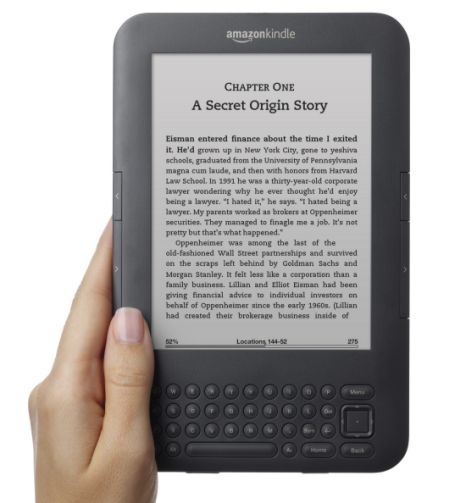
The two most popular ereaders are Amazon's Kindle and Barnes & Noble's Nook. The Kindle is available in three flavors: Kindle WiFi, Kindle 3G + WiFi, and the Kindle DX. The only difference between the WiFi and 3G + WiFi models is that the 3G + WiFi model can access Amazon's WhisperNet 3G service so you can download reading material and access web-based content without having to connect to a wireless router. The 3G service is very widely available (for example, it works in rural Siberia), and reasonably speedy. The web features are considered limited, experimental, and subject to change, but for now, you can use a Kindle to check your web-based email account, as well as use Twitter, and read Wikipedia to your heart's content.
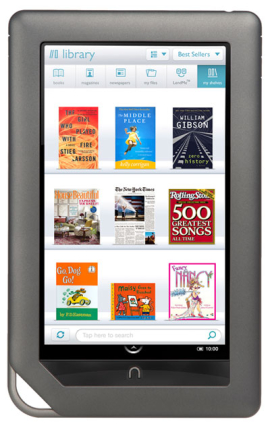
The Nook is available as a standard and Color version. The standard Nook is a direct competitor to the Kindle WiFi, and both cost $139. Having used both the Kindle WiFi and Nook, my recommendation is simple: go to a store and try them both out yourself! The Nook Color, on the other hand, is very different from all of the Kindles. It is essentially a touchscreen tablet that runs Android underneath Barnes & Noble's proprietary surface. Therefore, it can be hacked to run just Android. The Nook Color's hardware is not as capable as what is found in, say, the iPad 2 or Eee Pad, but it runs many Android apps acceptably well.
Next up, we take a look (or rather, give a listen) to portable media players, headphones, and computer speaker systems.
Originally published at https://www.anandtech.com/show/4556/back-to-school-technology-buyers-guide (Wayback Machine).