
Back To School Technology Buyer's Guide
Netbooks
Small, lightweight, inexpensive netbooks featuring exceptional battery life started becoming popular in 2007, largely due to ASUS' successful Eee PC line. In order to achieve great longevity while unplugged and low price tags, these netbooks sacrificed processing power. The CPU featured in most netbooks until the recent advent of AMD's Brazos products was Intel's Atom and its derivatives. The new AMD APUs typically offer CPU power on par with or exceeding comparable Atom chips, and far superior graphics performance. That said, even the lowliest single-core Atom is sufficient for basic web browsing and office productivity. I've found inexpensive netbooks make near-perfect 'daily drivers' for campus use. They weigh less than a hardcover textbook, are small enough to be typed on in cramped lecture halls, and they often don't need to be recharged at all during the day.
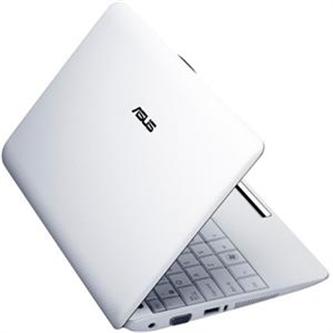
ASUS' Eee PC 1001P is a standard, mostly unremarkable single-core Intel Atom-based netbook that deserves your consideration for two reasons: it's cheap and its battery lasts a ridiculously long time. Tests here at AnandTech show the 1001P can stay unplugged for nearly 11 hours if idling and over 7.5 hours during heavy web browsing. You can expect it to last well over 8 hours if you're typing notes and occasionally browsing the web. At $260, it's one of the least expensive netbooks.
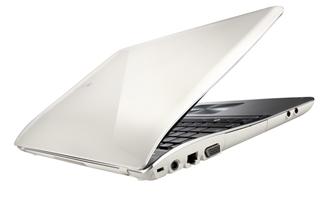
Since their original NC10, I've been a fan of Samsung's netbooks. I like their keyboards better than the competition's, and they're particularly well-built. The NF310 features a dual-core Atom CPU which can help with multi-tasking, offering a level of performance that's a step up from the single-core Atom netbooks. That said, trying to do anything more than web browsing and basic office productivity can quickly become aggravating. At the time of writing, its pricing on the web isn't particularly competitive, but I've seen it as low as $300, and at that price, it's an excellent product.
As alluded to above, AMD's Brazos APUs that came on the market at the beginning of 2011 changed the netbook landscape. The E-350 APU in particular offers substantially better all-around computing than any Intel Atom. Furthermore, most Intel Atom-based netbooks feature 10.1" screens while most AMD E-350-based netbooks feature 11.6" screens. More display real estate isn't just easier on your eyes—I've found my fingers fatigue slower using the 11.6" netbooks' keyboards. Finally, most E-350 netbooks come with Windows 7 Home Premium installed instead of the Windows 7 Starter Edition that comes installed on most Atom-based netbooks. Windows 7 Starter doesn't let you change your wallpaper, nor does it support multiple monitors. These might not be relevant to your netbook usage, but I'd much rather get more memory and a "real" OS.
Dustin reviewed HP's dm1z here on AnandTech, and as you can see from that review, the dm1z offers great battery life (over 8 hours idling, about 7 hours while browsing the web)—and it can game! Or at least produce playable frame rates on lowered settings on many popular titles like Left 4 Dead 2 and Starcraft 2. Starting at $400, the dm1z is definitely worth the extra hundred or so dollars compared to an Atom-based netbook if you are looking for more than bare minimum adequacy for the most basic tasks.
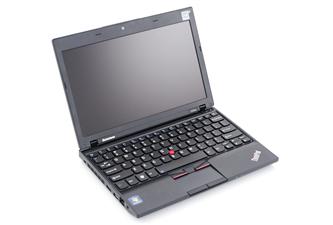
At almost $500, Lenovo's Thinkpad X120e is more expensive than many more powerful, full-sized laptops. It's more expensive than the dm1z, and in my personal testing, its battery life and performance are (unsurprisingly) very similar to those of the HP E-350-based netbook. However, I bought an X120e because the dm1z's screen is glossy while the X120e's is matte. Considering how much time I spend inside lecture halls and labs, I try to get outside as often as possible—and glossy screens are simply not as easy to see as matte screens in the sun. The keyboard on the X120e is also perhaps the bets "netbook" keyboard around.
If you're looking for something more capable than the above netbooks, or for a larger screen, we take a look at a number of full-sized laptops on the next page.
Originally published at https://www.anandtech.com/show/4556/back-to-school-technology-buyers-guide (Wayback Machine).