
ASUS' N82Jv: Jack-Of-All-Trades
A Closer Look at the ASUS N82Jv-X2
In terms of aesthetics and construction, the N82Jv improves on most consumer laptops. The lid is a textured aluminum surface that's bronze/brown in color, and it's a nice break from all the glossy plastic finishes we've seen in the past. The main body is still plastic, and it does show some flex, but it does look like it will hold up well over time. The palm rest is a matte plastic, and the sticker claims a "Scratchproof Surface". It won't resist a sharp metal tool, but scraping at it with my fingernails produced no visible markings, so in that sense it is scratchproof… or at least scratch resistant.


While I thought the N61Jv looked okay, the textured aluminum lid on the N82Jv easily wins out. Like any aluminum surface, it can show grease smudges, but it's nowhere near the fingerprint magnet of glossy plastics. One issue that we do have with the construction however is the use of a door/hatch on the right side to cover the USB, Ethernet, and eSATA/USB ports. This is a matter of taste, but I haven't had enough concerns about dust getting into my ports that I want a cover—especially not a cheap cover secured by rubbery plastic "hinges". This is one area where ASUS should have left well enough alone and gone with the standard ports on the side of the laptop.
The speakers consist of two Altec Lansing tweeters firing out the front of the laptop. Sound quality is decent for a 14" laptop, and at least the speakers don't distort at high volume levels, but they don't get very loud and they're lacking in bass response. Plug in a set of headphones and you'll be a lot happier with the audio experience.
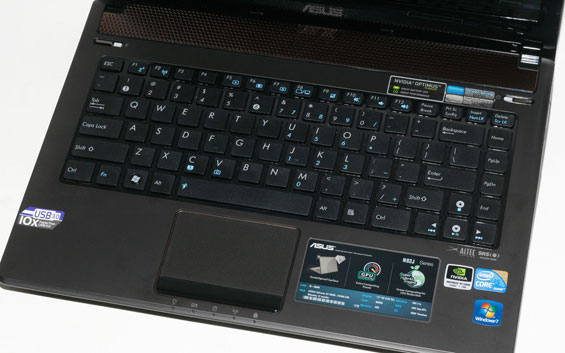
As with many of the other ASUS laptops, the keyboard layout is very good for a 14" chassis. The CTRL key is in the bottom-left corner, and the column of Home/End/PgUp/PgDn keys on the right works very well. Key response and travel isn't the greatest and certainly won't compete with the ThinkPads (or HP EliteBooks) of the world, but the decent sized palm rest and beveled edge make it comfortable enough for regular use. There's a bit of flex in the keyboard if you push hard, but that's only if you're looking for it—it's certainly not like some of the MSI keyboards where the keyboard tray bows at the slightest pressure. The chiclet style keys also have good spacing, though if you don't like chiclet there's nothing to change your mind here. In short, this is a functional keyboard that works well, but it doesn't rise above the market; it's better than the Acer Aspire keyboards, sure, but so is just about everything else.
The touchpad has a lightly textured surface that matches the lid, and it provides a nice differentiation from the rest of the palm rest. ASUS uses an Elan Smart Pad for the hardware, with support for most of the latest multi-touch/gesture options. Two finger scrolling works as expected, and tapping with two fingers (middle-click) or three fingers (right-click) also works. What you don't get are the "swipe" and "zoom" gestures found on some other touchpads, but personally I don't miss them. Until/unless such gestures are better integrated into the OS and applications (a la OS X), scrolling gestures are as much as I need.
For those looking at expansion options, ASUS' one concession is the inclusion of USB 3.0. That's a forward thinking technology that could prove very beneficial in the long run, but right now the only USB 3.0 devices are storage options. If you're a multimedia enthusiast like Dustin, obviously the lack of Firewire and ExpressCard is going to put this out of the running for use as a video editing workstation. Unfortunately for Dustin, such users are a distinct minority and most will be perfectly content with the three USB ports and the eSATA combo. If you want a laptop with more expansion potential, you'll have to look elsewhere.
One of our few complaints with the N61Jv was the LCD, so we had hoped the N82Jv would change things up. Well, it doesn't, and you're going to be getting the same sort of LCD we've seen in so many other sub-$1000 laptops. It's a TN panel with poor vertical viewing angles and generally mediocre quality, similar to the standard MacBook LCD. We'd love to see ASUS bump the price up $100 and move to something more like the 13" MacBook Pro LCD, but when you target a $1000 price ceiling something has to give. With the N82Jv, that "something" happens to be LCD quality and battery capacity. ASUS does include their Super Hybrid Engine that locks the CPU multiplier to 9x/10x in the battery results, but suffice it to say it doesn't do enough to warrant use in our book; an extra 10-15 minutes of battery life for less than half the performance isn't the same thing as a high capacity 6-cell battery, unfortunately.
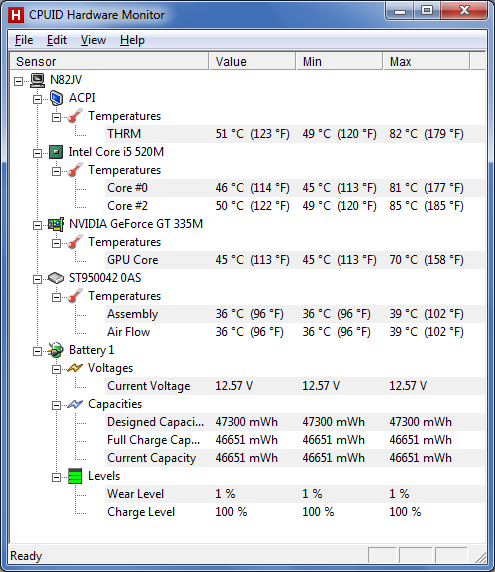
Above is a look at the temperature ranges we encountered during idle and load periods on the N82Jv. For stress testing we used 3DMark06 looping for upwards of an hour, as well as a 20 minute video cleanup using CUDA in vReveal. CPU and GPU core temperatures were as low as 45C (49C on CPU core 2). Load temperatures reached 70C on the GPU and 85C on the CPU. We measured surface temperatures 25-30C at idle, with load tempertures increasing a few degrees in most areas. The hottest spot is right underneath the CPU, where the bottom of the case was 41C. Noise levels are near 30dB at idle, and up to 39dB at load (from a distance of 12").
Having recently looked at the Toshiba A660D, the N82Jv is definitely a step up in overall build quality, but it's more of a step sideways in features and battery life. The A665D-S6059 comes priced $200 lower with an HD 5650 GPU, but there's little doubt the i5-450M will come out on top in the performance results. As for the A660D, currently priced at $950 this is an easy win for ASUS. The question is how it compares to other laptops, and here's where things become difficult. As mentioned, no one else has yet shipped a laptop with a midrange GPU (GT 330M or higher), Optimus Technology, and USB 3.0. The closest competitor is probably the Gateway ID49C08u, priced at $850 but with no current online availability. That comes with the standard (re: lousy) Acer/Gateway keyboard, a blinged-out glowing touchpad, a GT 330M GPU, and a 5400 RPM hard drive. All told it probably runs games ~20% slower than the N82Jv, so you're looking at $150 for USB 3.0, a faster GPU, and a much better keyboard.
We'll have a look at the ID49 next week, but in truth the real competition is going to be the 400M Optimus laptops when they start showing up. As it stands, the N82Jv is a good all-around laptop that can handle just about everything, priced at a cool grand. We have no serious complaints with the quality of features (outside of the LCD), and if you're not interested in waiting to see what sort of 400M systems we'll get in the next month or two—or if you're looking for something a little larger and faster than the Alienware M11x R2 for a lower price—the N82Jv should fit the bill. We do wish that there was less "differentiation" between some of the ASUS brands, though; combine the best of the U-series with the best of the N-series, and give us a chassis worthy of a business laptop and we'd be ecstatic.
Originally published at https://www.anandtech.com/show/3907/asus-n82jv-jackofalltrades (Wayback Machine).