
Gateway P-7808u: to Quad or Not to Quad?
- Posted in
- Laptops
Power Requirements
Power requirements with a laptop plugged in don't necessarily reflect power requirements when a laptop is on battery power. In particular, high-end GPUs run at lower maximum clock speeds when using the battery. Keep this in mind when looking at the following numbers. We test under idle conditions, with a 100% load placed on the CPU via Folding@Home SMP, and finally at maximum load by running FAH SMP at the same time as we loop 3DMark06 (at the native LCD resolution).
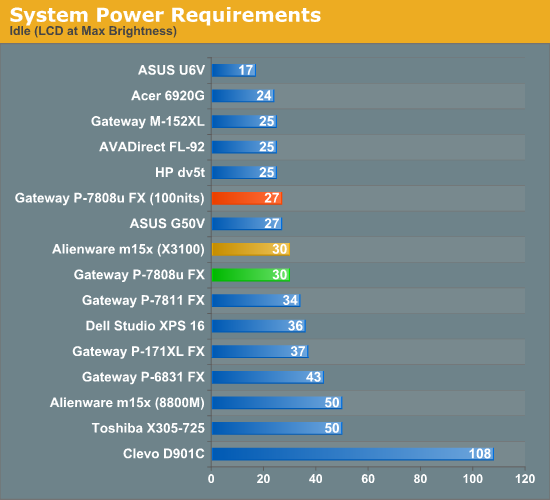
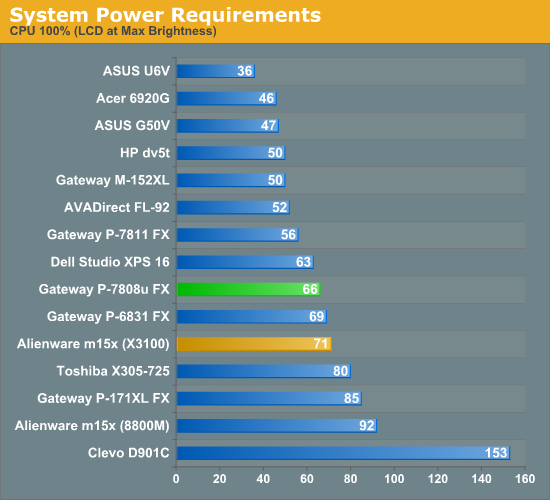
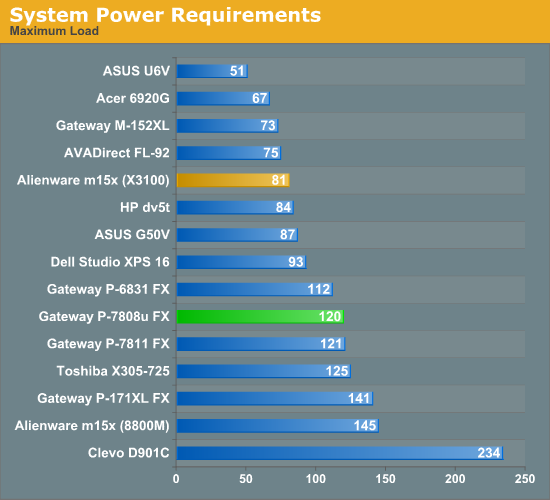
Our power measurements are with the LCD at maximum brightness, which isn't necessarily a fair way of doing things as some LCDs are much brighter than others. Unfortunately, we don't have most of the laptops around to retest. The Dell Studio XPS 16 uses 9W more power running at maximum brightness, which represents an increase in power draw of 33%. The Gateway P-7808u on the other hand only uses 3W more at maximum brightness. We can see that relative to the P-7811, idle power requirements have dropped, but tasks that place a load on the CPU - particularly on all four cores - tip the scales the other way.
Noise Levels
We also ran noise testing using an SPL meter at 24" under the same conditions as our power tests.
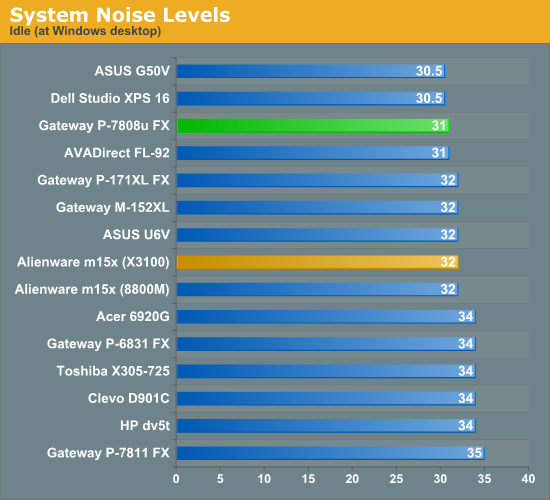
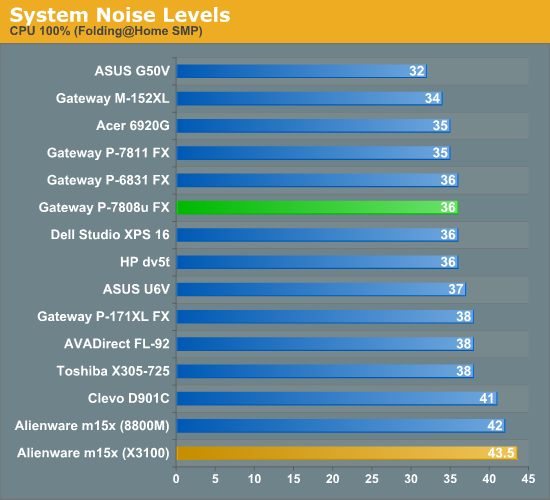
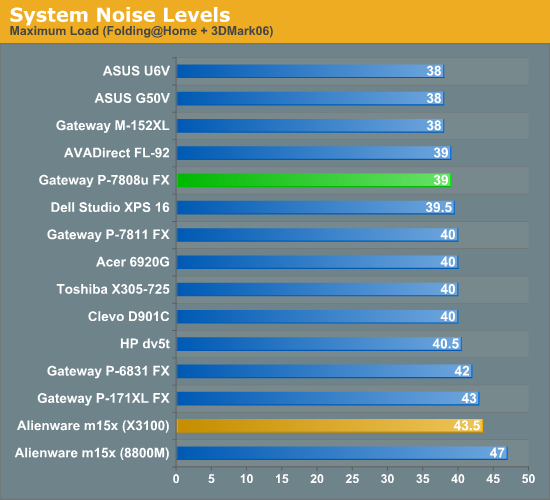
Gateway has clearly addressed some of the noise issues that were present on the P-7811, which never dropped below 35 dB. At idle and under low loads, the P-7808u fluctuates between almost completely silent (28 dB - or the limits of our testing equipment and environment) and around 31 dB. Once we load the CPU at 100%, noise levels increase to a range of 33-36 dB. At maximum load - or when running a modern 3D game - noise levels peak at 39 dB. Relative to other laptops, all of the noise results are good, generally placing in the upper portion of our charts. That's impressive for a laptop running a quad-core processor!
Temperatures
We didn't create any charts, but we wanted to give a quick rundown of the temperatures you might expect from the P-7808u. We placed a maximum load on the system for 60 minutes (looping 3DMark06) and then measured temperatures, so these results are something of a worst-case scenario. However, the testing environment was only 67°F, so in warmer conditions the notebook will likely run quite a bit warmer. Also note that the notebook was sitting on a hard, flat surface - you can use it on your lap, but if you block the ventilation slats temperatures may also increase.
We measured temperatures of ~45°C at the exhausts, which are the hottest spots on the chassis. Temperatures on the bottom of the laptop range from 25° to 40°, with most of the bottom measuring around 33°C. The keyboard and palm rest aren't quite as hot, ranging from 25° to 33°C with most of the keyboard staying under 30°. One of the advantages of larger notebook chassis is that they are better able to dissipate heat, we have seen quite a few smaller notebooks that run hotter than the P-7808u.
Originally published at https://www.anandtech.com/show/2748 (Wayback Machine).