
Gateway P-7808u: to Quad or Not to Quad?
- Posted in
- Laptops
Battery Life
For battery life testing, we run all laptops at around 100 nits brightness. If you choose to run your LCD at maximum brightness, you may lose anywhere from 10 to 60 minutes depending on the laptop and the display. In the case of the P-7808u, maximum brightness is ~220 nits and uses 3W more power, so the impact on battery life is relatively small (see the idle chart below for reference).
We run several different battery life scenarios: Internet surfing (load several webpages using the wireless adapter every minute until the battery dies), DVD playback, x264 playback, and idle (maximum) battery life. For x264 playback, we copy a 720p file to the hard drive and loop playback using Windows Media Player Classic Home Cinema; we will include scores from other laptops, but it's worth noting that we did not have GPU accelerated x264 decoding enabled in earlier laptop tests. We've also included web surfing results (and DVD for the MacBook Pro) for the latest Apple MacBooks as a point of reference.
Several systems that we've tested include extended capacity batteries or a second battery, so we've colored those results light blue. The Alienware m15x has two batteries in addition to letting you disable the discrete 8800M GPU and run on the integrated X3100 graphics, so we colored the IGP results gold/yellow. Some have questioned the results of the m15x in the past, but remember that using the IGP cuts power requirements by about 20W at idle (and over 60W at load), which dramatically changes its placement in these charts. We really wish more manufacturers would offer such a feature, especially with high-end GPUs.
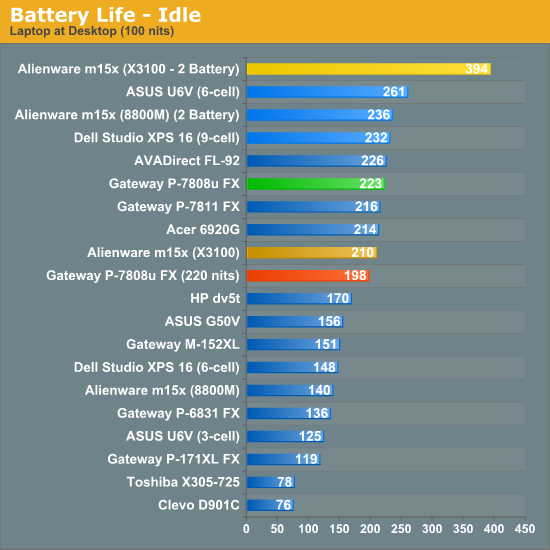
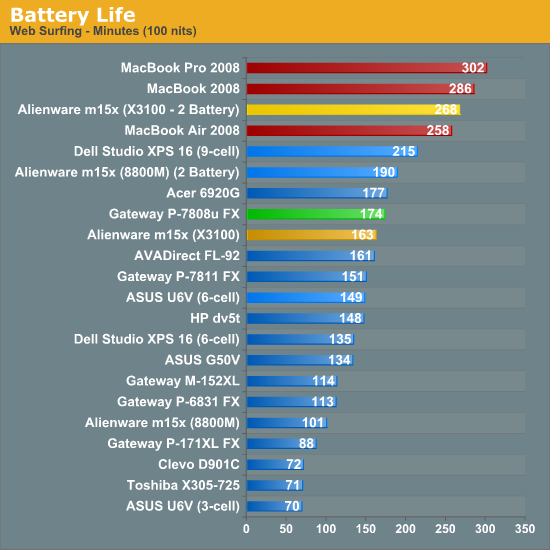
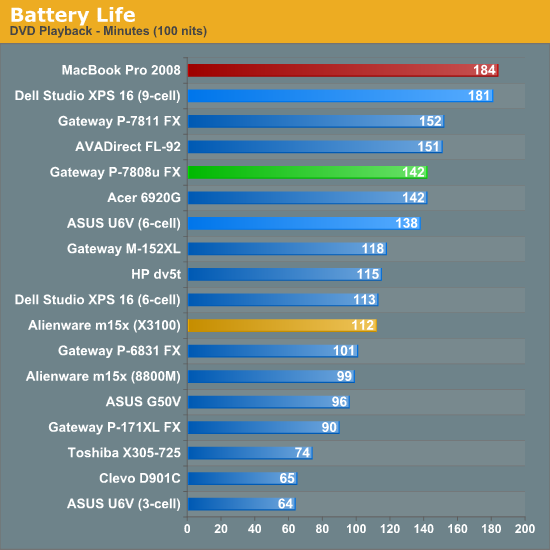
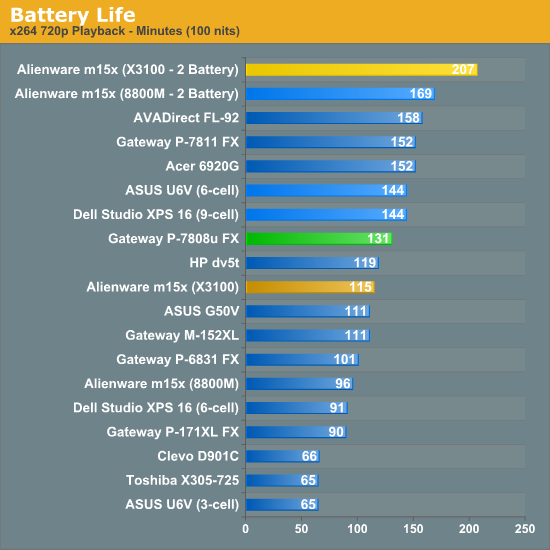
Battery life is quite good for a gaming laptop, scoring near the top of the charts when looking at similar options. The P-7811 swaps places in several tests with the P-7808u, which is somewhat odd. The 7811 does better in DVD and x264 battery life, but the 7808u wins in the Internet and idle tests. Running the LCD at max brightness rather than 100 nits (three steps down for maximum) reduces battery life by 25 minutes. However, we need to look at battery capacity in addition to battery life to get the complete picture. The following is an apples-to-apples comparison, showing the number of minutes of battery life you get per Whr (Watt Hour) of capacity.
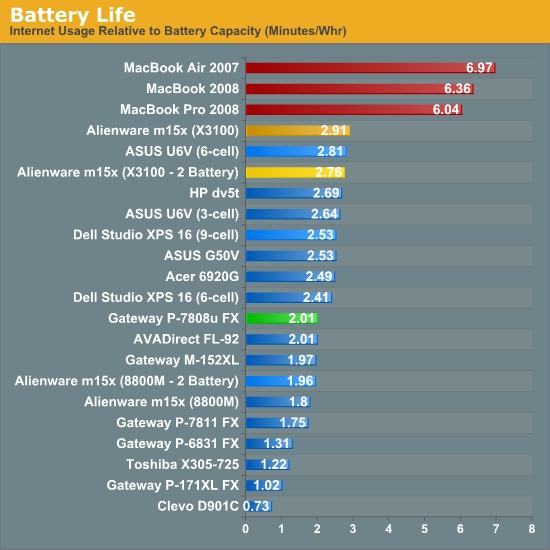
We've said it before and we will continue to say it until we see a Windows laptop that can prove a strong: Apple MacBook laptops are killing Windows options when it comes to battery life performance. Apple uses 40-50 Whr batteries, so there are Windows laptops that can offer "more" battery life, but once you compare performance, features, size, and weight Apple comes out far ahead of the competition. Integrated graphics solutions clearly help, but it will take quite a bit to close the gap. Lenovo is supposed to offer battery life comparable to the MacBooks, but we have been unsuccessful in acquiring a test sample to date.
Originally published at https://www.anandtech.com/show/2748 (Wayback Machine).