
Pentax K20D First Impressions
- Posted in
- Digital Camera
In-Camera Image Processing and Software
When Nikon introduced the D300 late last fall, some reviews detailed the in-camera image processing capabilities as if Nikon had invented the wheel. In fact, many of the "new" in-camera image-processing capabilities of the D300 were already features of the K10D. The K10D has remarkable abilities for capturing and manipulating raw, DNG (Adobe Digital Negative format), TIFF, and JPEG files.
The K20D extends those capabilities even further. JPEG images can be processed in-camera with digital filters, including sepia, color extraction, black and white, soft focus, and an illustration function that looks like a pencil drawing. Digital filters do not work for raw and TIFF files, but these get their own even more extensive in-camera processing options.
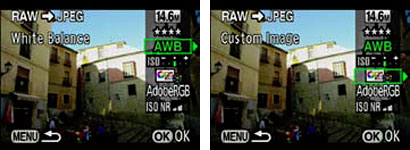
In playback mode, you hit the Fn (function) key, and then the down arrow on the four-way controller to bring up the parameters used to record the RAW image. You can then scroll through and change any parameter. These include image resolution, white balance, ISO sensitivity, color space (sRGB/AdobeRGB), high ISO Noise Reduction (four levels), and Custom Image.
The Custom Image function allows adjustment of Image Tone, Saturation, Filter Effects, Hue, Contrast, and Sharpness. Once you are satisfied with the RAW image changes, you can then hit OK and save the file under a new name. This preserves the original RAW file (like a negative) for future processing and creates a new processed file. This in-camera RAW processing can be very useful at a show or in the field where you are away from a computer. It is also useful if you want to process just a few RAW images.
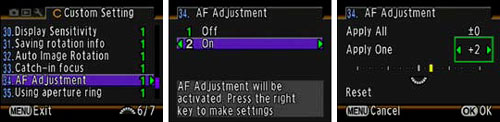
Perhaps to prove their claim that 24 million Pentax lenses will work on the K20D, Pentax includes comprehensive Autofocus adjustment tweaking for any lens that will mount on the K20D. The user can make fine adjustments to AF plane both forward and back to provide best AF performance of older full-frame lenses on the K20D. This even includes the ability to save and recall profiles for up to 20 lenses.
The K20D software is also very useful. Image processing is accomplished in Pentax Photo Browser 3 and Photo Laboratory 3. This Pentax software is a custom version of SILKYPIX Developer Studio 3.0, which is a very well-regarded RAW converter. While some manufacturers ignore the studio photographer needs, Pentax Remote Assistant 3 allows computer control of a tethered K20D. Most studio photographers demand this capability.
Frankly, most users don't bother with software packaged with their new digital cameras, but both these programs are capable and powerful. SILKYPIX in particular is regularly updated and it is fully Vista compatible. It also includes a version on the CD for Mac OS 10.3 or later. More Information on SILKYPIX can be found at their website.
Originally published at https://www.anandtech.com/show/2476 (Wayback Machine).