
The Google Mini - A look at Google's entry-level search appliance
- Posted in
- IT Computing
... And downsides
Though the Google Mini package is undoubtedly high in quality, we can't claim it's completely flawless. As we hinted previously, one of the first real limitations we ran into had to do with security. On both fileservers and webservers, the Mini is currently rather limited in properly handling secured content. The fact that the Google Search Appliance offers many of these capabilities isn't much consolation, because the price jump will be too large for smaller companies to afford, requiring them to either skip the crawling of their secure documents, or else find other solutions.
Our own internal wiki system is a good illustration of this problem. It contains information that's confidential to our lab, so we require users to authenticate before viewing any information. Since this system uses cookie-based authentication, the Mini was unable to crawl any of our wiki pages, which was actually the primary use we had in mind for it.
The Mini's inability to enforce authentication for our samba shares created another obvious problem for our lab, where access to nearly every file would ordinarily require authentication. Having the Mini crawl our fileserver left our documents open for anyone to see, and since the Mini serves the results as direct download links, our own safety measures were rendered ineffective .
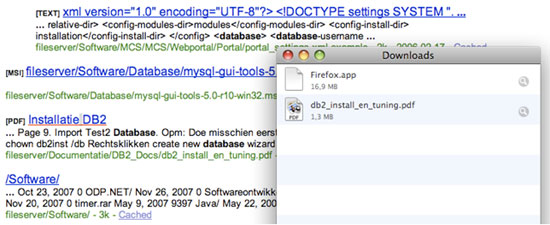
Using the Mini to index our fileserver made our secured content downloadable to everyone with access to the Mini.
Luckily, this did not cause too much trouble in our case, since our intranet is only accessible to a limited group of users, but it is still a factor to keep in mind when considering a Mini. Some changes to existing security systems may be necessary to keep sensitive content safe.
The lack of control over the Mini itself also bothered us.. Not only are we completely locked out of the OS itself, but monitoring the system's status is out of the question. Though the administration panel does give us a "System status" page, the info provided here is very sparse, and might as well not have been there at all. We hope Google will implement more detailed monitoring here in the future.
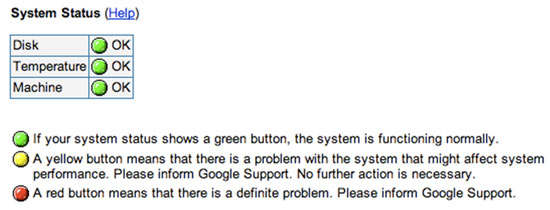
A screenshot containing the full package of the Mini's monitoring tools.
Lastly, we would also appreciate an easier overview of the crawler, and more direct control of it. At this point, any directions it can be given seem to be put into a priority queue of sorts, which does get crawled first, but isn't really clear, and gives you no real feedback on the results of your commands. This may cause some confusion as to whether your commands are really being handled at all, and made us wish we could actually see what the crawler was doing in real time. Granted, there are actually some reporting options available, but we found them rather lacking, and using the wonderful Google Analytics system really puts the Mini's built-in reporting options to shame.
In general, we feel that there's still a lot of room for improvement in the Mini's management console, both in usability and general provision of information. We hope that Google looks into these issues when they release their next update for the machine.
Originally published at https://www.anandtech.com/show/2407 (Wayback Machine).