
Killing the Business Desktop PC Softly
- Posted in
- IT Computing
Between VDI and SBC
Meet the rock - VDI - and the hard place: SBC. Server Based Computing (SBC) might not be the most exciting technology, but it is exciting from a cost point of view. It requires one large server, which means that you have to maintain only one server OS, which can support - depending on the amount of RAM you put in that machine - up to 100 users or more. As sessions don't require that much memory and you have only one kernel running, the memory demands are generally low too. The bandwidth demands are ridiculously low: one user can work over an ISDN line. Best of all, it is much cheaper to let 100 users access one server than paying for 100 OS licenses. Of course, SBC can only be used for "CPU light" software, and for software that is compatible with Terminal Services or Citrix.
VDI doesn't have these limitations. Basically you run a lot of desktops in separate virtual machines on one or more servers. Compatibility is not a problem, as each application gets its own OS running on its own virtual machine. In a sense VDI offers the same thing as CCI, but on virtual instead of physical machines. Our own research shows that if you attach one virtual machine to one CPU core, the performance loss of virtual machine manager is negligible, between 1% (CPU intensive applications) and 8% (memory intensive applications). Once you use more virtual machines than CPUs, this quickly rises to 15% and more in some cases. This is still acceptable, but if you absolutely want the same performance as CCI, you need one core per desktop.
The disadvantage is that VMWare ESX licenses are not cheap, unless you run a lot of virtual machines per socket. It is clear that quad core CPUs are the way to go here: it makes the Intel Xeon 53xx ("Clovertown") very attractive. VDI is certainly not a replacement for Terminal Services (TS). With TS you have to manage one OS for maybe 100 users; with VDI you have to manage 100 OSes for 100 users. For those of you that are relatively new to SBC, VDI, and blade PCs, you can get a brief overview in the table below.
So where does CCI fit? This is how HP positions Blade PCs relative to SBC and VDI. The X-axis represenst the increasing complexity of the user's required software, the Y-axis the level of performance one needs.
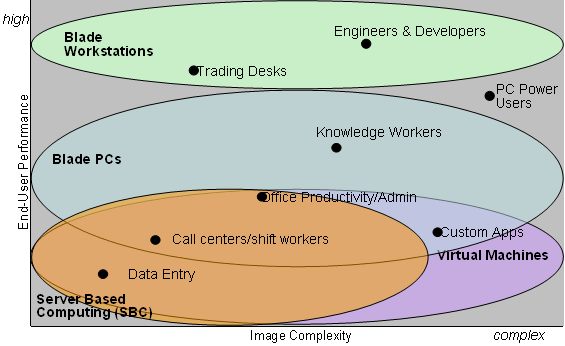
HP sees a lot overlap between blade PCs and SBC. We don't see so much space. With quad core CPUs, 64-bit Windows 2003 (and Linux), and decent Gigabit NICs, performance shouldn't be a problem for SBC. We mention the 64-bit OS as it is important because it allows servers to take advantage of large swap spaces and more than 4GB of physical RAM. It is hard to see any reason to go blade PC when your application is compatible with Terminal Services.
Meet the rock - VDI - and the hard place: SBC. Server Based Computing (SBC) might not be the most exciting technology, but it is exciting from a cost point of view. It requires one large server, which means that you have to maintain only one server OS, which can support - depending on the amount of RAM you put in that machine - up to 100 users or more. As sessions don't require that much memory and you have only one kernel running, the memory demands are generally low too. The bandwidth demands are ridiculously low: one user can work over an ISDN line. Best of all, it is much cheaper to let 100 users access one server than paying for 100 OS licenses. Of course, SBC can only be used for "CPU light" software, and for software that is compatible with Terminal Services or Citrix.
VDI doesn't have these limitations. Basically you run a lot of desktops in separate virtual machines on one or more servers. Compatibility is not a problem, as each application gets its own OS running on its own virtual machine. In a sense VDI offers the same thing as CCI, but on virtual instead of physical machines. Our own research shows that if you attach one virtual machine to one CPU core, the performance loss of virtual machine manager is negligible, between 1% (CPU intensive applications) and 8% (memory intensive applications). Once you use more virtual machines than CPUs, this quickly rises to 15% and more in some cases. This is still acceptable, but if you absolutely want the same performance as CCI, you need one core per desktop.
The disadvantage is that VMWare ESX licenses are not cheap, unless you run a lot of virtual machines per socket. It is clear that quad core CPUs are the way to go here: it makes the Intel Xeon 53xx ("Clovertown") very attractive. VDI is certainly not a replacement for Terminal Services (TS). With TS you have to manage one OS for maybe 100 users; with VDI you have to manage 100 OSes for 100 users. For those of you that are relatively new to SBC, VDI, and blade PCs, you can get a brief overview in the table below.
| SBC Overview | |||||
| Feature | Server based computing | VDI | Blade PC | Workstation blade | Traditional fat Client |
| Client | Terminal PC | thin PC | Thin PC | Thin PC | desktop PC |
| Task of the Terminal server | Server processes application data for many clients | One virtual PC processes data for one thin client | One blade PC processes data for one thin client | One blade PC does it all, sends compressed and encrypted graphics stream to one thin client | No terminal server |
| Task of the client | Displaying GUI | Displaying GUI | Displaying GUI | Displaying the graphics stream from the workstation blade | Displaying GUI & processing business logic |
| Relation Client - terminal server | n to 1 | 1 to 1 | 1 to 1 | 1 to 1 | N/A |
| 3D graphics? | No | No | No | Yes | Yes |
| Typical tasks | Light office work | Software that is not too intensive and that doesn't work with SBC | Data mining, application development | CAD | Light office work to Heavy CAD |
| Impossible tasks | CPU or graphics intensive apps | Graphics intensive apps | Graphics intensive apps | High-end CAD applications | Nothing |
| Protocol | ICA (Citrix), RDP (MS) | RDP | RDP | RGS (HP), IBM prop. Protocol | N/A |
| Bandwidth | 0.02 to 0.03 Mbit/s | 0.03 Mbit/s | 0.03 Mbit/s | 2-4 Mbit/s | N/A |
So where does CCI fit? This is how HP positions Blade PCs relative to SBC and VDI. The X-axis represenst the increasing complexity of the user's required software, the Y-axis the level of performance one needs.
HP sees a lot overlap between blade PCs and SBC. We don't see so much space. With quad core CPUs, 64-bit Windows 2003 (and Linux), and decent Gigabit NICs, performance shouldn't be a problem for SBC. We mention the 64-bit OS as it is important because it allows servers to take advantage of large swap spaces and more than 4GB of physical RAM. It is hard to see any reason to go blade PC when your application is compatible with Terminal Services.
Originally published at https://www.anandtech.com/show/2279 (Wayback Machine).