
Killing the Business Desktop PC Softly
- Posted in
- IT Computing
CCI, PC, or Workstation Blades: Does It Make Sense?
There is no question that both HP and IBM offer much more than hardware, and they focus on well-rounded solutions. Service and support, network and storage infrastructure, software deployment, and very low maintenance management: it's all there. That can save a lot of money. However, the most important question is: when does it make sense?
From a Total Cost of Acquisition (TCA) point of view, blade PCs and workstations blades are quite a bit more expensive than traditional desktops. We will ignore the cost of the central storage server, the software, and (most likely) the database server as these are necessary in both models. With traditional PCs you can also set a "roaming profile" that allows your PCs to be stateless as well, which helps to make sure that all (most?) data is saved to a central storage server. Let's first look at the blade PCs:
Next let's look at workstation blades. As IBM has the most interesting workstation blade for CAD engineers, we'll look at it.
TCO must save the CCI day of course. Both HP and IBM/Lenovo refer to the IDC TCO "The Tangible Benefits of Blade Clients" study. It describes the cost of each solution per year, over a period of 4 years.
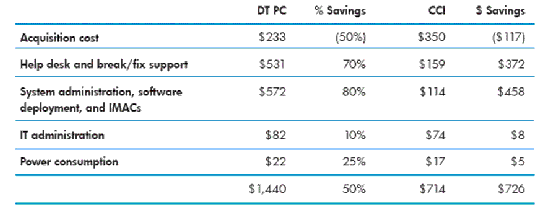
The big problems with this IDC study are:
The profits that are reported here are probably a result of rethinking the system administration and software deployment process instead of being solely the virtue of blade PC technology. In other words, even if the company kept the desktop PCs, considerable savings would have appeared after the smarter system administration and software deployment processes were implemented.
Also note that the power consumption savings are nothing to write home about, even though this was recorded at a time when power hogging Pentium 4 reigned over the business desktop. So now that we have some insight into hard numbers, we can analyze things further.
There is no question that both HP and IBM offer much more than hardware, and they focus on well-rounded solutions. Service and support, network and storage infrastructure, software deployment, and very low maintenance management: it's all there. That can save a lot of money. However, the most important question is: when does it make sense?
From a Total Cost of Acquisition (TCA) point of view, blade PCs and workstations blades are quite a bit more expensive than traditional desktops. We will ignore the cost of the central storage server, the software, and (most likely) the database server as these are necessary in both models. With traditional PCs you can also set a "roaming profile" that allows your PCs to be stateless as well, which helps to make sure that all (most?) data is saved to a central storage server. Let's first look at the blade PCs:
- 20 blade PCs costs slightly less than $20000 (if you choose the HP bc2000 blade PC)
- One chassis (with switch) costs about $7000
- A thin client t5720 costs about $500-$600
Next let's look at workstation blades. As IBM has the most interesting workstation blade for CAD engineers, we'll look at it.
- An IBM HC10 with Core 2 Duo E6700 (2.66GHz 4MB L2), 2GB RAM, and NVIDIA FX1600M is a decent workstation and costs about $3000
- Workstation blades are bigger, so both IBM and HP require a full blown blade chassis. The chassis and switch cost about $7000 and provide housing for 14 blades
- A thin clients costs about $500-$600
TCO must save the CCI day of course. Both HP and IBM/Lenovo refer to the IDC TCO "The Tangible Benefits of Blade Clients" study. It describes the cost of each solution per year, over a period of 4 years.
The big problems with this IDC study are:
- It is sponsored by a vendor of blade PCs (Clearcube)
- It is based on the feedback of customers that have already implemented blade PCs
The profits that are reported here are probably a result of rethinking the system administration and software deployment process instead of being solely the virtue of blade PC technology. In other words, even if the company kept the desktop PCs, considerable savings would have appeared after the smarter system administration and software deployment processes were implemented.
Also note that the power consumption savings are nothing to write home about, even though this was recorded at a time when power hogging Pentium 4 reigned over the business desktop. So now that we have some insight into hard numbers, we can analyze things further.
Originally published at https://www.anandtech.com/show/2279 (Wayback Machine).