
Killing the Business Desktop PC Softly
- Posted in
- IT Computing
Workstation Blades
The IT experts among our readers are probably protesting: CCI was launched in 2005 and blade PCs have been on the market since 2004-2005. So what's new? Besides the fact that the technology has matured and been upgraded, the technology is now able to meet the needs of more demanding applications like those used by CAD users, data miners, financial traders, and even 3D artists. So basically, the blade PCs are also now offering higher graphics and CPU performance. The "magic" to make this work is to replace the normal "remote protocols" such as ICA (Citrix) or RDP (Microsoft) by a proprietary lossless compression and encryption protocol. IBM has not yet given it a name to our knowledge; HP calls it Remote Graphics Software or RGS.
The blade workstation performs all 2D and 3D calculations and compresses and encrypts each frame before it's sent to the thin client. This kind of network transmission of 3D and 2D graphics at high "refresh" rates requires between 2 and 4 Mbit/s of bandwidth on average. The goal is to make it feel like the manipulation of 3D CAD is actually being done on the thin client. For this you need at least 50-60 frames per second and a response time of less than 20ms. With an excellent broadband internet connection, a leased line, or a LAN connection, it should be possible to get good performance even if your thin client is 2000 miles away from the blade PC or workstation blade. As long as your network connection doesn't add more than 10-15 ms to your frame time, it feels like you are working on a normal workstation. RGS works on both Red Hat Linux and Windows XP. You can also license RGS for blade PCs: HP's blade PCs contain a mobile version of AMD's 690G chipset.
Both the IBM and HP blades are based on the Intel 5000p chipset platform. The fastest supported CPU is a dual core Xeon 5150 at 2.66 GHz. The HP blade supports 16GB, the IBM blade 8GB. However, the IBM has the faster graphics card: it can support up to the modern Quadro FX1600 (256-bit interface), while the HP is limited to the relatively low-end older FX540M 128MB (128-bit memory interface). Notice that both IBM and HP are using lower clocked mobile versions, a result of using the cramped blade chassis. Both IBM and HP make quite a bit of noise claiming that their workstation blades require quite a bit less power than a typical workstation, around 150-200W versus >300W for a typical PC workstation. Although the workstation blades are slightly more efficient thanks to the fact that several blades use one or two big PSUs, the biggest gains are the result of using mobile but slower performing video chips.
The IT experts among our readers are probably protesting: CCI was launched in 2005 and blade PCs have been on the market since 2004-2005. So what's new? Besides the fact that the technology has matured and been upgraded, the technology is now able to meet the needs of more demanding applications like those used by CAD users, data miners, financial traders, and even 3D artists. So basically, the blade PCs are also now offering higher graphics and CPU performance. The "magic" to make this work is to replace the normal "remote protocols" such as ICA (Citrix) or RDP (Microsoft) by a proprietary lossless compression and encryption protocol. IBM has not yet given it a name to our knowledge; HP calls it Remote Graphics Software or RGS.
The blade workstation performs all 2D and 3D calculations and compresses and encrypts each frame before it's sent to the thin client. This kind of network transmission of 3D and 2D graphics at high "refresh" rates requires between 2 and 4 Mbit/s of bandwidth on average. The goal is to make it feel like the manipulation of 3D CAD is actually being done on the thin client. For this you need at least 50-60 frames per second and a response time of less than 20ms. With an excellent broadband internet connection, a leased line, or a LAN connection, it should be possible to get good performance even if your thin client is 2000 miles away from the blade PC or workstation blade. As long as your network connection doesn't add more than 10-15 ms to your frame time, it feels like you are working on a normal workstation. RGS works on both Red Hat Linux and Windows XP. You can also license RGS for blade PCs: HP's blade PCs contain a mobile version of AMD's 690G chipset.
 |
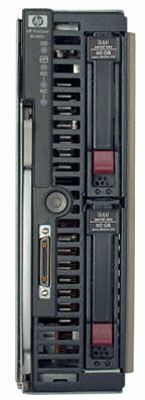 |
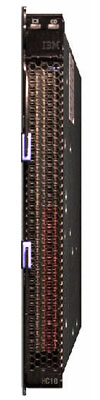
| IBM's HC10 and HP's XW460c | |
Both the IBM and HP blades are based on the Intel 5000p chipset platform. The fastest supported CPU is a dual core Xeon 5150 at 2.66 GHz. The HP blade supports 16GB, the IBM blade 8GB. However, the IBM has the faster graphics card: it can support up to the modern Quadro FX1600 (256-bit interface), while the HP is limited to the relatively low-end older FX540M 128MB (128-bit memory interface). Notice that both IBM and HP are using lower clocked mobile versions, a result of using the cramped blade chassis. Both IBM and HP make quite a bit of noise claiming that their workstation blades require quite a bit less power than a typical workstation, around 150-200W versus >300W for a typical PC workstation. Although the workstation blades are slightly more efficient thanks to the fact that several blades use one or two big PSUs, the biggest gains are the result of using mobile but slower performing video chips.
Originally published at https://www.anandtech.com/show/2279 (Wayback Machine).