
Getting the Most Out Of Your Hardware: Video Card Utility Roundup
- Posted in
- GPUs
nHancer
nHancer is another specialized application which only handles profiles. As we mentioned previously with the NVIDIA profile system, profiles go beyond controlling 3D settings by also being tied to SLI, but NVIDIA's utility set does a poor job configuring all of this. nHancer in turn can access the profile system and make the additional modifications to it that can't otherwise be done.
Since NVIDIA offers pretty good control over 3D settings, the main use for nHancer is for those problematic SLI features when configuring a game for which there's no profile. The SLI rendering mode can be set (split or alternating) along with using any additional SLI compatibility flags that may be in NVIDIA's drivers for handling all the unusual cases that can break SLI. A load balancing graph is also provided for helping to determine if SLI is working or not.
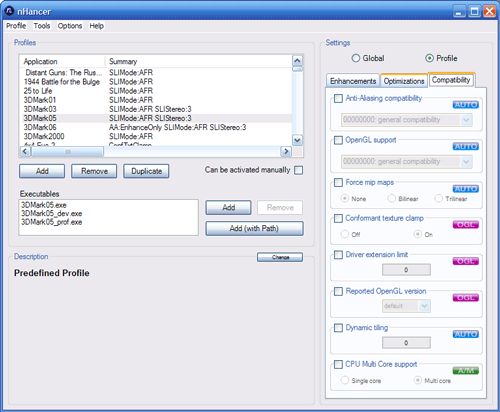
nHancer can also be used as an alternative to the NVIDIA utility set for general profile modification, because as we previously noted that the NVIDIA utility set has some UI issues. This allows for easier profile modification and addition, and access to a few extra minor features such as antialiasing compatibility that may be needed in rare cases. For non-SLI users, nHancer can also delete all the pre-supplied NVIDIA profiles that only contain SLI settings, so that those unused profiles don't clutter up the list.
Overall, SLI users will likely find this a must-have critical utility, while non-SLI users who make serious use of profiles will also find a lot of use in it.
Originally published at https://www.anandtech.com/show/2257 (Wayback Machine).