
Hitachi Deskstar 7K1000: Two Terabyte RAID Redux
- Posted in
- Storage
Final Thoughts
Equipped with a new test bed that should remove the vast majority of CPU and GPU bound situations we noticed further improvements in our quasi-synthetic PCMark05 tests. We measured an improvement of 43% in the final PCMark05 score with RAID 0 compared to a 25% improvement in our previous test bed. While we expected the File Write and Anti-Virus tests to improve significantly, we were slightly surprised with the General Usage scores that were up to 28% better. However, the Application loading score was still in the 5% range with the Raptors but the Hitachi 7K1000 showed almost zero differences. The most surprising result was the fact that the Deskstar 7K1000 scored 3%~5% better than the Raptors on the Intel platform.
In our last article the only meaningful application performance improvement with RAID 0 came in the Nero Recode tests where the improved write performance reduced our encoding process by about 5%. Now that we have basically removed the CPU from being a factor in these tests, we see a 30% difference with RAID 0 during encoding, a 21% difference in file extraction, and a 45% difference when doing file copy or move operations on the RAID volume.
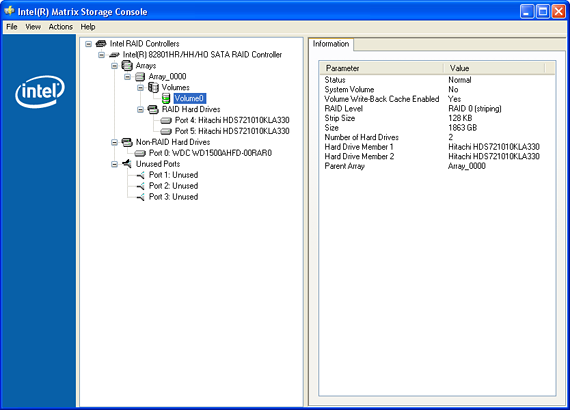
All of those results sound very impressive but in the balance of our application and game tests we only noticed a 2%~3% performance difference between RAID 0 and single drive configurations. Unless you extract files, copy or move them on the same drive, and encode all day long then the benefits of RAID 0 on the typical consumer desktop is not worth the price of admission. What is the price? In this case, $399 for a second 7K1000, a halving of the mean time between failure rates on each drive, a data backup nightmare, and increases in noise, thermals, and power consumption.
We really wanted to provide additional benchmarks for this article as we had developed and tested benchmarks for Photoshop CS3, AutoCAD 2008, Oblivion, S.T.A.L.K.E.R., and multi-tasking scenarios with BiTorrent clients but there was an issue during testing. We had a Western Digital WD1500 meet its maker during testing. The drive literally smoked its platters. Of course we lost the entire test image and a significant amount of test time. However, those are the perils of pushing hardware on a continuous basis. The fact that it happened during RAID 0 testing made it difficult to accept but it just as easily could have happened in single drive testing resulting in the same loss of data. A data loss that would not have occurred if we had been using RAID 1, 5, or 10.
RAID 0 can provide some impressive performance results in synthetic benchmarks and certain applications that are write speed starved as we have shown. In fact, with the new test bed the test results where RAID 0 shines are even more impressive now. However, we still do not think RAID 0 is worth the trouble or cost for the average desktop user or gamer, especially with the software RAID capabilities included on most motherboards. If you must run RAID on the desktop, then we highly recommend the use of RAID 1, 5, or 10 (0+1) in order to protect your data and probably a hardware controller if you can afford one. We are going to delve into the world of RAID in the coming weeks with additional tests, system configurations, and hardware controllers. At this time we still do not recommend RAID 0 for most desktop users due to the lack of widespread performance improvements and potential data integrity concerns with it.
Equipped with a new test bed that should remove the vast majority of CPU and GPU bound situations we noticed further improvements in our quasi-synthetic PCMark05 tests. We measured an improvement of 43% in the final PCMark05 score with RAID 0 compared to a 25% improvement in our previous test bed. While we expected the File Write and Anti-Virus tests to improve significantly, we were slightly surprised with the General Usage scores that were up to 28% better. However, the Application loading score was still in the 5% range with the Raptors but the Hitachi 7K1000 showed almost zero differences. The most surprising result was the fact that the Deskstar 7K1000 scored 3%~5% better than the Raptors on the Intel platform.
In our last article the only meaningful application performance improvement with RAID 0 came in the Nero Recode tests where the improved write performance reduced our encoding process by about 5%. Now that we have basically removed the CPU from being a factor in these tests, we see a 30% difference with RAID 0 during encoding, a 21% difference in file extraction, and a 45% difference when doing file copy or move operations on the RAID volume.
All of those results sound very impressive but in the balance of our application and game tests we only noticed a 2%~3% performance difference between RAID 0 and single drive configurations. Unless you extract files, copy or move them on the same drive, and encode all day long then the benefits of RAID 0 on the typical consumer desktop is not worth the price of admission. What is the price? In this case, $399 for a second 7K1000, a halving of the mean time between failure rates on each drive, a data backup nightmare, and increases in noise, thermals, and power consumption.
We really wanted to provide additional benchmarks for this article as we had developed and tested benchmarks for Photoshop CS3, AutoCAD 2008, Oblivion, S.T.A.L.K.E.R., and multi-tasking scenarios with BiTorrent clients but there was an issue during testing. We had a Western Digital WD1500 meet its maker during testing. The drive literally smoked its platters. Of course we lost the entire test image and a significant amount of test time. However, those are the perils of pushing hardware on a continuous basis. The fact that it happened during RAID 0 testing made it difficult to accept but it just as easily could have happened in single drive testing resulting in the same loss of data. A data loss that would not have occurred if we had been using RAID 1, 5, or 10.
RAID 0 can provide some impressive performance results in synthetic benchmarks and certain applications that are write speed starved as we have shown. In fact, with the new test bed the test results where RAID 0 shines are even more impressive now. However, we still do not think RAID 0 is worth the trouble or cost for the average desktop user or gamer, especially with the software RAID capabilities included on most motherboards. If you must run RAID on the desktop, then we highly recommend the use of RAID 1, 5, or 10 (0+1) in order to protect your data and probably a hardware controller if you can afford one. We are going to delve into the world of RAID in the coming weeks with additional tests, system configurations, and hardware controllers. At this time we still do not recommend RAID 0 for most desktop users due to the lack of widespread performance improvements and potential data integrity concerns with it.
Originally published at https://www.anandtech.com/show/2217 (Wayback Machine).