
Hitachi Deskstar 7K1000: Two Terabyte RAID Redux
- Posted in
- Storage
Nero Recode
Our encoding test is quite easy - we take our original Office Space DVD and use AnyDVD Ripper to copy the full DVD to the hard drive without compression, thus providing an almost exact duplicate of the DVD. We then fire up Nero Recode 2, select our Office Space copy on the hard drive, and perform a shrink operation to allow the entire movie along with extras to fit on a single 4.5GB DVD disc. We leave all options on their defaults except we turn off the advanced analysis option. The scores reported include the full encoding process and are represented in seconds, with lower numbers indicating better performance.
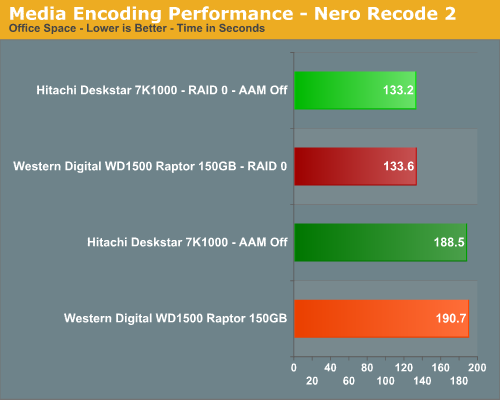
The IPEAK results in our last article showed a 93% improvement with RAID 0 and a 5% difference during application testing. Armed with an encoding friendly CPU we now see a 30% improvement during encoding with the Hitachi drive outperforming the Raptor in this demanding test. The differences in performance between the two setups are significant and one that might cause us to consider RAID 0 on the desktop if this was our only activity during the course of the day. Is it worth the cost for a typical home/office user? No, but for someone who encodes all day long then the time saved is probably worth the cost over the long run. However, we would then have to recommend a RAID 10 setup which could get very expensive with these drives.
Audio Encoding Performance
While the media encoding prowess of RAID 0 was superb in our media encoding testing, we wanted to see how it faired on the audio side. Our audio test suite consists of Exact Audio Copy v095.b4 and LAME 3.98a3. We utilize the INXS Greatest Hits CD that contains 16 tracks totaling 606MB of one time '80s hits. We set up EAC for variable bit rate encoding, burst mode for extraction, use external program for compression, and to start the external compressor upon extraction (EAC will read the next track while LAME is working on the previous track, thus removing a potential bottleneck with the optical drive). We also set the number of active threads to two to ensure both cores are active during testing. The results are presented in seconds for the encoding process, with lower numbers being better.
Our Plextor drive consistently took two minutes and nine seconds to read all sixteen tracks. This means our test systems are only utilizing one core during testing until the midway point of the extraction process where the drive speed begins exceeding the capability of the encoder and requires the use of a second thread.
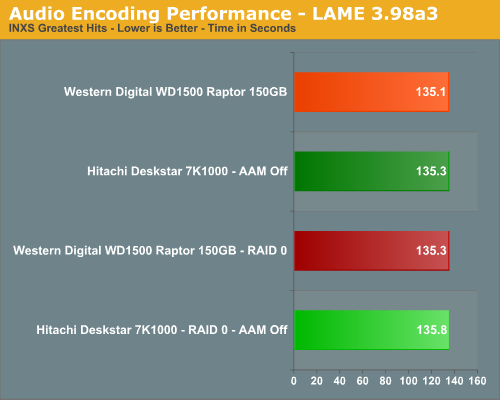
Our IPEAK results in off line testing showed a 39% improvement with RAID 0 and we wondered how our drives would fair considering this test is largely CPU dependent although a fast storage system was helpful in our previous test bed. In this test, there is no difference between the setups and a fast optical drive along with a decent CPU is more important than a top tier hard drive.
WinRAR 3.62
Our WinRAR tests measures the time it takes to compress our test folder that contains 444 files, 10 folders, and 602MB of data and then extract it on the same drive. This is same test folder utilized in our IPEAK test suite. While the benchmark is CPU intensive for the compression tests it still requires a fast storage system to keep pace with the CPU. A drive that offers excellent write performance can make a slight difference in this benchmark.
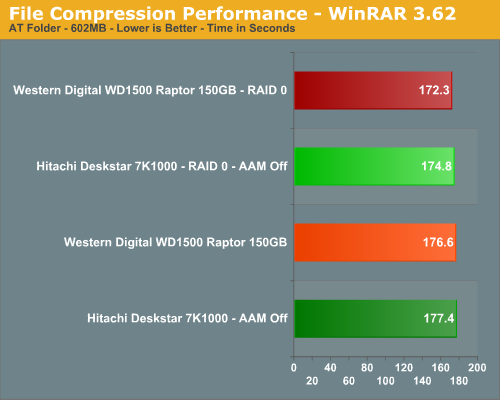
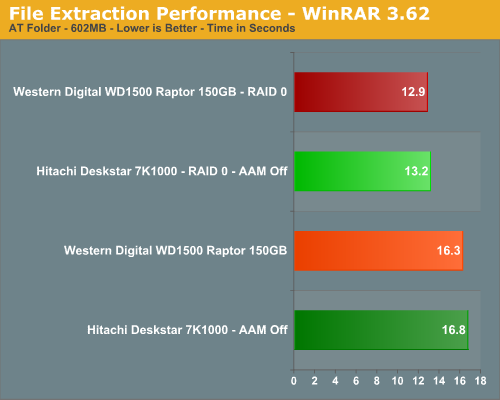
Our IPEAK test showed a 50% advantage for the RAID 0 setups but we only see a 2% difference in the compression test results. Our IPEAK tests showed a 54% difference in the extraction speed with an impressive 21% difference in the actual test. However, one must ask if the costs is worth the few seconds saved when extracting a file.
File Copy Performance
Our first file copy test measures the time it takes to transfer our test folder that contains 29 files, 1 folder, and has 7.55GB of data from our source drive to the target test drive. This benchmark is disk write intensive and requires a fast storage system. The second test does copies the same folder on the test drive to another folder on the same drive.
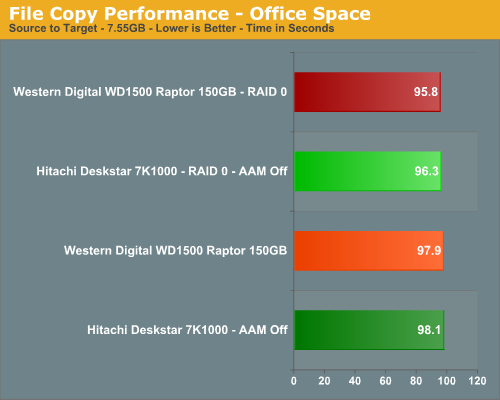
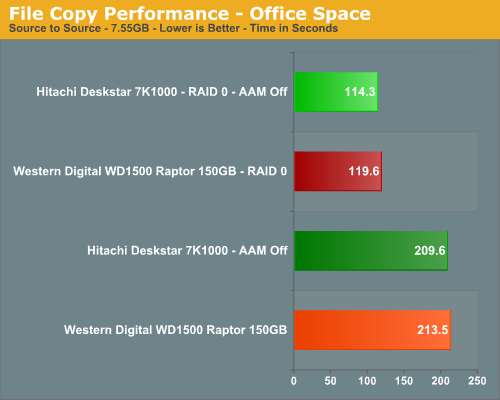
We finish our tests with benchmarks that should favor the RAID 0 setups in a pure write scenario. Unlike our IPEAK test and for that matter a similar test in PCMark05 where the largest differences in scores were generated, we see RAID 0 only making a 2% difference in the first test but a 45% difference in the second test. If you do a lot a copying or moving of information on a single drive then RAID 0 will help.
Our encoding test is quite easy - we take our original Office Space DVD and use AnyDVD Ripper to copy the full DVD to the hard drive without compression, thus providing an almost exact duplicate of the DVD. We then fire up Nero Recode 2, select our Office Space copy on the hard drive, and perform a shrink operation to allow the entire movie along with extras to fit on a single 4.5GB DVD disc. We leave all options on their defaults except we turn off the advanced analysis option. The scores reported include the full encoding process and are represented in seconds, with lower numbers indicating better performance.
The IPEAK results in our last article showed a 93% improvement with RAID 0 and a 5% difference during application testing. Armed with an encoding friendly CPU we now see a 30% improvement during encoding with the Hitachi drive outperforming the Raptor in this demanding test. The differences in performance between the two setups are significant and one that might cause us to consider RAID 0 on the desktop if this was our only activity during the course of the day. Is it worth the cost for a typical home/office user? No, but for someone who encodes all day long then the time saved is probably worth the cost over the long run. However, we would then have to recommend a RAID 10 setup which could get very expensive with these drives.
Audio Encoding Performance
While the media encoding prowess of RAID 0 was superb in our media encoding testing, we wanted to see how it faired on the audio side. Our audio test suite consists of Exact Audio Copy v095.b4 and LAME 3.98a3. We utilize the INXS Greatest Hits CD that contains 16 tracks totaling 606MB of one time '80s hits. We set up EAC for variable bit rate encoding, burst mode for extraction, use external program for compression, and to start the external compressor upon extraction (EAC will read the next track while LAME is working on the previous track, thus removing a potential bottleneck with the optical drive). We also set the number of active threads to two to ensure both cores are active during testing. The results are presented in seconds for the encoding process, with lower numbers being better.
Our Plextor drive consistently took two minutes and nine seconds to read all sixteen tracks. This means our test systems are only utilizing one core during testing until the midway point of the extraction process where the drive speed begins exceeding the capability of the encoder and requires the use of a second thread.
Our IPEAK results in off line testing showed a 39% improvement with RAID 0 and we wondered how our drives would fair considering this test is largely CPU dependent although a fast storage system was helpful in our previous test bed. In this test, there is no difference between the setups and a fast optical drive along with a decent CPU is more important than a top tier hard drive.
WinRAR 3.62
Our WinRAR tests measures the time it takes to compress our test folder that contains 444 files, 10 folders, and 602MB of data and then extract it on the same drive. This is same test folder utilized in our IPEAK test suite. While the benchmark is CPU intensive for the compression tests it still requires a fast storage system to keep pace with the CPU. A drive that offers excellent write performance can make a slight difference in this benchmark.
Our IPEAK test showed a 50% advantage for the RAID 0 setups but we only see a 2% difference in the compression test results. Our IPEAK tests showed a 54% difference in the extraction speed with an impressive 21% difference in the actual test. However, one must ask if the costs is worth the few seconds saved when extracting a file.
File Copy Performance
Our first file copy test measures the time it takes to transfer our test folder that contains 29 files, 1 folder, and has 7.55GB of data from our source drive to the target test drive. This benchmark is disk write intensive and requires a fast storage system. The second test does copies the same folder on the test drive to another folder on the same drive.
We finish our tests with benchmarks that should favor the RAID 0 setups in a pure write scenario. Unlike our IPEAK test and for that matter a similar test in PCMark05 where the largest differences in scores were generated, we see RAID 0 only making a 2% difference in the first test but a 45% difference in the second test. If you do a lot a copying or moving of information on a single drive then RAID 0 will help.
Originally published at https://www.anandtech.com/show/2217 (Wayback Machine).