
Hitachi Deskstar 7K1000 in RAID 0: Is Two Terabytes really better than One?
- Posted in
- Storage
Hard Disk Performance: PCMark05
We are utilizing the HDD test suite within PCMark05 for further comparative hard disk scores as it provides a mixture of actual application results and specific read/write percentages utilized within these programs. It is also a readily available benchmark that others can use for comparative purposes. The program utilizes the RankDisk application within the Intel iPeak SPT suite of tools to record a trace of disk activity during usage of real world applications. These traces are then replayed to generate performance measurements based upon the actual disk operations within each application. The HDD test suite contains 53% read and 47% write operations with each trace section utilizing varied amounts of read or write operations. Additional information about the test suite can be found in PDF format here PCMark05 whitepaper.
The PCMark05 test results are based upon the following trace runs:
Windows XP Startup: This test consists of 90% reading and 10% writes that tracks XP activities at start-up.
Application Loading: This test consists of 83% reading and 17% writes that tracks the opening and closing of the following programs.
File Write: This test consists of 100% write activities by writing 680MB of files onto the hard disk.
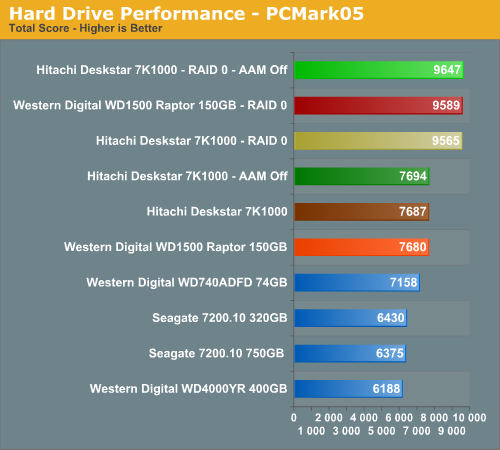
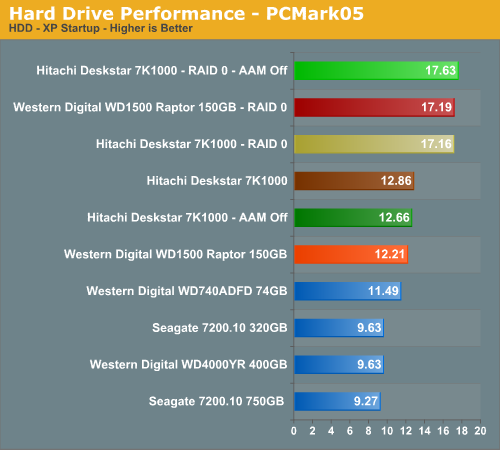
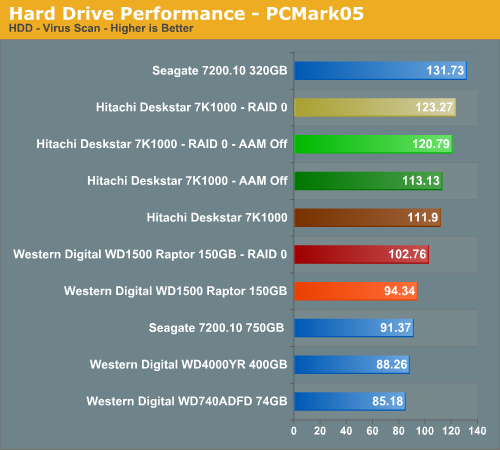
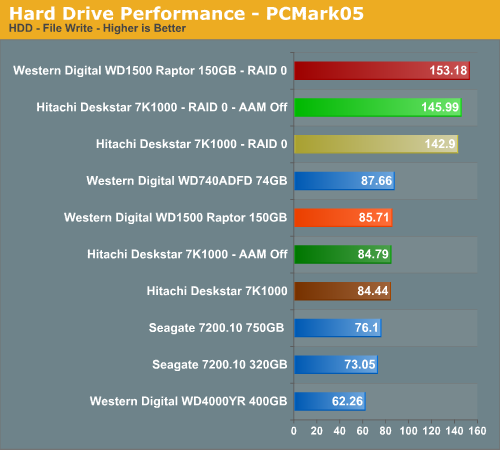
Our PCMark05 RAID 0 results show a 25% improvement over the single Hitachi drive results. The 7K1000 combination still scores better than the WD 150GB Raptor setup in this benchmark provided AAM is turned off, although the differences are minor. The major performance delta between the 7K1000 single and RAID 0 configuration is in the Windows Startup and File Write tests. As a side test that we are still developing, we tracked our actual XP startup times with each configuration. The RAID 0 setups only improved startup times by a few tenths of a second in most cases.
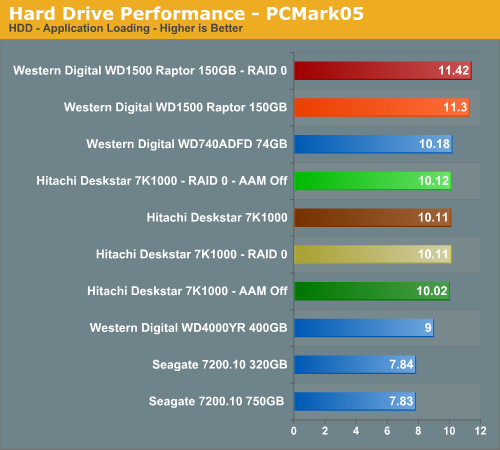
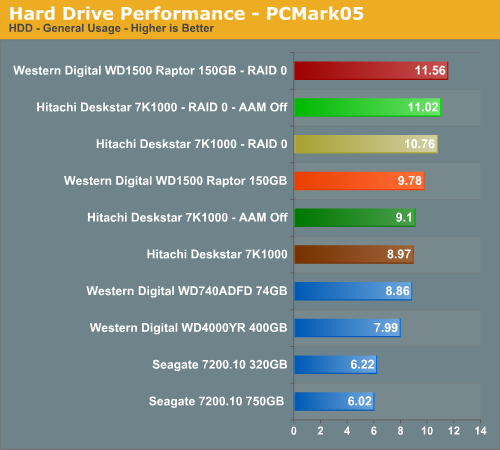
We fully expected the File Write tests to show major improvements as this is an area where RAID 0 will show an advantage. We see minor differences occurring in the General Usage and Application Loading sections of the test where write and read operations are balanced to a certain degree.
The Raptor's superior rotational/access speeds allow it to basically score slightly better than the 7K1000 except in the Virus Scan test where the 7K1000 has exceptional scores, even though it still lags behind the Seagate drive. Overall, if you need to improve your PCMark05 benchmark scores then RAID 0 will certainly do that, but as evidenced in the General Usage and Application results which mimic actual applications there is minimal impact.
We are utilizing the HDD test suite within PCMark05 for further comparative hard disk scores as it provides a mixture of actual application results and specific read/write percentages utilized within these programs. It is also a readily available benchmark that others can use for comparative purposes. The program utilizes the RankDisk application within the Intel iPeak SPT suite of tools to record a trace of disk activity during usage of real world applications. These traces are then replayed to generate performance measurements based upon the actual disk operations within each application. The HDD test suite contains 53% read and 47% write operations with each trace section utilizing varied amounts of read or write operations. Additional information about the test suite can be found in PDF format here PCMark05 whitepaper.
The PCMark05 test results are based upon the following trace runs:
Windows XP Startup: This test consists of 90% reading and 10% writes that tracks XP activities at start-up.
Application Loading: This test consists of 83% reading and 17% writes that tracks the opening and closing of the following programs.
- Microsoft Word
- Adobe Acrobat Reader
- Windows Media Player
- 3Dmark 2001SE
- Leadtek WinFast DVD
- Mozilla Internet Browser
- Opening a Microsoft Word document, performing grammar check, saving and closing
- Compression and decompression using WinZip
- Encrypting and decrypting a file using PowerCrypt
- Scanning files for viruses using F-Secure Antivirus
- Playing an MP3 file with Winamp
- Playing a WAV file with Winamp
- Playing a DivX video using the DivX codec and Windows Media Player
- Playing a WMV video file using Windows Media Player
- Viewing pictures using Windows Picture Viewer
- Browsing the Internet using Microsoft Internet Explorer
- Loading, playing and exiting a game with Tom Clancy's Ghost Recon
File Write: This test consists of 100% write activities by writing 680MB of files onto the hard disk.
Our PCMark05 RAID 0 results show a 25% improvement over the single Hitachi drive results. The 7K1000 combination still scores better than the WD 150GB Raptor setup in this benchmark provided AAM is turned off, although the differences are minor. The major performance delta between the 7K1000 single and RAID 0 configuration is in the Windows Startup and File Write tests. As a side test that we are still developing, we tracked our actual XP startup times with each configuration. The RAID 0 setups only improved startup times by a few tenths of a second in most cases.
We fully expected the File Write tests to show major improvements as this is an area where RAID 0 will show an advantage. We see minor differences occurring in the General Usage and Application Loading sections of the test where write and read operations are balanced to a certain degree.
The Raptor's superior rotational/access speeds allow it to basically score slightly better than the 7K1000 except in the Virus Scan test where the 7K1000 has exceptional scores, even though it still lags behind the Seagate drive. Overall, if you need to improve your PCMark05 benchmark scores then RAID 0 will certainly do that, but as evidenced in the General Usage and Application results which mimic actual applications there is minimal impact.
Originally published at https://www.anandtech.com/show/2212 (Wayback Machine).