
EVGA nForce 650i Ultra: Performance on a Budget
- Posted in
- Motherboards
EVGA 650i Ultra Board Layout and Features
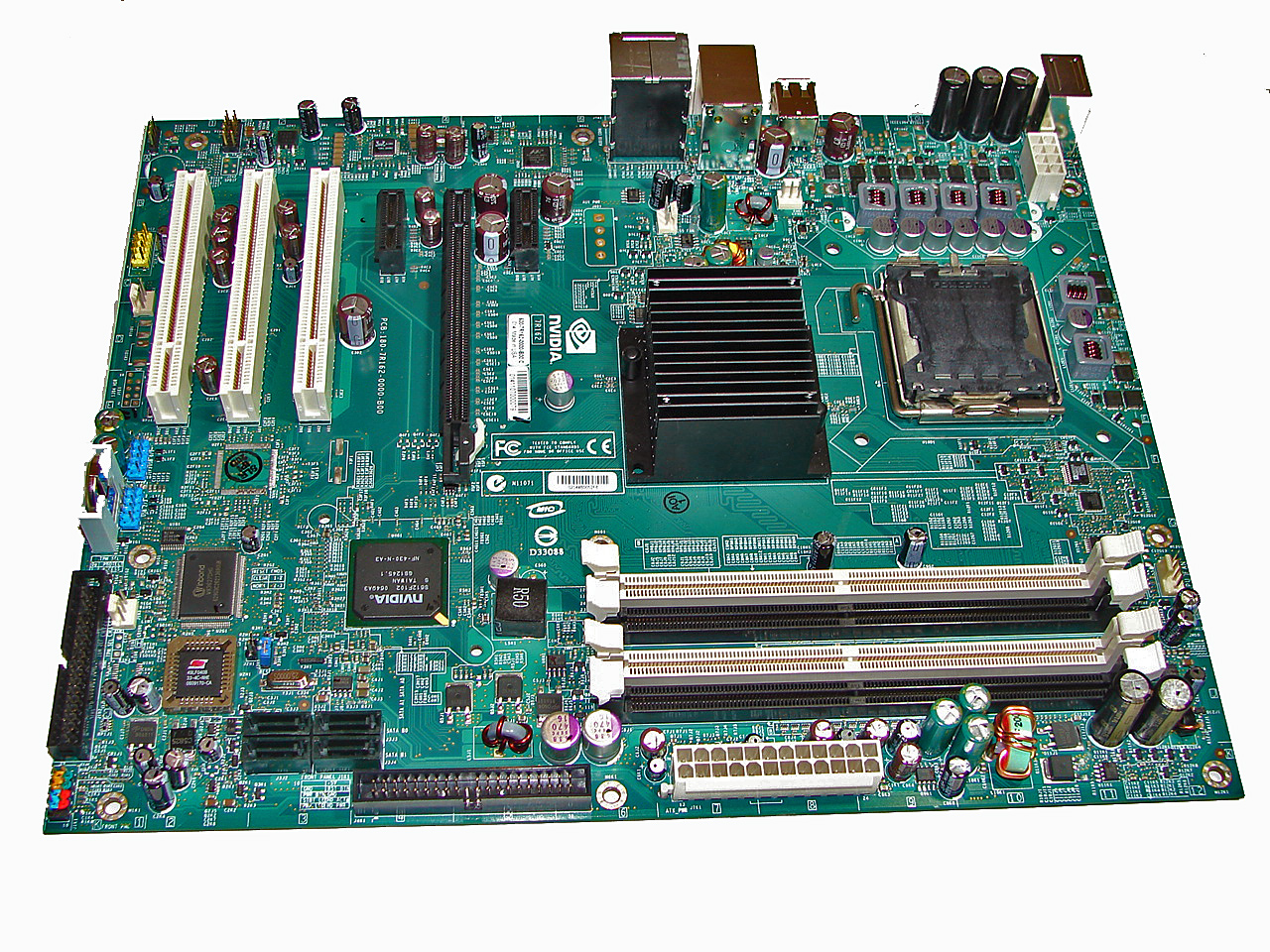
EVGA did a nice job in the layout of this board as all features on the board except for the floppy drive connector were easily reached. This board features a four-layer design along with six-phase power regulation. NVIDIA specified a mix of solid polymer aluminum and high quality electrolyte capacitors that provided excellent stability during testing at stock speeds. During our overclocking tests we found the passive heat sink on the 650i SPP worked well but additional airflow was required to ensure stability. The board installed easily into our Cooler Master CM Stacker 830 case and cable management was very good for power, optical, and hard drives.
There are five fan headers (one 4-pin, four 3-pin) located in easy to reach positions on the board. All of the headers are monitored within nTune but only the CPU fan and one chassis fan header of the user's choice offer automatic fan control capabilities within the BIOS. The automatic control system includes a choice of using temperature ranges or duty cycle speeds to control the CPU fan header, and duty cycle only for the chassis fan.
We initially thought the fan header just north of the CPU socket was defective but it turns out this header will not spin up the fan until the CPU reaches 60C. Also, due to temperature control concerns with the passively cooled SPP, the BIOS will automatically run the CPU fan header at 100% duty cycle to ensure enough airflow when overclocking the board past a 1333FSB setting.
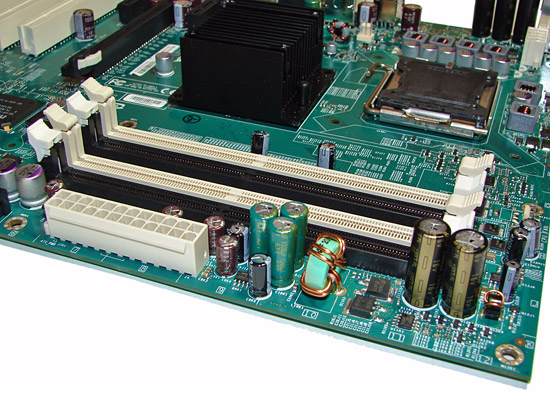
The memory slots are color coded correctly for dual channel operation. The 24-pin ATX power connector is conveniently located on the edge of the board. The CPU fan header is located next to the first memory slot on the right edge of the board and was easily reached by a variety of heatsink/fan cables.
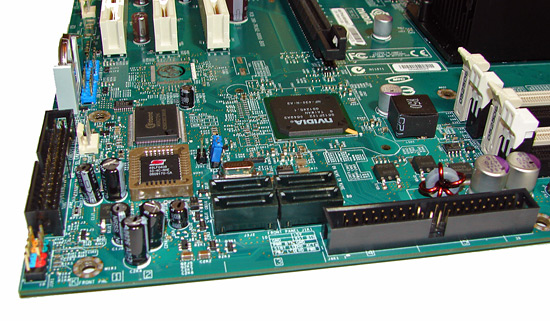
The four black SATA ports are located near the edge of the board. We found the positioning of the SATA ports to be very good when utilizing the PCI-E x16 or PCI slots. The black IDE connector is located on the bottom edge of the board and will be a right angle design on the production level boards. The reason for this is that the connector was not usable with an 8800GTX card installed in it. The black floppy drive connector is located on the left edge of the board along with the chassis connector panel.
The MCP is not actively or passively cooled and remained hot to the touch throughout testing; although additional cooling was not needed it is recommended. We feel like the inclusion of an additional low profile heatsink would have been in EVGA's best interest with temperatures soaring to 83C without airflow and 76C with airflow while overclocking. At stock voltages we witnessed temperatures reaching 71C without airflow while under load and hovering around 64C with airflow. Our idle temperature at stock voltage was 59C without airflow and 53C with airflow. Fortunately, the board has the mounting holes for a heatsink if the user wishes to add one.
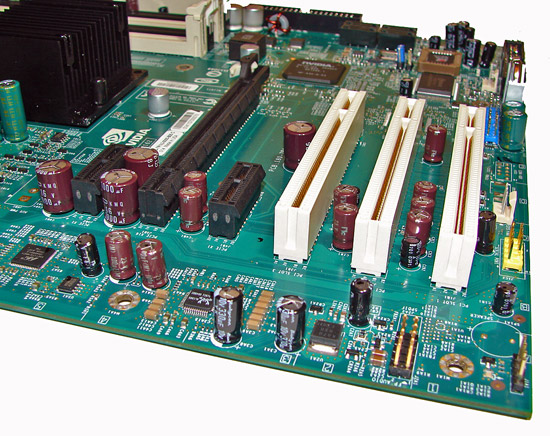
The board comes with one PCI Express x16 connector (x16 electrical), two PCI Express x1, and three PCI 2.2 connectors. This is a very good single x16 connector design. The second PCI Express x1 slot will be physically unavailable if you utilize a double slot card design in the x16 slot.
Returning to the CPU socket area, we find an excellent amount of room for alternative cooling solutions. We utilized the stock heatsink/fan in our normal testing but also verified a few larger Socket-775 air cooling solutions such as the Tuniq 120 would fit easily in this area during our overclocking tests. The 650i SPP chipset is passively cooled with a mid-rise heatsink unit that did not interfere with any installed peripherals but did run extremely hot without additional airflow over it during overclocking.
We noticed temperatures hitting 103C during overclocking without airflow across the heatsink. Obviously this is a worst case example as we momentarily turned off our heatsink fan but it does show that proper cooling around the SPP area is required. Temperatures with the stock Intel heatsink/fan combination were near 46C during overclocking and dropped to 39C once we turned on our case fans. We recorded temperatures of 54C with the Tuniq 120 during overclocking with a drop to 43C once the case fans were turned on. The 8-pin ATX power connector is ideally situated in an area that will not hinder airflow.
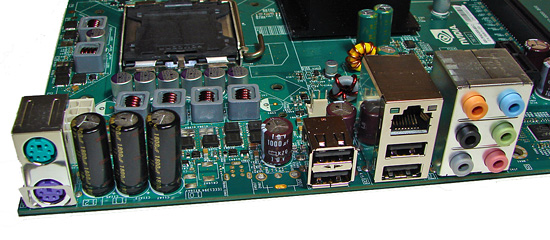
The rear panel contains the standard PS/2 mouse and keyboard ports, one LAN port, and four USB 2.0 ports. The LAN (RJ-45) port has two LED indicators representing Activity and Speed of the connection through the Marvell Gigabit PCI-E PHY controller. The panel also has a six connector panel for the audio system.
The audio subsystem is based on the Realtek ALC885 and offers 8-channel output. While this audio solution will not offer better performance over the Creative X-Fi series, it will suffice for the majority of users needing decent audio output across a variety of requirements that include gaming, music, and DVD playback. The one significant drawback continues to be EAX 2.0 audio quality that is significantly worse than the Creative or ADI solutions.
 |
| Click to enlarge |
EVGA did a nice job in the layout of this board as all features on the board except for the floppy drive connector were easily reached. This board features a four-layer design along with six-phase power regulation. NVIDIA specified a mix of solid polymer aluminum and high quality electrolyte capacitors that provided excellent stability during testing at stock speeds. During our overclocking tests we found the passive heat sink on the 650i SPP worked well but additional airflow was required to ensure stability. The board installed easily into our Cooler Master CM Stacker 830 case and cable management was very good for power, optical, and hard drives.
There are five fan headers (one 4-pin, four 3-pin) located in easy to reach positions on the board. All of the headers are monitored within nTune but only the CPU fan and one chassis fan header of the user's choice offer automatic fan control capabilities within the BIOS. The automatic control system includes a choice of using temperature ranges or duty cycle speeds to control the CPU fan header, and duty cycle only for the chassis fan.
We initially thought the fan header just north of the CPU socket was defective but it turns out this header will not spin up the fan until the CPU reaches 60C. Also, due to temperature control concerns with the passively cooled SPP, the BIOS will automatically run the CPU fan header at 100% duty cycle to ensure enough airflow when overclocking the board past a 1333FSB setting.
The memory slots are color coded correctly for dual channel operation. The 24-pin ATX power connector is conveniently located on the edge of the board. The CPU fan header is located next to the first memory slot on the right edge of the board and was easily reached by a variety of heatsink/fan cables.
The four black SATA ports are located near the edge of the board. We found the positioning of the SATA ports to be very good when utilizing the PCI-E x16 or PCI slots. The black IDE connector is located on the bottom edge of the board and will be a right angle design on the production level boards. The reason for this is that the connector was not usable with an 8800GTX card installed in it. The black floppy drive connector is located on the left edge of the board along with the chassis connector panel.
The MCP is not actively or passively cooled and remained hot to the touch throughout testing; although additional cooling was not needed it is recommended. We feel like the inclusion of an additional low profile heatsink would have been in EVGA's best interest with temperatures soaring to 83C without airflow and 76C with airflow while overclocking. At stock voltages we witnessed temperatures reaching 71C without airflow while under load and hovering around 64C with airflow. Our idle temperature at stock voltage was 59C without airflow and 53C with airflow. Fortunately, the board has the mounting holes for a heatsink if the user wishes to add one.
The board comes with one PCI Express x16 connector (x16 electrical), two PCI Express x1, and three PCI 2.2 connectors. This is a very good single x16 connector design. The second PCI Express x1 slot will be physically unavailable if you utilize a double slot card design in the x16 slot.
 |
| Click to enlarge |
Returning to the CPU socket area, we find an excellent amount of room for alternative cooling solutions. We utilized the stock heatsink/fan in our normal testing but also verified a few larger Socket-775 air cooling solutions such as the Tuniq 120 would fit easily in this area during our overclocking tests. The 650i SPP chipset is passively cooled with a mid-rise heatsink unit that did not interfere with any installed peripherals but did run extremely hot without additional airflow over it during overclocking.
We noticed temperatures hitting 103C during overclocking without airflow across the heatsink. Obviously this is a worst case example as we momentarily turned off our heatsink fan but it does show that proper cooling around the SPP area is required. Temperatures with the stock Intel heatsink/fan combination were near 46C during overclocking and dropped to 39C once we turned on our case fans. We recorded temperatures of 54C with the Tuniq 120 during overclocking with a drop to 43C once the case fans were turned on. The 8-pin ATX power connector is ideally situated in an area that will not hinder airflow.
The rear panel contains the standard PS/2 mouse and keyboard ports, one LAN port, and four USB 2.0 ports. The LAN (RJ-45) port has two LED indicators representing Activity and Speed of the connection through the Marvell Gigabit PCI-E PHY controller. The panel also has a six connector panel for the audio system.
The audio subsystem is based on the Realtek ALC885 and offers 8-channel output. While this audio solution will not offer better performance over the Creative X-Fi series, it will suffice for the majority of users needing decent audio output across a variety of requirements that include gaming, music, and DVD playback. The one significant drawback continues to be EAX 2.0 audio quality that is significantly worse than the Creative or ADI solutions.
Originally published at https://www.anandtech.com/show/2207 (Wayback Machine).