
Apple TV - Part 2: Apple Enters the Digital Home
- Posted in
- Mac
Movies: Not Pirate Friendly, yet
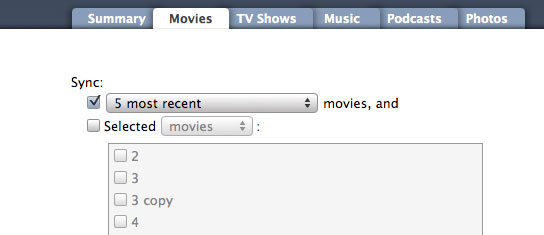
If you download all of your movies and TV shows from the iTunes Store, then Apple TV is perfect for you. You can set Apple TV to sync unwatched movies/TV shows, certain ones or simply the most recent ones. If you purchased them from the iTunes Store, they are already in the required .m4v format (QuickTime's H.264 wrapper) and Apple TV can sync/stream and play them with no additional steps.
The problem is that as popular as the iTunes Store may be, there's a far larger group of users who have content that wasn't procured from it. There are no ifs, ands, or buts about it: Apple TV will not play content that's not in its requisite .m4v format. There is already work being done on solutions to this limitation but they aren't quite automated enough yet for mainstream use in our opinion.
Not only is Apple TV picky about the file format and codec of videos, there are bit rate and resolution limitations. According to Apple, H.264 video is supported only at bit rates up to 5Mbps. For H.264 content, the maximum supported resolution is 1280 x 720 at 24 fps or 960 x 540 at 30 fps. The bit rate limitations explain how Apple is able to get away with playback on a 1GHz Pentium M (even with the help of the GeForce 7300). Keep in mind that H.264 content on Blu-ray and HD-DVD is much higher resolution (1080p) and often has scenes with more than 4 times the bitrate of the maximum that Apple TV can handle.
Apple does provide some support for playing other file formats on Apple TV, through transcoding of course. The latest version of QuickTime Pro will let you export any video you can play in it to the exact format Apple TV needs. There are no settings for quality or resolution, there's just one option: Export to Apple TV. The export option simply transcodes your movie file from whatever format it's in to an Apple TV supported H.264 format. The problem is that even on a fast system, this is a time intensive process.
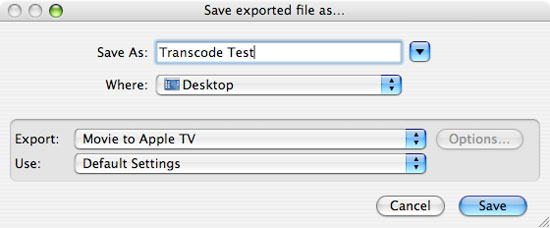
To put it into perspective, we transcoded a 702.1MB Xvid video (640 x 352) to the Apple TV format on a 3.0GHz Mac Pro. The entire process took 55 minutes at a rate of about 0.213MB/s. H.264 encoding performance, especially under QuickTime, isn't particularly fast even with four very fast cores at your disposal. To make matters worse, even if you happen to have the fastest Mac available today, QuickTime doesn't appear to take advantage of more than two cores.
In short, it takes a lot of time to transcode your content into something that's Apple TV friendly. If you decide that you want to watch an episode of House that you didn't buy from the iTunes Store on your TV you'll have to come back in about an hour before you can actually start watching it. We understand why Apple didn't offer support for alternative codecs (e.g. DivX) out of the box, but it doesn't change the fact that it makes the device less attractive to users.
How does Apple TV make watching movies and TV shows? For the most part it's as good of an experience as you'd expect. Once again we have a complaint about the way the interface deals with navigating up the menu tree while you're playing content. If you're playing a video and hit the menu button, perhaps to see what else you have available to watch, video playback stops completely. We'd prefer a Media Center-esque solution where we get a menu overlay on top of the video, or simply a smaller video window while we navigate through the menu. Again it's an argument of simplicity vs. functionality, and we know which side of the fence Apple is on. It may be better this way for the vast majority of the public; we just know how we'd rather have it.

Fast forwarding through video content is done very well: simply tap the forward button on the remote to skip ahead by a fixed interval and the player jumps ahead. There's very little lag before resuming playback and we didn't have any audio sync issues when going back and forth in a video.

The only other complaint we had was that there's no volume control on the Apple TV itself, so you'll unfortunately need to keep another remote around for that purpose.
Originally published at https://www.anandtech.com/show/2196 (Wayback Machine).