
Apple TV - Part 2: Apple Enters the Digital Home
- Posted in
- Mac
Photos
Photo support is, once again, straightforward with Apple TV.
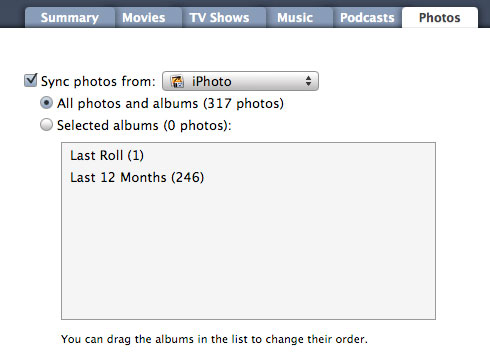
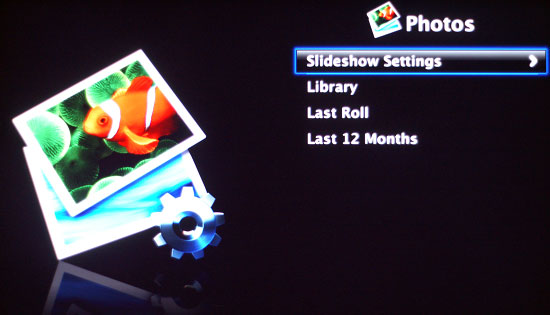
Click on photos and then you can immediately click on slideshow to go through every picture in your album, of course played to music synced to your Apple TV. Unlike all other content, photos cannot be streamed to Apple TV. Mac users can sync their iPhoto albums to Apple TV, while PC users have the option of using Adobe Photoshop Album 2.0 or Adobe Photoshop Elements 3.0, or later.
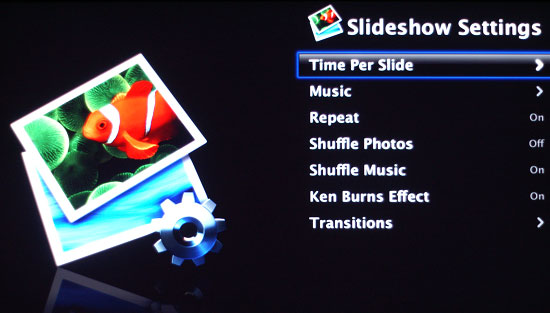
The slide show mode is easily configured: you can adjust options like time between transitions, the type of transitions, what music to play while the slideshow is going on, etc. Also note that the photos you sync to Apple TV will be displayed as a screen saver should you stop interacting with the device.
There is no easy way to browse all of your photos unfortunately; it looks like things were meant for you to set up your slideshows and photo albums beforehand on your Mac/PC and simply stream the mostly prepared setup to your Apple TV, further cementing its role as a very passive device in the digital home.
Final Words
As expected, Apple TV is absolutely brilliant if all of your content (music, movies, TV shows) is purchased from the iTunes Store. Apple TV is the perfect extension of iTunes to your television set, and as the most popular online digital music store it's not far fetched to assume that there is a market for such a device. While the iPod expanded Apple's customer base, the Apple TV seems to be a device that Apple built for its current users - and some of its most dedicated ones at that.
For those of us who aren't heavily invested in the iTunes Store, Apple TV still has quite a bit of merit. The interface is very fast, clean, and to the point. The device itself is small, quiet, and setup couldn't be easier. From a usage standpoint, it does serve as a good way of getting MP3s to your TV, albeit an expensive one at that. Our real concerns come into play once we start dealing with other, non-iTunes content.
Although Apple's first goal with Apple TV appears to be simplicity, we would've liked more from the device. We mentioned integration with online movie listings and ratings when it comes to accessing movie trailers; it's a simple addition that would significantly increase the usefulness of the box. Building a good passive media extender was fine a few years ago, but now our demands for information are much greater than before.
Then there's the obvious issue of not being able to play video content encoded in formats other than Apple TV-friendly H.264. While transcoding is always an option, it takes a great deal of time, thus hampering the instant gratification we often seek when trying to watch anything on a TV. So while it's possible to get just about all of your video content onto Apple TV, it's not easy to do and for $299 we want something that is.
Not all content can be synced either; what we want isn't just a media extender that will play DivX/Xvid content, but what about videos from YouTube? Showing a bunch of people over at your home a hilarious clip on YouTube is the perfect example of what a device like Apple TV should be able to do. To be able to stream all of this content from your computer to your TV, only to have to get up and head back to the computer the moment you want to watch something on YouTube just doesn't seem the way things should work.
These aren't simple requests, we understand, but they are necessary, in our opinion, to build the perfect media extender. Apple TV was a good attempt, but in its current form it doesn't have the broad appeal that other Apple products have been able to attain. Apple TV does a great job of serving its niche: the loyal iTunes Store customer. Above and beyond that, however, it loses its value.
Originally published at https://www.anandtech.com/show/2196 (Wayback Machine).