
Thermalright Ultra 120: Elegant, Fanless and Efficient Cooling
- Posted in
- Cases/Cooling/PSUs
CPU Cooling Test Configuration
The standard test bed for cooling tests is the EVGA NVIDIA 680i SLI motherboard. This is primarily based on the consistent test results on this board and the excellent NVIDIA Monitor temperature measurement utility, which is part of the nTune program.
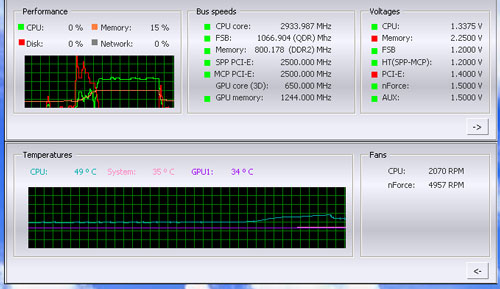
NVIDIA Monitor has a drop-down pane for temperature measurement which reports CPU, System, and GPU results. Reviews at this point will concentrate primarily on CPU temperature. In addition to the real-time temperature measurement, NVIDIA Monitor also has a logging feature which can record temperature to a file in standard increments (we selected every 4 seconds). This allows recording of temperatures during testing and play back, for example, of stress test results that can then be examined when the stress tests are completed. There is also the handy reference of speeds and voltages in the top pane to confirm the test setup.
Other components in the cooling test bed are generally the same as those used in our motherboard and memory test bed:
All cooling tests are run with the components mounted in a standard mid-tower case. The idle and stress temperature tests are run with the case closed and standing as it would in most home setups. We do not use auxiliary fans in the test cooling case, except for the north bridge fan attached to the 680i for overclocking.
Since Thermalright provided a syringe of their own thermal compound, the Thermalright compound was used in mounting the Ultra 120. If the manufacturer does not provide a premium thermal compound with the heatsink we use a standard high quality silver-colored (but no silver content) thermal paste for testing.
In our experience the thermal compound used makes little to no difference in cooling test results. This is particularly true now that processors ship with a large manufacturer-installed heatspreader. Our only control on thermal compound is that we use the manufacturer-supplied product, if they supply a premium product, or a standard high-quality thermal paste if a premium brand is not supplied.
We first tested the stock Intel cooler at standard X6800 speed, measuring the CPU temperature at idle and while the CPU was being stressed. We stressed the CPU by running continuous loops of the Far Cry River demo. The same tests were repeated at the highest stable overclock we could achieve with the stock cooler. Stable in this case meant the ability to handle our Far Cry looping for at least 30 minutes.
The same tests were then run on the cooler under test at stock, highest stock cooler OC speed (3.73GHz), and the highest OC that could be achieved in the same setup with the cooler being tested. This allows measurement of the cooling efficiency of the test unit compared to stock and the improvement in overclocking capabilities, if any, from using the test cooler.
The Thermalright Ultra 120 does not come with a fan, but it is designed to mount one 120mm fan. The fan selected for benchmarking with the Ultra 120 is the Scythe S-Flex SFF21F, a high output and low noise fan with a fan motor using the Sony Fluid Dynamic Bearing. The Ultra 120 was also tested without a cooling fan.
Noise Levels
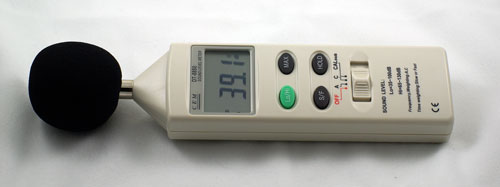
In addition to cooling efficiency and overclocking abilities, users shopping for CPU cooling solutions may also be interested in the noise levels of the cooling devices they are considering. Noise levels are measured with the case open on its side and are measured using a C.E.M. DT-8850 Sound Level meter. This meter allows accurate sound level measurements from 35bdB to 130dB with a resolution of 0.1dB and an accuracy of 1.5dB. This is sufficient for our needs in these tests, as measurement starts at the level of a relatively quiet room. Our own test room, with all computers and fans turned off, has a room noise level of 36.4dB.
Our procedures for measuring cooling system noise are described on page seven along with noise results comparing the stock Intel cooler and recently tested CPU coolers to the Thermalright Ultra 120 coolers.
The standard test bed for cooling tests is the EVGA NVIDIA 680i SLI motherboard. This is primarily based on the consistent test results on this board and the excellent NVIDIA Monitor temperature measurement utility, which is part of the nTune program.
NVIDIA Monitor has a drop-down pane for temperature measurement which reports CPU, System, and GPU results. Reviews at this point will concentrate primarily on CPU temperature. In addition to the real-time temperature measurement, NVIDIA Monitor also has a logging feature which can record temperature to a file in standard increments (we selected every 4 seconds). This allows recording of temperatures during testing and play back, for example, of stress test results that can then be examined when the stress tests are completed. There is also the handy reference of speeds and voltages in the top pane to confirm the test setup.
Other components in the cooling test bed are generally the same as those used in our motherboard and memory test bed:
| Cooling Performance Test Configuration | |
| Processor | Intel Core 2 Duo X6800 (x2, 2.93GHz, 4MB Unified Cache) |
| RAM | 2x1GB Corsair Dominator PC2-8888 (DDR2-1111) |
| Hard Drive(s) | Hitachi 250GB SATA2 enabled (16MB Buffer) |
| Video Card: | 1 x EVGA 7900GTX - All Standard Tests |
| Platform Drivers: | NVIDIA 9.53 |
| NVIDIA nTune: | 5.05.22.00 (1/16/2007) |
| Video Drivers: | NVIDIA 93.71 |
| CPU Cooling: | Thermalright Ultra 120 Scythe Infinity Zalman CNS9700 Zalman CNS9500 Cooler Master Hyper 6+ Vigor Monsoon II Lite Thermalright MST-9775 Scythe Katana Tuniq Tower 120 Intel Stock HSF for X6800 |
| Power Supply: | OCZ PowerStream 520W |
| Motherboards: | EVGA nForce 680i SLI (NVIDIA 680i) |
| Operating System(s): | Windows XP Professional SP2 |
| BIOS | Award P24 (1/12/2007) |
All cooling tests are run with the components mounted in a standard mid-tower case. The idle and stress temperature tests are run with the case closed and standing as it would in most home setups. We do not use auxiliary fans in the test cooling case, except for the north bridge fan attached to the 680i for overclocking.
Since Thermalright provided a syringe of their own thermal compound, the Thermalright compound was used in mounting the Ultra 120. If the manufacturer does not provide a premium thermal compound with the heatsink we use a standard high quality silver-colored (but no silver content) thermal paste for testing.
In our experience the thermal compound used makes little to no difference in cooling test results. This is particularly true now that processors ship with a large manufacturer-installed heatspreader. Our only control on thermal compound is that we use the manufacturer-supplied product, if they supply a premium product, or a standard high-quality thermal paste if a premium brand is not supplied.
We first tested the stock Intel cooler at standard X6800 speed, measuring the CPU temperature at idle and while the CPU was being stressed. We stressed the CPU by running continuous loops of the Far Cry River demo. The same tests were repeated at the highest stable overclock we could achieve with the stock cooler. Stable in this case meant the ability to handle our Far Cry looping for at least 30 minutes.
The same tests were then run on the cooler under test at stock, highest stock cooler OC speed (3.73GHz), and the highest OC that could be achieved in the same setup with the cooler being tested. This allows measurement of the cooling efficiency of the test unit compared to stock and the improvement in overclocking capabilities, if any, from using the test cooler.
The Thermalright Ultra 120 does not come with a fan, but it is designed to mount one 120mm fan. The fan selected for benchmarking with the Ultra 120 is the Scythe S-Flex SFF21F, a high output and low noise fan with a fan motor using the Sony Fluid Dynamic Bearing. The Ultra 120 was also tested without a cooling fan.
Noise Levels
In addition to cooling efficiency and overclocking abilities, users shopping for CPU cooling solutions may also be interested in the noise levels of the cooling devices they are considering. Noise levels are measured with the case open on its side and are measured using a C.E.M. DT-8850 Sound Level meter. This meter allows accurate sound level measurements from 35bdB to 130dB with a resolution of 0.1dB and an accuracy of 1.5dB. This is sufficient for our needs in these tests, as measurement starts at the level of a relatively quiet room. Our own test room, with all computers and fans turned off, has a room noise level of 36.4dB.
Our procedures for measuring cooling system noise are described on page seven along with noise results comparing the stock Intel cooler and recently tested CPU coolers to the Thermalright Ultra 120 coolers.
Originally published at https://www.anandtech.com/show/2185 (Wayback Machine).