
Gateway FPD2485W: 24" LCD Beauty or Beast?
- Posted in
- Displays
Introduction
It has been quite some time since we've done any display reviews at AnandTech. It is a topic that comes up on a regular basis, and the display is definitely an important aspect of any computer system. Quite a bit has changed since our last display review, nearly all of those changes for the better. Many of the concerns we used to have about LCDs have now been addressed - pixel response times, color purity, and pricing have in the past been the major deterrence towards purchasing a large new LCD. While there is always room for improvement, desktop LCDs are now at the point where very few people would prefer anything else. Simply put, the CRT is dead; long live the LCD! That is not to say that LCDs are the only foreseeable display technology for the future, but before we get into the technologies, let's briefly talk about displays in general.
For some applications/scenarios the display is of little importance. Many large corporations will have headless servers - servers that aren't connected to any display - because they don't need to use the system directly. Logging into a server from a remote location is more than sufficient for most administrative tasks. A single KVM switch (Keyboard Video Mouse) can also be connected to a bunch of systems for times when physical interaction with a server is necessary. It's possible to have as many as 24 systems sharing a single KVM setup, which allows you to conserve space in a data center, not to mention cutting back on cable clutter and power requirements. In such usage scenarios, the display is probably the least important component in the system.
The reverse of that is the typical home or office user. Depending on your work and hobbies, you may find yourself staring into a computer display as much as 12 hours a day, and even more in some instances. Hopefully you take periodic breaks, but more likely than not you get too involved and forget such minor considerations. A typical power user will load up a lot of web pages in the course of a day; work on some documents, images, spreadsheets, etc.; maybe play a few games; answer email, and perhaps even watch a video or two.... That's a lot of time looking at your display! While having documents and web pages open faster is always nice, most people agree that the fastest computer in the world connected to a lousy display would be a chore to use.
We have frequently argued that the display should be a primary decision when purchasing a new computer - unless you already have a high quality display that you'll be keeping. Unlike computers where you might upgrade systems every year or two - or at least a few of the components - it is not unusual to use a display for a very long time. Some people will spend as much as 33% of their computer budget at the time of a new system purchase on the display, with the intention of using the display for at least five years. Once you have a good quality display, there are only a few reasons to consider upgrading: either you want a larger display, your old display starts to wear out (i.e. poor colors/contrast/brightness), something breaks, or now we have the new problem of not being able to support HDCP content. As much as that last item can irritate some of us - anyone who purchased an expensive LCD two years ago feel free to raise your hand - HDCP support is now a feature that the majority of users will want to have, if only as a safeguard. If you never intend to watch video content on your display, you can probably manage to live without it, but all other things being equal why not spend a few dollars more for something that might be useful?
Besides the features that go into a display, there are plenty of new technologies in various phases of development that are worth keeping an eye on. CRTs have basically been relegated to the budget sector, and very few manufacturers are interested in that market anymore. LCDs are the most common display right now, generally offering high contrast ratios, clear and bright colors, and an attractive slim profile that so many people like. Looking towards the future, OLEDs show a lot of promise, and different methods of backlighting are being used with LCDs to further improve image quality. Outside of computers, various other technologies are in development/deployment, but most of these aren't likely to move onto the desktop. Rear projection HDTVs have been around awhile, with many projection systems now moving towards DLP, but rear projection/DLP displays require far too much space for most people to want them on a desktop. Plasma displays have also been around for quite some time, but their increased weight relative to LCDs is likely to keep them away from the computer market. SED (Surface-conduction Electron-emitter Display), FED (Field Emission Display), and various other display technologies may steal the spotlight in the future but for now it looks like LCDs and OLEDs will be the primary choices for computer users.
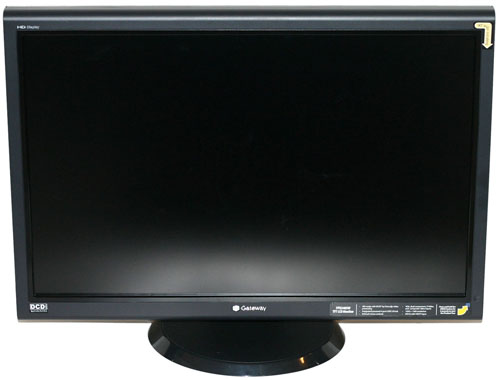
We're going to kick off our return to display reviews with a look at one of Gateway's newest offerings, the FPD2485W. This is a relatively high-end display intended to compete with offerings from other major manufacturers (Dell, Samsung, HP, Viewsonic, Acer, etc.) In contrast to some of the other 24" LCDs currently on the market, it has only been available for a few months and it sports one of the newer LCD panels. Priced at under $700, it's also reasonably affordable though certainly not cheap. Given what we've just said above, however, we would definitely recommend anyone considering the purchase of a midrange or faster computer take a serious look at their display and decide whether or not it's time to upgrade. After seeing what we have to say about the Gateway FPD2485W, you might be willing to make the investment.
It has been quite some time since we've done any display reviews at AnandTech. It is a topic that comes up on a regular basis, and the display is definitely an important aspect of any computer system. Quite a bit has changed since our last display review, nearly all of those changes for the better. Many of the concerns we used to have about LCDs have now been addressed - pixel response times, color purity, and pricing have in the past been the major deterrence towards purchasing a large new LCD. While there is always room for improvement, desktop LCDs are now at the point where very few people would prefer anything else. Simply put, the CRT is dead; long live the LCD! That is not to say that LCDs are the only foreseeable display technology for the future, but before we get into the technologies, let's briefly talk about displays in general.
For some applications/scenarios the display is of little importance. Many large corporations will have headless servers - servers that aren't connected to any display - because they don't need to use the system directly. Logging into a server from a remote location is more than sufficient for most administrative tasks. A single KVM switch (Keyboard Video Mouse) can also be connected to a bunch of systems for times when physical interaction with a server is necessary. It's possible to have as many as 24 systems sharing a single KVM setup, which allows you to conserve space in a data center, not to mention cutting back on cable clutter and power requirements. In such usage scenarios, the display is probably the least important component in the system.
The reverse of that is the typical home or office user. Depending on your work and hobbies, you may find yourself staring into a computer display as much as 12 hours a day, and even more in some instances. Hopefully you take periodic breaks, but more likely than not you get too involved and forget such minor considerations. A typical power user will load up a lot of web pages in the course of a day; work on some documents, images, spreadsheets, etc.; maybe play a few games; answer email, and perhaps even watch a video or two.... That's a lot of time looking at your display! While having documents and web pages open faster is always nice, most people agree that the fastest computer in the world connected to a lousy display would be a chore to use.
We have frequently argued that the display should be a primary decision when purchasing a new computer - unless you already have a high quality display that you'll be keeping. Unlike computers where you might upgrade systems every year or two - or at least a few of the components - it is not unusual to use a display for a very long time. Some people will spend as much as 33% of their computer budget at the time of a new system purchase on the display, with the intention of using the display for at least five years. Once you have a good quality display, there are only a few reasons to consider upgrading: either you want a larger display, your old display starts to wear out (i.e. poor colors/contrast/brightness), something breaks, or now we have the new problem of not being able to support HDCP content. As much as that last item can irritate some of us - anyone who purchased an expensive LCD two years ago feel free to raise your hand - HDCP support is now a feature that the majority of users will want to have, if only as a safeguard. If you never intend to watch video content on your display, you can probably manage to live without it, but all other things being equal why not spend a few dollars more for something that might be useful?
Besides the features that go into a display, there are plenty of new technologies in various phases of development that are worth keeping an eye on. CRTs have basically been relegated to the budget sector, and very few manufacturers are interested in that market anymore. LCDs are the most common display right now, generally offering high contrast ratios, clear and bright colors, and an attractive slim profile that so many people like. Looking towards the future, OLEDs show a lot of promise, and different methods of backlighting are being used with LCDs to further improve image quality. Outside of computers, various other technologies are in development/deployment, but most of these aren't likely to move onto the desktop. Rear projection HDTVs have been around awhile, with many projection systems now moving towards DLP, but rear projection/DLP displays require far too much space for most people to want them on a desktop. Plasma displays have also been around for quite some time, but their increased weight relative to LCDs is likely to keep them away from the computer market. SED (Surface-conduction Electron-emitter Display), FED (Field Emission Display), and various other display technologies may steal the spotlight in the future but for now it looks like LCDs and OLEDs will be the primary choices for computer users.
We're going to kick off our return to display reviews with a look at one of Gateway's newest offerings, the FPD2485W. This is a relatively high-end display intended to compete with offerings from other major manufacturers (Dell, Samsung, HP, Viewsonic, Acer, etc.) In contrast to some of the other 24" LCDs currently on the market, it has only been available for a few months and it sports one of the newer LCD panels. Priced at under $700, it's also reasonably affordable though certainly not cheap. Given what we've just said above, however, we would definitely recommend anyone considering the purchase of a midrange or faster computer take a serious look at their display and decide whether or not it's time to upgrade. After seeing what we have to say about the Gateway FPD2485W, you might be willing to make the investment.
Originally published at https://www.anandtech.com/show/2179 (Wayback Machine).