
Thermalright Ultra 120: Elegant, Fanless and Efficient Cooling
- Posted in
- Cases/Cooling/PSUs
Thermalright Ultra 120
Thermalright specializes in the enthusiast market, manufacturing the usual CPU coolers but also chipset, VGA, and RAM coolers, as well as thermal paste. Thermalright emphasizes their design capabilities in the cooling market, and their advanced manufacturing processes are ISO-9000 certified.
Most hobbyists first heard of Thermalright when their SK-6 cooler appeared in the summer of 2001 and started winning most of the heatsink roundups. Since then Thermalright has become a well-respected name in high-end air cooling. Thermalright produced several well-known heatsinks for the AMD K8 and Pentium 4 sockets, such as the XP-120 and XP-90 heatsinks. You bought the Thermalright heatsink and paired it with the 120mm or 90mm fan of your choice - for low noise or massive air flow or some combination that met your needs.
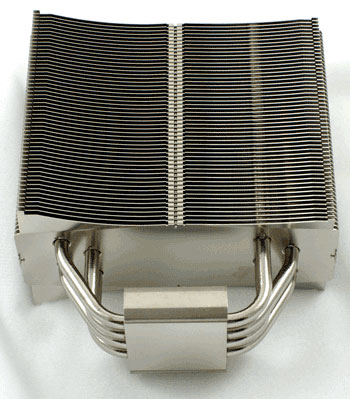
The Thermalright Ultra 120 is a top-of-the-line heatsink. As the top model in the current Thermalright lineup it is targeted at enthusiasts who want the best and most flexible performance available in a CPU cooler. The Ultra 120 mounts 120mm fans, but there is also a smaller and lighter version called the Ultra 90 that logically mounts 92mm fans.
The Ultra 120 comes packaged in the usual plain brown Thermalright box. All the Thermalright coolers we have seen are shipped in sturdy natural cardboard boxes. Some would argue the name says it all. Like Godiva in chocolates, Thermalright says you have the best. Whether Thermalright really is the best is what this review will help determine.
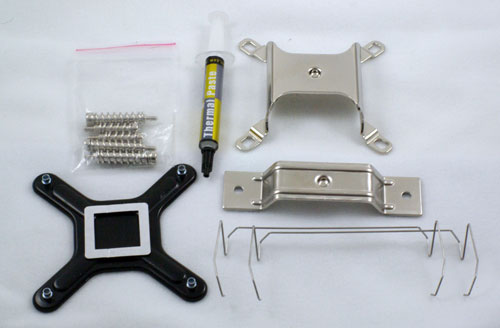
Inside the box you will find an exceptionally well-protected Ultra 120 heatsink, along with everything you need to mount the Ultra 120 on an Intel Socket 775 or an AMD Athlon 64/FX/X2/Opteron.
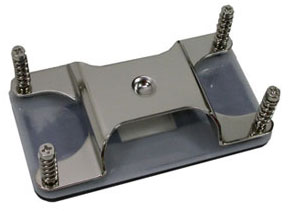
For AM2 you will need to purchase an Ultra-120 AM2 adapter, which sells for about $8. The Ultra 120 is not currently available in an AM2 version right out of the box. The smaller Ultra-90 does come in an AM2 version.
The Thermalright Ultra 120 kit is available for around $47 retail. The Ultra 90 sells for a little less, around $40. You will also need a 120mm fan such as the Scythe S-Flex SFF21F or the Noctua fans. Just keep in mind that the fan needs holes for the fan wires to work - solid post fans will not work. At a total cost for heatsink and fan of around $50 to $60 the Thermalright is competitively priced with other top heatsink towers like the Tuniq Tower 120 and the Scythe Infinity.
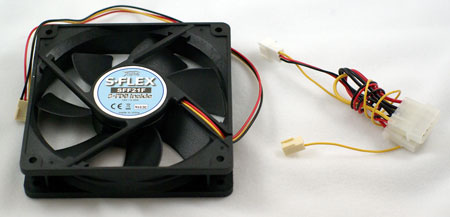
The Scythe S-Flex fan that was tested with the Thermalright comes with just a 3-pin connector. It can be powered directly by the board, or if you are concerned about current draw Scythe provides a 4-pin Molex to fan adapter. Since there is no 4-pin connection you will need something like the Zalman Fan Mate controller if you want to vary the fan speed of the S-Flex. On motherboards supported by Speed Fan, that free software utility is also an option for controlling fan speed.
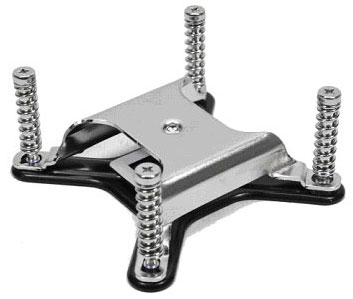
Installing the Ultra 120 is relatively easy, but you will need to remove the motherboard from the case to install. A mounting plate rests on the back of the board with screw pegs passing through the mounting holes on the board. The heavy Ultra 120 is then supported by four spring-loaded screws on a mounting plate that covers the entire top of the CPU mounting block.
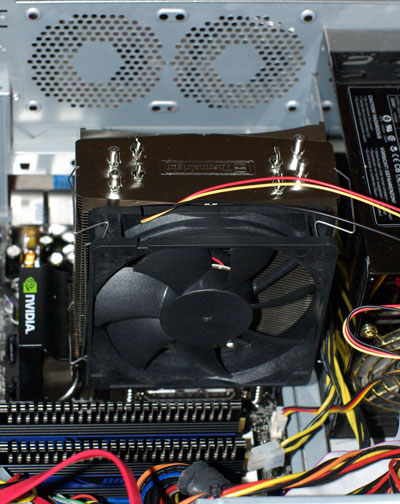
Thermalright has developed a very logical method of installation that provides security for the heavy Ultra 120 heatsink. There was never a worry that the Ultra 120 would fall off the board or rip out of the mounting holes. However, caution is still needed in moving a system with the Ultra 120. The heatsink weighs 745g and the fan we used is 180g. That total weight of 925g is just over two pounds.
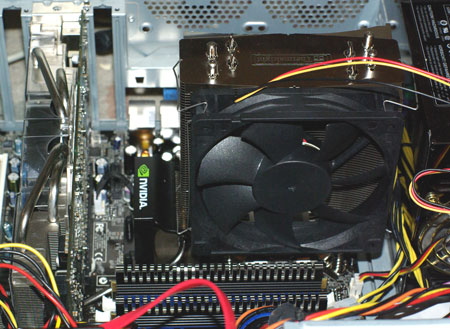
We had no problems during testing and moving our test tower around. However, constantly moving a tower system with this kind of cooler weight supported by the motherboard could over flex the board and cause failure.
Specifications
Our test system is Intel Socket 775, but the Thermalright Ultra 120 will also mount on any AMD 754/939/940 CPU with the included adapter. An optional AM2 adapter is needed for that socket.
S-Flex fans are available in other noise and air flow specifications to meet your needs. The SFF21D has an 8.7dB-A noise rating at 33.5CFM, while the mid-range 21E is 20.1 dB-A at 49.0 CFM. Noctua also has a wide range of fans that will fit the Ultra 120. You will find a wide selection of fans available at etailers like Newegg or Frozen CPU.
Thermalright specializes in the enthusiast market, manufacturing the usual CPU coolers but also chipset, VGA, and RAM coolers, as well as thermal paste. Thermalright emphasizes their design capabilities in the cooling market, and their advanced manufacturing processes are ISO-9000 certified.
Most hobbyists first heard of Thermalright when their SK-6 cooler appeared in the summer of 2001 and started winning most of the heatsink roundups. Since then Thermalright has become a well-respected name in high-end air cooling. Thermalright produced several well-known heatsinks for the AMD K8 and Pentium 4 sockets, such as the XP-120 and XP-90 heatsinks. You bought the Thermalright heatsink and paired it with the 120mm or 90mm fan of your choice - for low noise or massive air flow or some combination that met your needs.
The Thermalright Ultra 120 is a top-of-the-line heatsink. As the top model in the current Thermalright lineup it is targeted at enthusiasts who want the best and most flexible performance available in a CPU cooler. The Ultra 120 mounts 120mm fans, but there is also a smaller and lighter version called the Ultra 90 that logically mounts 92mm fans.
The Ultra 120 comes packaged in the usual plain brown Thermalright box. All the Thermalright coolers we have seen are shipped in sturdy natural cardboard boxes. Some would argue the name says it all. Like Godiva in chocolates, Thermalright says you have the best. Whether Thermalright really is the best is what this review will help determine.
Inside the box you will find an exceptionally well-protected Ultra 120 heatsink, along with everything you need to mount the Ultra 120 on an Intel Socket 775 or an AMD Athlon 64/FX/X2/Opteron.
For AM2 you will need to purchase an Ultra-120 AM2 adapter, which sells for about $8. The Ultra 120 is not currently available in an AM2 version right out of the box. The smaller Ultra-90 does come in an AM2 version.
The Thermalright Ultra 120 kit is available for around $47 retail. The Ultra 90 sells for a little less, around $40. You will also need a 120mm fan such as the Scythe S-Flex SFF21F or the Noctua fans. Just keep in mind that the fan needs holes for the fan wires to work - solid post fans will not work. At a total cost for heatsink and fan of around $50 to $60 the Thermalright is competitively priced with other top heatsink towers like the Tuniq Tower 120 and the Scythe Infinity.
The Scythe S-Flex fan that was tested with the Thermalright comes with just a 3-pin connector. It can be powered directly by the board, or if you are concerned about current draw Scythe provides a 4-pin Molex to fan adapter. Since there is no 4-pin connection you will need something like the Zalman Fan Mate controller if you want to vary the fan speed of the S-Flex. On motherboards supported by Speed Fan, that free software utility is also an option for controlling fan speed.
Installing the Ultra 120 is relatively easy, but you will need to remove the motherboard from the case to install. A mounting plate rests on the back of the board with screw pegs passing through the mounting holes on the board. The heavy Ultra 120 is then supported by four spring-loaded screws on a mounting plate that covers the entire top of the CPU mounting block.
Thermalright has developed a very logical method of installation that provides security for the heavy Ultra 120 heatsink. There was never a worry that the Ultra 120 would fall off the board or rip out of the mounting holes. However, caution is still needed in moving a system with the Ultra 120. The heatsink weighs 745g and the fan we used is 180g. That total weight of 925g is just over two pounds.
We had no problems during testing and moving our test tower around. However, constantly moving a tower system with this kind of cooler weight supported by the motherboard could over flex the board and cause failure.
Specifications
Our test system is Intel Socket 775, but the Thermalright Ultra 120 will also mount on any AMD 754/939/940 CPU with the included adapter. An optional AM2 adapter is needed for that socket.
| Thermalright Ultra 120 Specifications | |
| Heatsink | |
| Dimensions | 63.5(L) X 132(W) X 160.5(H)mm (excluding fan) |
| Weight | 745g (excluding fan) |
| Material | Nickel-plated Copper and Aluminum |
| Fan Configuration | Supports 120mm fans with open mounting posts |
| Optional Fan | |
| Model | Scythe S-Flex SFF21F |
| Fan Size | 120mm x 120mm x 25mm |
| Bearing Type | Sony Fluid Dynamic Bearing |
| Noise Level | 28.0 dbA |
| Speed | 1600 rpm |
| Air Flow | 63.7 CFM |
| Fan Life | 150,000 hrs (vs. 50,000 hrs for ball bearing) |
| Weight | 180g (fan only) |
S-Flex fans are available in other noise and air flow specifications to meet your needs. The SFF21D has an 8.7dB-A noise rating at 33.5CFM, while the mid-range 21E is 20.1 dB-A at 49.0 CFM. Noctua also has a wide range of fans that will fit the Ultra 120. You will find a wide selection of fans available at etailers like Newegg or Frozen CPU.
Originally published at https://www.anandtech.com/show/2185 (Wayback Machine).