
Gateway FPD2485W: 24" LCD Beauty or Beast?
- Posted in
- Displays
Color Accuracy
Something far more important than contrast ratio or brightness is the accuracy of the colors that are produced. A bright display with a high contrast ratio could still have terrible color reproduction, and it's not always possible to correct this. Most people will simply "eyeball" the display output to try and determine what looks best, and there are various color charts available online that can help. Outside of image professionals, that is often sufficient, and most users will find that their eyes adapt to whatever display they use and it is only when doing side-by-side comparisons that differences become apparent.
Monaco Optix XR Pro was used to generate reports of color accuracy. 24 color patches are sent to the display with the colorimeter measuring the resulting values. The difference between what is requested and what the LCD actually shows is known as Delta E, with lower values being better. Any score less than one is basically "perfect" - the naked eye is not going to be able to tell the difference - and scores less than 2.0 are very good. Ideally, you would want all of the tested colors to have a Delta E of less than 1.0, but few people are likely to have problems with anything scoring below 2.0. From 2.0 to 4.0, most people will be able to detect a slight inaccuracy in the color palette when comparing displays side by side, but it's not too irritating. Anything above 4.0 begins to represent a more significant deviance, and numerous scores above 4.0 will almost certainly be noticeable by just about anyone using the display.
The Gateway FPD2485W includes EZTune software to help users calibrate their displays, although this will at best provide moderately accurate results. We started out with the EZTune software, checked the results, and then proceeded to use the Monaco Optix software to calibrate the display. Unless you have a colorimeter and the necessary software, you can expect your results to be closer to the EZTune values, but outside of image/video editing that is often sufficient.
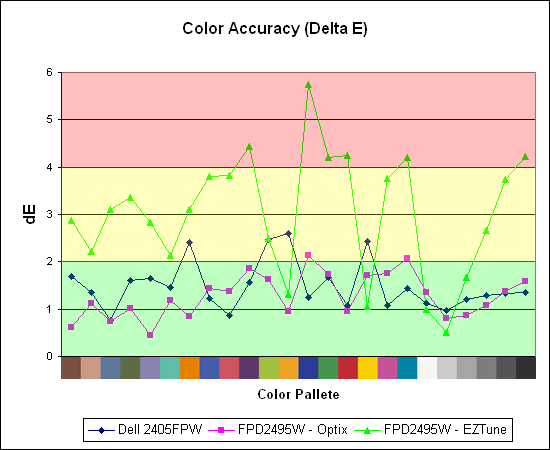
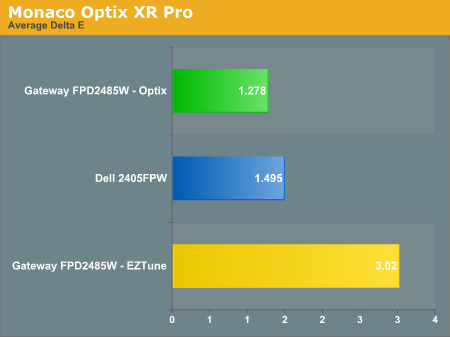
Both displays perform very well when calibrated by Monaco Optix, but not surprisingly the out of box experience from the Gateway isn't nearly as accurate. Uncalibrated results for the 2405FPW were not recorded because it is only intended as a baseline measurement and is not being reviewed. The Dell 2405FPW is about two years old now, but it still performs about the same as the newer 2407WFP and the Gateway FPD2485W when it comes to reproducing accurate colors. We will be taking a closer look at the 2407WFP in the near future, but outside of the most demanding users any of these three displays will work very well. That's not too surprising, considering all three of them are based off of PVA panels.
The second aspect of color accuracy that we need to address is the color depth. The FPD2485W can produce a resulting color pretty close to the requested value, but how does it do in terms of gradient scales? This was something we neglected initially, and after further investigation there is definitely a lot of banding when viewing gradient scales, to the point that we would almost question whether or not this is a true 8-bit panel or if it's really a 6-bit panel. Attempts to capture the results of the banding with a camera have been unsuccessful so far, but needless to say the Dell 2405FPW shows less banding while the 2407WFP doesn't show any noticeable banding. In normal use, the banding usually isn't a serious problem, but graphics editors are likely to notice the effect. Any gradients created in Photoshop or other similar programs have definite problems in regards to producing a smooth color scale on the FPD2485W, and for some people that is a big enough concern that they will want to look elsewhere.
Note: Our review sample is from the first run of these LCDs and was manufactured in November 2006. Later models have apparently improved on some aspects of the display, but unfortunately we can't say whether the color gradients have gotten any better. Again, if colors are important to you, try to check out a display in person and bring up some gradient images to see whether or not you notice any issues.
Update: Additional information on viewing angles and color calibration for print work with these displays is available in our Acer AL2216W review.
Something far more important than contrast ratio or brightness is the accuracy of the colors that are produced. A bright display with a high contrast ratio could still have terrible color reproduction, and it's not always possible to correct this. Most people will simply "eyeball" the display output to try and determine what looks best, and there are various color charts available online that can help. Outside of image professionals, that is often sufficient, and most users will find that their eyes adapt to whatever display they use and it is only when doing side-by-side comparisons that differences become apparent.
Monaco Optix XR Pro was used to generate reports of color accuracy. 24 color patches are sent to the display with the colorimeter measuring the resulting values. The difference between what is requested and what the LCD actually shows is known as Delta E, with lower values being better. Any score less than one is basically "perfect" - the naked eye is not going to be able to tell the difference - and scores less than 2.0 are very good. Ideally, you would want all of the tested colors to have a Delta E of less than 1.0, but few people are likely to have problems with anything scoring below 2.0. From 2.0 to 4.0, most people will be able to detect a slight inaccuracy in the color palette when comparing displays side by side, but it's not too irritating. Anything above 4.0 begins to represent a more significant deviance, and numerous scores above 4.0 will almost certainly be noticeable by just about anyone using the display.
The Gateway FPD2485W includes EZTune software to help users calibrate their displays, although this will at best provide moderately accurate results. We started out with the EZTune software, checked the results, and then proceeded to use the Monaco Optix software to calibrate the display. Unless you have a colorimeter and the necessary software, you can expect your results to be closer to the EZTune values, but outside of image/video editing that is often sufficient.
Both displays perform very well when calibrated by Monaco Optix, but not surprisingly the out of box experience from the Gateway isn't nearly as accurate. Uncalibrated results for the 2405FPW were not recorded because it is only intended as a baseline measurement and is not being reviewed. The Dell 2405FPW is about two years old now, but it still performs about the same as the newer 2407WFP and the Gateway FPD2485W when it comes to reproducing accurate colors. We will be taking a closer look at the 2407WFP in the near future, but outside of the most demanding users any of these three displays will work very well. That's not too surprising, considering all three of them are based off of PVA panels.
The second aspect of color accuracy that we need to address is the color depth. The FPD2485W can produce a resulting color pretty close to the requested value, but how does it do in terms of gradient scales? This was something we neglected initially, and after further investigation there is definitely a lot of banding when viewing gradient scales, to the point that we would almost question whether or not this is a true 8-bit panel or if it's really a 6-bit panel. Attempts to capture the results of the banding with a camera have been unsuccessful so far, but needless to say the Dell 2405FPW shows less banding while the 2407WFP doesn't show any noticeable banding. In normal use, the banding usually isn't a serious problem, but graphics editors are likely to notice the effect. Any gradients created in Photoshop or other similar programs have definite problems in regards to producing a smooth color scale on the FPD2485W, and for some people that is a big enough concern that they will want to look elsewhere.
Note: Our review sample is from the first run of these LCDs and was manufactured in November 2006. Later models have apparently improved on some aspects of the display, but unfortunately we can't say whether the color gradients have gotten any better. Again, if colors are important to you, try to check out a display in person and bring up some gradient images to see whether or not you notice any issues.
Update: Additional information on viewing angles and color calibration for print work with these displays is available in our Acer AL2216W review.
Originally published at https://www.anandtech.com/show/2179 (Wayback Machine).