
Gateway FPD2485W: 24" LCD Beauty or Beast?
- Posted in
- Displays
Brightness and Contrast Comparisons
As this is our first display review in quite some time, we don't have a large backlog of results with which to compare new displays. Given that many people are familiar with Dell's older 2405FPW we decided to provide results from our 18 month old Dell LCD for comparison. While we have heard of users that are experiencing backlight fade or other problems on older displays, our 2405FPW continues to perform admirably. We'll start by looking at brightness levels and contrast ratios.
For testing, we used a Monaco Optix XR (DTP-94) colorimeter on the hardware side. For software, we used Monaco Optix XR Pro. The software and hardware is relatively easy to use and helps users to fine tune their displays. We did find that the instructions tend to be a bit aggressive in terms of setting the contrast ratio, however, as we achieved better results by setting the Gateway LCD to a 60% contrast ratio instead of the 100% that was recommended.
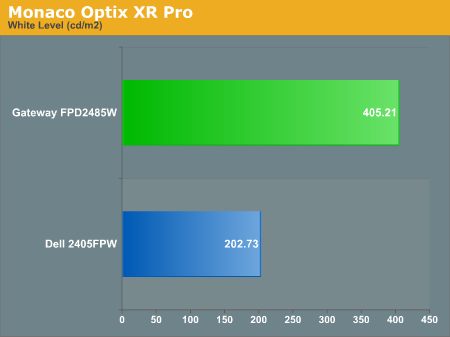
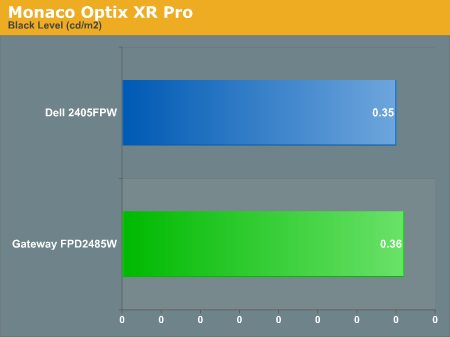
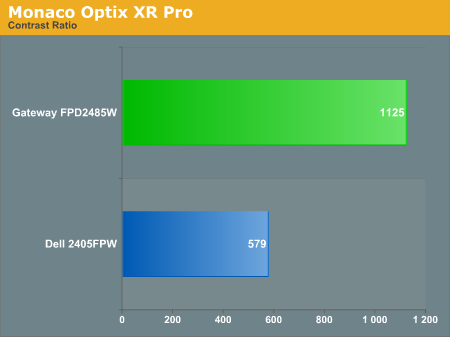
Theoretically, you want your whites to be brighter and your blacks to be darker, and we have sorted the charts appropriately. Dividing the white point by the black point gives you the effective contrast ratio, with higher scores being better. The problem is, darker blacks are good but brighter whites are only good up to a certain point. Anything above 400 cd/m 2 is far too bright in our opinion. As you can see, the black levels of both the Gateway and Dell LCD are equal, so the Gateway LCD achieves better contrast ratios mostly by offering brighter whites. If you work in a well lit office environment, the Gateway system might be the better choice, but most users will likely end up running either LCD at similar brightness levels.
As this is our first display review in quite some time, we don't have a large backlog of results with which to compare new displays. Given that many people are familiar with Dell's older 2405FPW we decided to provide results from our 18 month old Dell LCD for comparison. While we have heard of users that are experiencing backlight fade or other problems on older displays, our 2405FPW continues to perform admirably. We'll start by looking at brightness levels and contrast ratios.
For testing, we used a Monaco Optix XR (DTP-94) colorimeter on the hardware side. For software, we used Monaco Optix XR Pro. The software and hardware is relatively easy to use and helps users to fine tune their displays. We did find that the instructions tend to be a bit aggressive in terms of setting the contrast ratio, however, as we achieved better results by setting the Gateway LCD to a 60% contrast ratio instead of the 100% that was recommended.
Theoretically, you want your whites to be brighter and your blacks to be darker, and we have sorted the charts appropriately. Dividing the white point by the black point gives you the effective contrast ratio, with higher scores being better. The problem is, darker blacks are good but brighter whites are only good up to a certain point. Anything above 400 cd/m 2 is far too bright in our opinion. As you can see, the black levels of both the Gateway and Dell LCD are equal, so the Gateway LCD achieves better contrast ratios mostly by offering brighter whites. If you work in a well lit office environment, the Gateway system might be the better choice, but most users will likely end up running either LCD at similar brightness levels.
Originally published at https://www.anandtech.com/show/2179 (Wayback Machine).