
PC Club Enpower Sabre Extreme: E6600 Made Easy
- Posted in
- Systems
Gaming Resolution Scaling
As this is a system review, we wanted to also look at gaming performance that can be achieved using the Sabre Extreme at lower resolutions and/or detail settings. We tested the five most commonly used resolutions for modern LCD displays at "high" and "medium" settings. We have provided a chart below of the test settings used for "midrange" and "high-end" configurations. Here are the results, along with scores from the ABS Ultimate X9. All of the results are with sound enabled where possible, as this is how most people play games and it reflects testing the performance of the entire package rather than individual components.
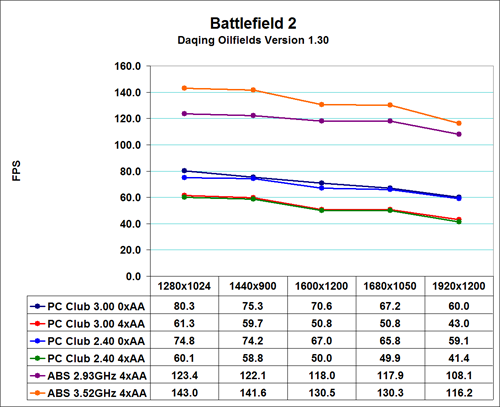
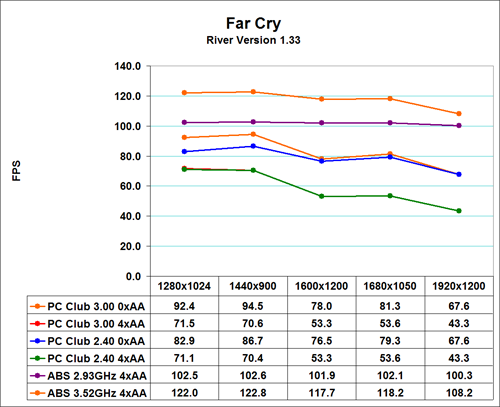
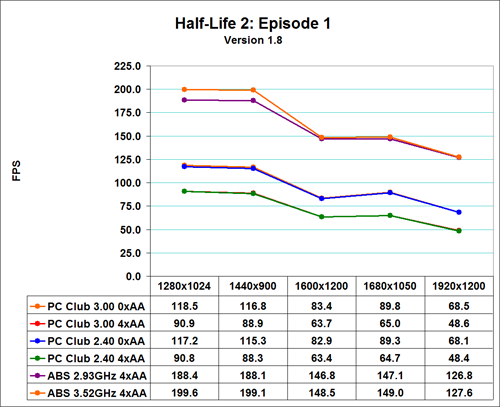
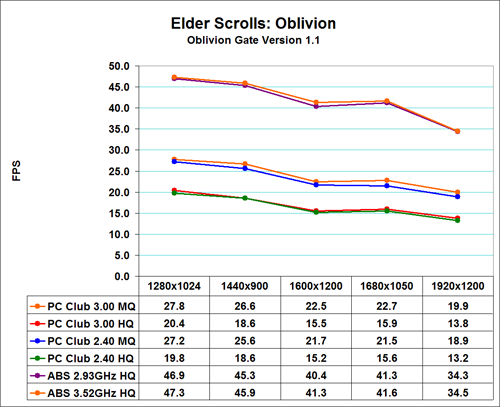
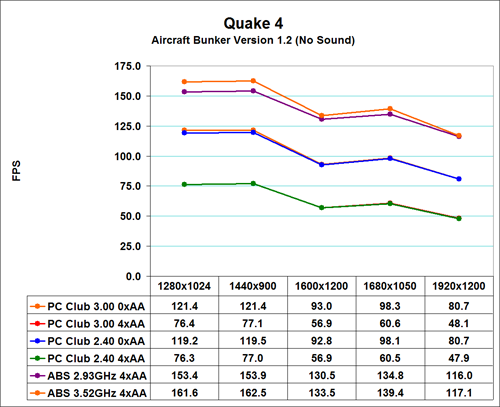
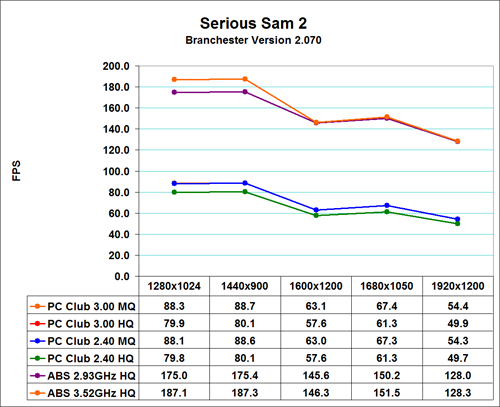
It should come as little surprise that the ABS Ultimate X9 is faster than the PC Club Sabre Extreme in every situation, especially at higher detail settings. Given the graphics configuration of the ABS Ultimate X9, we did not bother testing without antialiasing (except in Oblivion and SS2 due to the use of HDR), as performance is more than acceptable so there's no need to drop detail levels. The Sabre Extreme on the other hand can definitely benefit by running at slightly reduced detail settings, especially at higher resolutions.
Even the ultra high end ABS Ultimate X9 is running into GPU limitations, so the performance comparisons here essentially amount to comparing different GPUs. At present, the vast majority of games depend more on graphics performance than CPU performance, so with the exception of flight simulators and certain strategy games, GPU performance really does equate to gaming performance. That being the case, if you need help deciding whether or not you should upgrade the graphics card in a prebuilt system, you can always refer to our video card reviews.
You can see the GPU limited nature of games by looking at the stock vs. overclocked performance of both the ABS and PC Club computers; even with a top-end GPU configuration, CPU performance really only impacts gaming at the lower resolutions, and when you're talking about a 5% or less difference in performance, it really won't matter too much which Core 2 Duo CPU you use for gaming. Perhaps future games will be able to place more of a burden on the CPU, but that doesn't appear too likely, as games like Unreal Tournament 2007 and the recently released Prey are more GPU limited than current titles.
If you choose to go with a 19" widescreen ViewSonic LCD like the one PC Club sent us, the maximum resolution of 1440x900 is playable in nearly all cases at high detail settings. If you would rather use a larger monitor and/or run at higher resolutions, you may find it necessary to drop antialiasing down to 2xAA and/or reduce other settings. Whatever route you go, however, the gaming performance offered is more than acceptable for all present titles; you just may find that you need to tweak settings a bit in order to find the right balance between resolution, detail, and frame rate.
As this is a system review, we wanted to also look at gaming performance that can be achieved using the Sabre Extreme at lower resolutions and/or detail settings. We tested the five most commonly used resolutions for modern LCD displays at "high" and "medium" settings. We have provided a chart below of the test settings used for "midrange" and "high-end" configurations. Here are the results, along with scores from the ABS Ultimate X9. All of the results are with sound enabled where possible, as this is how most people play games and it reflects testing the performance of the entire package rather than individual components.
| Game Settings | ||
| Medium Quality | High Quality | |
| Battlefield 2 | All settings at high with 0xAA | All settings at high with 4xAA |
| Far Cry | All settings at Very High with 0xAA/8xAF Water at Ultra High |
All settings at Very High with 4xAA/8xAF Water at Ultra High |
| HL2: Episode 1 | All settings on high HDR and color correction enabled 0xAA/8xAF |
All settings on high HDR and color correction enabled 4xAA/8xAF |
| Oblivion | Ultra High Defaults (Max) except: Grass: 0% Interior/Exterior Shadows: 25% Self Shadows: Off Shadows on Grass: Off Tree Canopy Shadows: Off Shadow Filtering: Off Specular Distance: 50% HDR: On (AA: Off) |
Ultra High Defaults (Max) except: Grass: 50% Interior/Exterior Shadows: 50% Self Shadows: Off Shadows on Grass: Off HDR: On (AA: Off) |
| Quake 4 | High defaults with 0xAA SMP enabled |
High defaults with 4xAA SMP enabled |
| Serious Sam 2 | High Detail Defaults High Texture Size HDR Enabled (AA Off) |
Maximum Detail Defaults HDR Enabled (AA Off) |
It should come as little surprise that the ABS Ultimate X9 is faster than the PC Club Sabre Extreme in every situation, especially at higher detail settings. Given the graphics configuration of the ABS Ultimate X9, we did not bother testing without antialiasing (except in Oblivion and SS2 due to the use of HDR), as performance is more than acceptable so there's no need to drop detail levels. The Sabre Extreme on the other hand can definitely benefit by running at slightly reduced detail settings, especially at higher resolutions.
Even the ultra high end ABS Ultimate X9 is running into GPU limitations, so the performance comparisons here essentially amount to comparing different GPUs. At present, the vast majority of games depend more on graphics performance than CPU performance, so with the exception of flight simulators and certain strategy games, GPU performance really does equate to gaming performance. That being the case, if you need help deciding whether or not you should upgrade the graphics card in a prebuilt system, you can always refer to our video card reviews.
You can see the GPU limited nature of games by looking at the stock vs. overclocked performance of both the ABS and PC Club computers; even with a top-end GPU configuration, CPU performance really only impacts gaming at the lower resolutions, and when you're talking about a 5% or less difference in performance, it really won't matter too much which Core 2 Duo CPU you use for gaming. Perhaps future games will be able to place more of a burden on the CPU, but that doesn't appear too likely, as games like Unreal Tournament 2007 and the recently released Prey are more GPU limited than current titles.
If you choose to go with a 19" widescreen ViewSonic LCD like the one PC Club sent us, the maximum resolution of 1440x900 is playable in nearly all cases at high detail settings. If you would rather use a larger monitor and/or run at higher resolutions, you may find it necessary to drop antialiasing down to 2xAA and/or reduce other settings. Whatever route you go, however, the gaming performance offered is more than acceptable for all present titles; you just may find that you need to tweak settings a bit in order to find the right balance between resolution, detail, and frame rate.
Originally published at https://www.anandtech.com/show/2071 (Wayback Machine).