
PC Club Enpower Sabre Extreme: E6600 Made Easy
- Posted in
- Systems
Noise and Power
Another aspect of system performance that would like to test is the noise and power requirements. As this is supposed to be a general use computer, most people aren't going to be interested in turbine engine noise levels or high power bills. We test systems at stock and overclocked (where applicable) speeds in both idle and 100% load situations. We then measured power draw and noise levels created by the system. 100% load is achieved by running two instances of Folding@Home along with the Splinter Cell: Chaos Theory benchmark. Performing video encoding or other CPU intensive tasks while playing a game will achieve a similar CPU load. We also provide a CPU-only stress test to show the difference between 100% CPU load and 100% CPU + GPU load. The CPU load is achieved by running the two Folding@Home instances without starting any games or other tasks.
Some of our readers have questioned in the past why we even perform such heavy stress test scenarios. After all, there are a lot of people that will never run to CPU intensive tasks along with a game to fully stress their computer, right? The problem is, we really don't know for sure what the future holds. Right now, most games and applications will not achieve the same load levels that we are using. In another year, however, with products like Windows Vista shipping and new games on the horizon, we may actually see situations where "typical use" scenarios put a similar stress on a system. We consider these tests a worst-case scenario, but provided the systems can run fully stable throughout our testing then we can say with some confidence that they will be okay with future applications and games.
For the ABS system, noise results basically showed no difference between any of the clock speeds, as all of the fans run at a constant RPM. However, the water cooling fan does come with the ability to control fan speed, so we set that to minimum for idle testing and maximum speed to show the difference in noise levels. The PC Club Sabre Extreme uses variable fan speeds to deal with heat output, so we enabled the appropriate setting in the BIOS for testing.
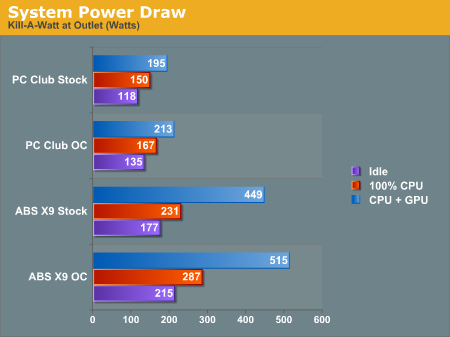
Starting with power requirements, it should come as little surprise that increasing CPU speed and voltage requires more power. The 25% overclock we used on the Sabre Extreme uses an additional ~20W of power. In comparison to an extreme system like the ABS Ultimate X9, the power requirements of the Sabre Extreme are extremely low. Using two faster graphics cards, a faster CPU, not to mention the water cooling configuration and hard drives clearly requires a lot more power than a typical midrange computer.
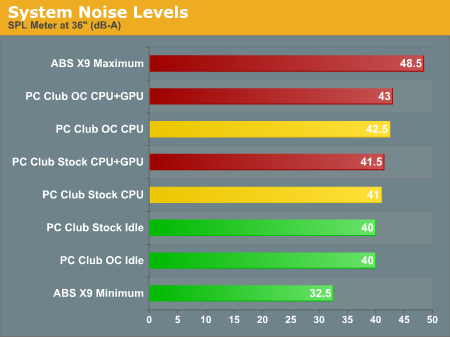
Looking at noise levels, the charts look relatively constant on the PC Club. At higher overclocks (not shown), noise levels did increase a few more decibels, but it required additional CPU voltage to reach that point. The PC Club Sabre Extreme is not a silent system, but it is relatively quiet. One thing that isn't shown is the variations in noise level that occur with variable fan speeds enabled in the BIOS. We actually found the changing RPMs of the fans to be more annoying than simply leaving them at maximum fan speed all the time. Particularly at lower RPMs, the fans in the PC Club tend to generate a dull hum that resonates with the case. We preferred disabling the CPU fan speed control in order to eliminate this effect, although there's no way to disable the variable fan speed of the PSU.
The ABS Ultimate X9 is louder at maximum fan speed and quieter at minimum fan speed -- nearly silent in the case of the latter -- but we also have to mention that the X9 was not entirely stable during testing in the original configuration, and for high stress situations you would definitely want to increase the fan RPMs.
Another aspect of system performance that would like to test is the noise and power requirements. As this is supposed to be a general use computer, most people aren't going to be interested in turbine engine noise levels or high power bills. We test systems at stock and overclocked (where applicable) speeds in both idle and 100% load situations. We then measured power draw and noise levels created by the system. 100% load is achieved by running two instances of Folding@Home along with the Splinter Cell: Chaos Theory benchmark. Performing video encoding or other CPU intensive tasks while playing a game will achieve a similar CPU load. We also provide a CPU-only stress test to show the difference between 100% CPU load and 100% CPU + GPU load. The CPU load is achieved by running the two Folding@Home instances without starting any games or other tasks.
Some of our readers have questioned in the past why we even perform such heavy stress test scenarios. After all, there are a lot of people that will never run to CPU intensive tasks along with a game to fully stress their computer, right? The problem is, we really don't know for sure what the future holds. Right now, most games and applications will not achieve the same load levels that we are using. In another year, however, with products like Windows Vista shipping and new games on the horizon, we may actually see situations where "typical use" scenarios put a similar stress on a system. We consider these tests a worst-case scenario, but provided the systems can run fully stable throughout our testing then we can say with some confidence that they will be okay with future applications and games.
For the ABS system, noise results basically showed no difference between any of the clock speeds, as all of the fans run at a constant RPM. However, the water cooling fan does come with the ability to control fan speed, so we set that to minimum for idle testing and maximum speed to show the difference in noise levels. The PC Club Sabre Extreme uses variable fan speeds to deal with heat output, so we enabled the appropriate setting in the BIOS for testing.
Starting with power requirements, it should come as little surprise that increasing CPU speed and voltage requires more power. The 25% overclock we used on the Sabre Extreme uses an additional ~20W of power. In comparison to an extreme system like the ABS Ultimate X9, the power requirements of the Sabre Extreme are extremely low. Using two faster graphics cards, a faster CPU, not to mention the water cooling configuration and hard drives clearly requires a lot more power than a typical midrange computer.
Looking at noise levels, the charts look relatively constant on the PC Club. At higher overclocks (not shown), noise levels did increase a few more decibels, but it required additional CPU voltage to reach that point. The PC Club Sabre Extreme is not a silent system, but it is relatively quiet. One thing that isn't shown is the variations in noise level that occur with variable fan speeds enabled in the BIOS. We actually found the changing RPMs of the fans to be more annoying than simply leaving them at maximum fan speed all the time. Particularly at lower RPMs, the fans in the PC Club tend to generate a dull hum that resonates with the case. We preferred disabling the CPU fan speed control in order to eliminate this effect, although there's no way to disable the variable fan speed of the PSU.
The ABS Ultimate X9 is louder at maximum fan speed and quieter at minimum fan speed -- nearly silent in the case of the latter -- but we also have to mention that the X9 was not entirely stable during testing in the original configuration, and for high stress situations you would definitely want to increase the fan RPMs.
Originally published at https://www.anandtech.com/show/2071 (Wayback Machine).