
HP DX5150 – OEM plus AMD
- Posted in
- Systems
Gaming Benchmarks - Battlefield 2
For our gaming benchmarks, we ran the systems in two different modes: a lower quality mode that allowed the IGPs to get relatively playable frame rates, and a higher quality mode that was a more realistic setting for the discrete graphics cards. Most of the discrete graphics cards will be system/CPU limited in the low quality mode, but that information can be interesting as well. Obviously, the IGP solutions really aren't intended for serious gamers, but we wanted to see if they could still provide a playable gaming experience with lower detail settings.
The above screenshots show the settings that we used in Battlefield 2. Our low quality BF2 configuration uses the "Low" preset, with texture quality also downgraded to low. Anisotropic filtering and antialiasing are disabled, and we tested at 640x480, 800x600, 1024x768, and 1280x1024. (We don't consider 640x480 playable in BF2, as the text is unreadable, but it was included for reference.) The higher quality mode uses the "High" preset, with textures also set to high. Antialiasing is disabled, and anisotropic filtering is set to 8x. The 7800 GTX generally wouldn't have a problem with 4xAA on the tested resolutions, but realistically, we don't expect users to put a 7800 GTX in this type of system.
While the integrated graphics solutions struggle to maintain playable frame rates even at the lowest resolutions, sticking with low detail levels and switching to even a 6600 provides very good results. In fact, the 6600 is capable of running very well in the medium quality modes while still maintaining reasonable frame rates. With the more powerful graphics cards, we can see that the faster memory and lower latencies provided on our custom system end up winning out - even with the slower processor. The 3800+ Venice core is limited to 171 FPS, while the HP system is limited to 157 FPS.
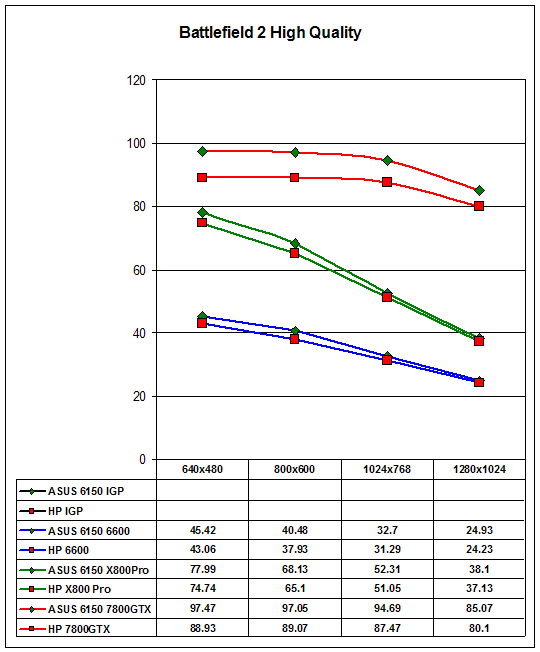
Moving onto the higher-quality mode, the IGP solutions are way too slow. Both systems were providing single digit frame rates, so we halted benchmarking rather than waiting for each test to complete. With the other graphics cards, the custom system ends up leading by as much as 9%, but you really wouldn't notice the difference in practical use. It appears that the improved memory controller and cache subsystem on the Venice core makes up for the lack of cache relative to the ClawHammer core. At that point, the lower latency RAM takes the lead.
For our gaming benchmarks, we ran the systems in two different modes: a lower quality mode that allowed the IGPs to get relatively playable frame rates, and a higher quality mode that was a more realistic setting for the discrete graphics cards. Most of the discrete graphics cards will be system/CPU limited in the low quality mode, but that information can be interesting as well. Obviously, the IGP solutions really aren't intended for serious gamers, but we wanted to see if they could still provide a playable gaming experience with lower detail settings.
 |
 |
| Click on images to enlarge. | |
The above screenshots show the settings that we used in Battlefield 2. Our low quality BF2 configuration uses the "Low" preset, with texture quality also downgraded to low. Anisotropic filtering and antialiasing are disabled, and we tested at 640x480, 800x600, 1024x768, and 1280x1024. (We don't consider 640x480 playable in BF2, as the text is unreadable, but it was included for reference.) The higher quality mode uses the "High" preset, with textures also set to high. Antialiasing is disabled, and anisotropic filtering is set to 8x. The 7800 GTX generally wouldn't have a problem with 4xAA on the tested resolutions, but realistically, we don't expect users to put a 7800 GTX in this type of system.
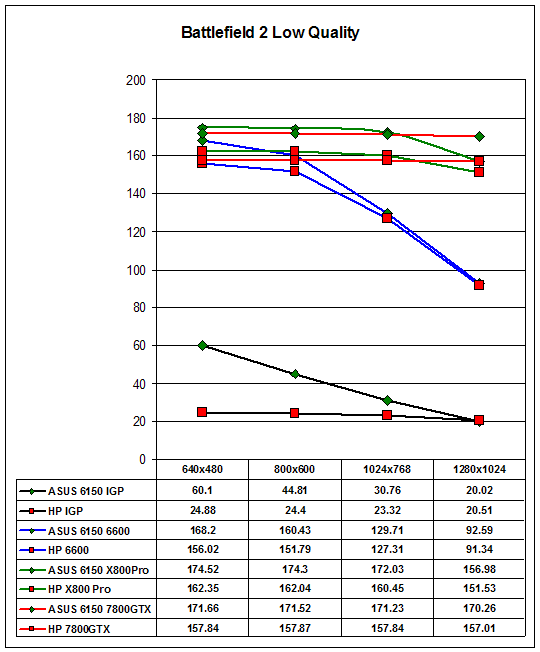
While the integrated graphics solutions struggle to maintain playable frame rates even at the lowest resolutions, sticking with low detail levels and switching to even a 6600 provides very good results. In fact, the 6600 is capable of running very well in the medium quality modes while still maintaining reasonable frame rates. With the more powerful graphics cards, we can see that the faster memory and lower latencies provided on our custom system end up winning out - even with the slower processor. The 3800+ Venice core is limited to 171 FPS, while the HP system is limited to 157 FPS.
Moving onto the higher-quality mode, the IGP solutions are way too slow. Both systems were providing single digit frame rates, so we halted benchmarking rather than waiting for each test to complete. With the other graphics cards, the custom system ends up leading by as much as 9%, but you really wouldn't notice the difference in practical use. It appears that the improved memory controller and cache subsystem on the Venice core makes up for the lack of cache relative to the ClawHammer core. At that point, the lower latency RAM takes the lead.
Originally published at https://www.anandtech.com/show/1895 (Wayback Machine).