
HP DX5150 – OEM plus AMD
- Posted in
- Systems
Multimedia and Networking Benchmarks
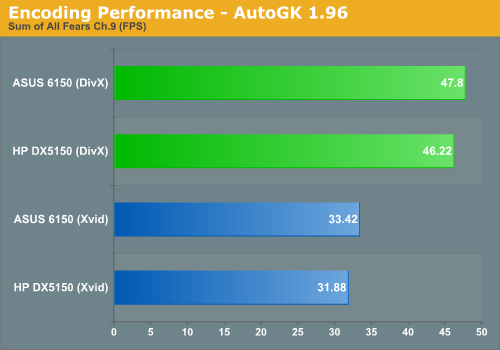
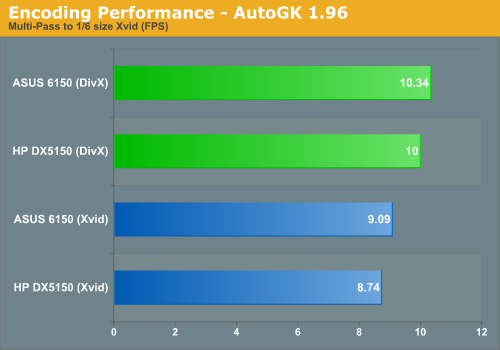
We ran all the configurations through a set of encoding benchmarks. We used chapter 9 from The Sum of All Fears, with a target quality of 75% and without audio. This does a single-pass encode that results in reasonable quality at the cost of file size. We also ran a multi-pass encode of a 30-second commercial, with a target size of 5 MB and with audio. The original video is 30 MB in size, and AutoGK makes three passes: a compression test, an initial pass, and the final pass. For larger files, the compression test scans segments of the video, so it isn't a full pass. With this small file, it ends up simply doing three full passes.
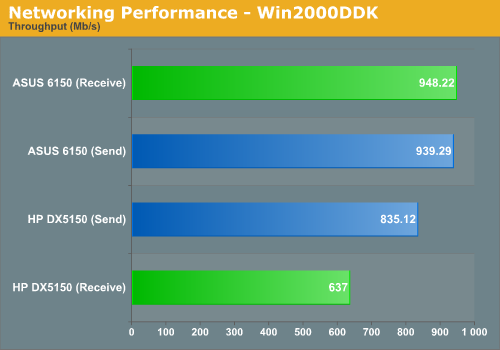
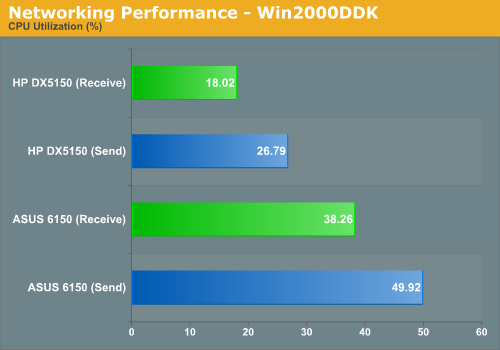
As with encoding performance, using a different graphics card has no impact on network performance. We employed our standard testing methodology using the Windows 2000 DDK. A second system, an MSI K8N Neo Platinum with a 3400+ processor, was set to communicate with each system in turn. Traffic was routed through a gigabit Ethernet switch, but that doesn't matter in real world performance scenarios - rarely does sustained network traffic exceed 500 Mb per second.
We ran all the configurations through a set of encoding benchmarks. We used chapter 9 from The Sum of All Fears, with a target quality of 75% and without audio. This does a single-pass encode that results in reasonable quality at the cost of file size. We also ran a multi-pass encode of a 30-second commercial, with a target size of 5 MB and with audio. The original video is 30 MB in size, and AutoGK makes three passes: a compression test, an initial pass, and the final pass. For larger files, the compression test scans segments of the video, so it isn't a full pass. With this small file, it ends up simply doing three full passes.
As with encoding performance, using a different graphics card has no impact on network performance. We employed our standard testing methodology using the Windows 2000 DDK. A second system, an MSI K8N Neo Platinum with a 3400+ processor, was set to communicate with each system in turn. Traffic was routed through a gigabit Ethernet switch, but that doesn't matter in real world performance scenarios - rarely does sustained network traffic exceed 500 Mb per second.
Originally published at https://www.anandtech.com/show/1895 (Wayback Machine).