
HTPC - TV Tuner Reviews
- Posted in
- Smartphones
- Mobile
MyHD MDP-130 (cont'd)
The MyHD can function in the same modes as the Fusion5. Analog reception along with OTA DTV and/or digital cable are all available. The initial configuration is very similar to that of the Fusion5: you choose the type of device that you have connected and then run a channel scan. In order to receive cable digital channels properly, the QAM decoding checkbox should be enabled prior to detecting the available channels, and you need to set the mode to "Auto" - you can see how we configured the card in the following screenshot.
The channel scan on the MyHD does not show which channels are encrypted and takes longer than the FusionHDTV software; 4 minutes for the analog channels and another 7 minutes for the digital channels. The digital channels are also listed in a slightly different manner than on FusionHDTV: 830-1 in FusionHDTV is 83-1 in MyHD, 824-1 is 82-4, etc. It's pretty easy to see how the two match up, but since most people will only try one card, configuring the channels is going to be a tedious process, regardless of which card you use. The MyHD listing makes more sense to us, though it does mean that you can't tune in directly to a subchannel: you need to select 82, and then press the "channel up" button three times to get to 82-4, for example.
The recording options with the MyHD card are slightly different than the Fusion5. Here, the FusionHDTV interface actually comes out ahead, as with MyHD several of the details that you'll want to change are buried in subscreens that are accessed by pressing the "Detail Options" buttons. Analog recording on the MyHD can be sent through DivX or Indeo by default, but you can also check the box labeled "Display All Video/Audio Compressors" to gain access to other codecs.
For analog recording, MyHD simply plugs into the Video For Windows (VFW) interface, which has some good points and bad points. It does afford you the ability to select from a wide range of codecs, but it's also a lot more involved than simply choosing between "Good/Better/Best" (or "Poor/Okay/Good" if you want to be realistic) recording quality. Due to the smaller file sizes, we like the DivX option, and it features extensive integrated configuration options. The big problem, unfortunately, is performance. Using single pass encoding with a 4000 Kbit data rate taxes the CPU quite a bit with the Sempron, to the point where audio cuts out periodically, the video skips, and basically it isn't worth keeping. The HP with the 4000+ fares better, but even then, we're limited to using the "Fastest" encoding mode in DivX in order to avoid performance issues. (We'll show some examples of the quality that each mode provides later.)
At this point, the analog recording seems like a total loss. The first thought is that this is a hardware or software bug, but using the faster HP system gives a clue to the real problem. Even watching analog channels on the Sempron is problematic, while on the 4000+, it works fine. The solution? More CPU power! By "upgrading" to an X2 3800+ system, the analog recoding quality was improved dramatically.
Running the card with the Athlon X2 3800+ allowed the DivX "Encoding Performance" option to be changed from "Fastest" to "Fast" or even "Normal". This had a dramatic impact on the quality of the analog recordings, providing for a near-perfect capture of the analog signal (which was merely okay to begin with) at a file size that was smaller than on the other cards. In theory, if you have a good/fast codec that hooks into the VFW interface, that might get around the performance requirement. On our base installation, we couldn't find any suitable codec that worked well without a very fast processor. (You don't even want to know what Xvid capture was like without the X2.)
Even without the CPU upgrade, you will want to tweak the capture to get proper video sizes - the analog recording is made as a 480x480 video and doesn't look right during playback unless you correct the aspect ratio. The above two screens show the configuration that we used for analog recording using DivX (though on the X2, we selected " Normal" instead of "Fastest"). There are a lot of potential tweaks to get DivX encoding to work better, so perhaps it's simply a matter of configuring the codec to work optimally on slower CPUs. Still, these settings resulted in a 640x480 AVI that played properly in a number of media players, and they worked well with a dual core processor. (Changing the size and cropping are only options when using the DivX codec, incidentally; one more reason to stick with it rather than Xvid or some MPEG2 codec.) Unfortunately, the resulting AVI files can't be played internally - you have to use a separate application like Windows Media Player to watch them.
Even at the highest quality settings, the DivX file sizes are much smaller than the HD streams, typically coming in at 1 GB or less per hour. Then again, 640x480 30FPS content doesn't compare favorably to 720p or 1080i recordings. You can also setup MyHD so that digital channels are recorded using the DivX (or other) codec as well, but we don't feel that that's the best idea, and performance issues were already present with encoding non-HD streams. Another drawback to capturing HD content to a different format is that the maximum resolution is 720x480. If you want to re-encode files to some other format, we would recommend that you do it on a separate PC or in offline mode.
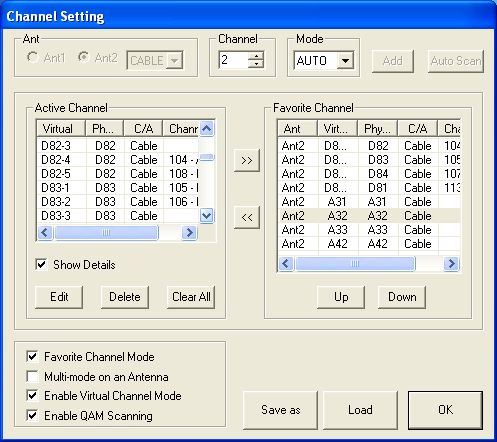
The MyHD can function in the same modes as the Fusion5. Analog reception along with OTA DTV and/or digital cable are all available. The initial configuration is very similar to that of the Fusion5: you choose the type of device that you have connected and then run a channel scan. In order to receive cable digital channels properly, the QAM decoding checkbox should be enabled prior to detecting the available channels, and you need to set the mode to "Auto" - you can see how we configured the card in the following screenshot.
The channel scan on the MyHD does not show which channels are encrypted and takes longer than the FusionHDTV software; 4 minutes for the analog channels and another 7 minutes for the digital channels. The digital channels are also listed in a slightly different manner than on FusionHDTV: 830-1 in FusionHDTV is 83-1 in MyHD, 824-1 is 82-4, etc. It's pretty easy to see how the two match up, but since most people will only try one card, configuring the channels is going to be a tedious process, regardless of which card you use. The MyHD listing makes more sense to us, though it does mean that you can't tune in directly to a subchannel: you need to select 82, and then press the "channel up" button three times to get to 82-4, for example.
 |
 |
| Click to enlarge. | |
The recording options with the MyHD card are slightly different than the Fusion5. Here, the FusionHDTV interface actually comes out ahead, as with MyHD several of the details that you'll want to change are buried in subscreens that are accessed by pressing the "Detail Options" buttons. Analog recording on the MyHD can be sent through DivX or Indeo by default, but you can also check the box labeled "Display All Video/Audio Compressors" to gain access to other codecs.
For analog recording, MyHD simply plugs into the Video For Windows (VFW) interface, which has some good points and bad points. It does afford you the ability to select from a wide range of codecs, but it's also a lot more involved than simply choosing between "Good/Better/Best" (or "Poor/Okay/Good" if you want to be realistic) recording quality. Due to the smaller file sizes, we like the DivX option, and it features extensive integrated configuration options. The big problem, unfortunately, is performance. Using single pass encoding with a 4000 Kbit data rate taxes the CPU quite a bit with the Sempron, to the point where audio cuts out periodically, the video skips, and basically it isn't worth keeping. The HP with the 4000+ fares better, but even then, we're limited to using the "Fastest" encoding mode in DivX in order to avoid performance issues. (We'll show some examples of the quality that each mode provides later.)
At this point, the analog recording seems like a total loss. The first thought is that this is a hardware or software bug, but using the faster HP system gives a clue to the real problem. Even watching analog channels on the Sempron is problematic, while on the 4000+, it works fine. The solution? More CPU power! By "upgrading" to an X2 3800+ system, the analog recoding quality was improved dramatically.
Running the card with the Athlon X2 3800+ allowed the DivX "Encoding Performance" option to be changed from "Fastest" to "Fast" or even "Normal". This had a dramatic impact on the quality of the analog recordings, providing for a near-perfect capture of the analog signal (which was merely okay to begin with) at a file size that was smaller than on the other cards. In theory, if you have a good/fast codec that hooks into the VFW interface, that might get around the performance requirement. On our base installation, we couldn't find any suitable codec that worked well without a very fast processor. (You don't even want to know what Xvid capture was like without the X2.)
 |
 |
| Click to enlarge. | |
Even without the CPU upgrade, you will want to tweak the capture to get proper video sizes - the analog recording is made as a 480x480 video and doesn't look right during playback unless you correct the aspect ratio. The above two screens show the configuration that we used for analog recording using DivX (though on the X2, we selected " Normal" instead of "Fastest"). There are a lot of potential tweaks to get DivX encoding to work better, so perhaps it's simply a matter of configuring the codec to work optimally on slower CPUs. Still, these settings resulted in a 640x480 AVI that played properly in a number of media players, and they worked well with a dual core processor. (Changing the size and cropping are only options when using the DivX codec, incidentally; one more reason to stick with it rather than Xvid or some MPEG2 codec.) Unfortunately, the resulting AVI files can't be played internally - you have to use a separate application like Windows Media Player to watch them.
Even at the highest quality settings, the DivX file sizes are much smaller than the HD streams, typically coming in at 1 GB or less per hour. Then again, 640x480 30FPS content doesn't compare favorably to 720p or 1080i recordings. You can also setup MyHD so that digital channels are recorded using the DivX (or other) codec as well, but we don't feel that that's the best idea, and performance issues were already present with encoding non-HD streams. Another drawback to capturing HD content to a different format is that the maximum resolution is 720x480. If you want to re-encode files to some other format, we would recommend that you do it on a separate PC or in offline mode.
Originally published at https://www.anandtech.com/show/1887/htpc-ndash-tv-tuner-reviews (Wayback Machine).