
HTPC - TV Tuner Reviews
- Posted in
- Smartphones
- Mobile
More MyHD MDP-130
Once the card is properly configured, you can get around to actually using it. The setup is a bit tedious - both in waiting for the channel scan to complete as well as in properly configuring analog capture settings - but the card works well once configured.
The quality of the HD reception is great, and in the HD/bypass mode, it is impossible to tell the difference between the output of the Comcast box and the output of the MyHD card. Those with decent OTA DTV reception will find more to like with the MyHD. TitanTV works properly with no need to configure your channels manually, and you can even use antenna 1 for OTA HD and antenna 2 for analog/digital cable, with the card switching between the two inputs as necessary.
Speaking of TitanTV, MyHD includes a utility called "TitanTVHelperApp.exe" to allow you to schedule recordings within TitanTV. While it would be nice not to have to go through the training process, it's better than nothing. The way you "train" MyHD and TitanTV to work together is another somewhat complex interface. You have to select the "record" link within TitanTV, which brings up the top dialog shown above. You also need to know the virtual channel maps to the desired program. In the example image, NBC HD shows up as channel 105-1 in TitanTV, but the real channel is 83-1. Once you select the new channel and press OK, you're greeted with the MyHD update confirmation dialog (the lower image). If you choose "Yes," MyHD will remember your change for the future. Once this is done for each digital channel you want to watch, you can then forget about remembering sub-channels.
There are still some items to address, though. While watching digital channels works very well, the analog reception is clearly worse than the other two cards. Besides the performance issues, image quality at best is perhaps a tie or slightly better than the Fusion5, and clearly inferior to the Theater 550. Timeshifting (pause/play of live TV) works fine, but only for digital channels. Given the issues with recording analog channels, that's not too surprising, and the FusionHDTV software has the same problem. Still, people used to TiVo or the Windows MCE interface will find this to be a less-than-perfect solution, and unlike the other cards in this article, Windows MCE is not supported with the MyHD.
Something else that we felt was lacking was the overlay/preview window. This apparently shows 720x480 content, scaled to however large you make the window. We wish that an option for the full content was available, but even if the preview window only shows a 480p version of the content, the ability to simply maximize the overlay window would be a good addition. (Completely eliminating the overscan of the Toshiba HDTV is pretty cool and can be done with the FusionHDTV software, for example.) This is really a minor complaint, though.
Another slightly confusing interface issue comes up with the video output and aspect ratios. As mentioned before, the HDTV is a 1080i device. We have the computer set to output a 720p (actually 1152x648) signal, so that text remains legible in Windows. Switching to HD mode bypasses the PC output and goes straight from the MyHD card, so a separate output setting takes precedence (and unfortunately, we get overscan from the TV). There are quite a few resolutions available, but the most useful are 1920x1080i, 1280x720p, and Native. Since most HD broadcasts are in either 720p or 1080i, selecting "Native" seems like it should provide the optimal result. However, this actually causes all of the analog channels to end up stretched or zoomed, and sometimes the digital channels get skewed as well.
Selecting a specific widescreen resolution solves these problems, but this isn't immediately clear and you might also wonder how to proceed. The FusionHDTV software has an option for aspect ratio called "Original", and it works properly for all HD and analog channels. The "Native" AR in MyHD tries to accomplish that, but it doesn't work out as well (and you would end up with your TV often changing resolutions every time that you change the channel). The UI on the MyHD card has options for video resolution, screen ratio, and screen format on the AV page. We feel the best result comes from choosing a standard resolution for your display (1920x1080i or 1280x720p most likely), and then check the "Auto" box in the aspect ratio. It may not get every AR correct, but that's probably due to the lack of tight standards in the US market more than anything. You can also set up the overlay size on the VGA dialog tab, and we selected "Fixed Aspect Ratio" and "16:9 Display".
The MyHD card ends up being the reverse of the Fusion5. It has issues with analog video, but the digital quality is better (and uses fewer system resources) and there are few major bugs/problems. The card lists the minimum system requirements as a Pentium II 400 MHz, and while that might work for DTV content where the hardware decoding is a factor, watching and recording the analog channels requires an excessive amount of CPU power. Of course, most people are going to be interested in the HD aspects of this card, and the analog is only a fringe benefit.
With a fast system and once configured properly, the MyHD worked very well and didn't give us any cause for complaint. The cost is substantially higher, but right now, it would definitely be our pick out of these two HD-capable cards. It's better to spend an extra $100 for a device that works well more often than not than to save the money and end up fighting with a problematic interface. Considering the cost of equipment used in many entertainment centers, $270 for the MyHD + DVI really isn't that much - you can even throw in a dual core processor for $330 and you're still only up to the price of a good set of speakers, and nowhere near what some people pay for high-end speakers. If you enjoy checking out the latest home theater equipment, the MyHD card isn't likely to disappoint.
Once the card is properly configured, you can get around to actually using it. The setup is a bit tedious - both in waiting for the channel scan to complete as well as in properly configuring analog capture settings - but the card works well once configured.
The quality of the HD reception is great, and in the HD/bypass mode, it is impossible to tell the difference between the output of the Comcast box and the output of the MyHD card. Those with decent OTA DTV reception will find more to like with the MyHD. TitanTV works properly with no need to configure your channels manually, and you can even use antenna 1 for OTA HD and antenna 2 for analog/digital cable, with the card switching between the two inputs as necessary.
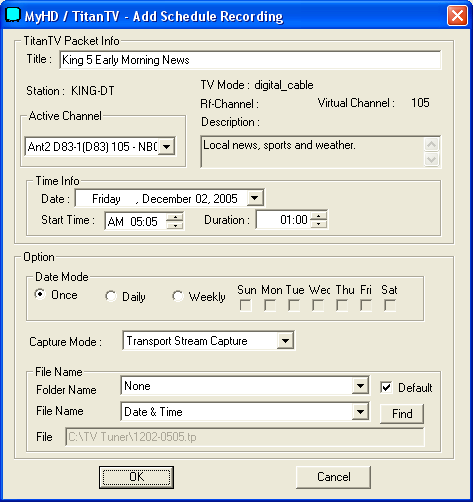
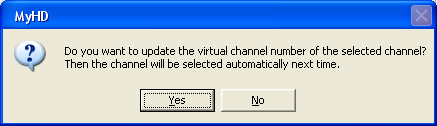
Speaking of TitanTV, MyHD includes a utility called "TitanTVHelperApp.exe" to allow you to schedule recordings within TitanTV. While it would be nice not to have to go through the training process, it's better than nothing. The way you "train" MyHD and TitanTV to work together is another somewhat complex interface. You have to select the "record" link within TitanTV, which brings up the top dialog shown above. You also need to know the virtual channel maps to the desired program. In the example image, NBC HD shows up as channel 105-1 in TitanTV, but the real channel is 83-1. Once you select the new channel and press OK, you're greeted with the MyHD update confirmation dialog (the lower image). If you choose "Yes," MyHD will remember your change for the future. Once this is done for each digital channel you want to watch, you can then forget about remembering sub-channels.
There are still some items to address, though. While watching digital channels works very well, the analog reception is clearly worse than the other two cards. Besides the performance issues, image quality at best is perhaps a tie or slightly better than the Fusion5, and clearly inferior to the Theater 550. Timeshifting (pause/play of live TV) works fine, but only for digital channels. Given the issues with recording analog channels, that's not too surprising, and the FusionHDTV software has the same problem. Still, people used to TiVo or the Windows MCE interface will find this to be a less-than-perfect solution, and unlike the other cards in this article, Windows MCE is not supported with the MyHD.
Something else that we felt was lacking was the overlay/preview window. This apparently shows 720x480 content, scaled to however large you make the window. We wish that an option for the full content was available, but even if the preview window only shows a 480p version of the content, the ability to simply maximize the overlay window would be a good addition. (Completely eliminating the overscan of the Toshiba HDTV is pretty cool and can be done with the FusionHDTV software, for example.) This is really a minor complaint, though.
 |
 |
| Click to enlarge. | |
Another slightly confusing interface issue comes up with the video output and aspect ratios. As mentioned before, the HDTV is a 1080i device. We have the computer set to output a 720p (actually 1152x648) signal, so that text remains legible in Windows. Switching to HD mode bypasses the PC output and goes straight from the MyHD card, so a separate output setting takes precedence (and unfortunately, we get overscan from the TV). There are quite a few resolutions available, but the most useful are 1920x1080i, 1280x720p, and Native. Since most HD broadcasts are in either 720p or 1080i, selecting "Native" seems like it should provide the optimal result. However, this actually causes all of the analog channels to end up stretched or zoomed, and sometimes the digital channels get skewed as well.
Selecting a specific widescreen resolution solves these problems, but this isn't immediately clear and you might also wonder how to proceed. The FusionHDTV software has an option for aspect ratio called "Original", and it works properly for all HD and analog channels. The "Native" AR in MyHD tries to accomplish that, but it doesn't work out as well (and you would end up with your TV often changing resolutions every time that you change the channel). The UI on the MyHD card has options for video resolution, screen ratio, and screen format on the AV page. We feel the best result comes from choosing a standard resolution for your display (1920x1080i or 1280x720p most likely), and then check the "Auto" box in the aspect ratio. It may not get every AR correct, but that's probably due to the lack of tight standards in the US market more than anything. You can also set up the overlay size on the VGA dialog tab, and we selected "Fixed Aspect Ratio" and "16:9 Display".
The MyHD card ends up being the reverse of the Fusion5. It has issues with analog video, but the digital quality is better (and uses fewer system resources) and there are few major bugs/problems. The card lists the minimum system requirements as a Pentium II 400 MHz, and while that might work for DTV content where the hardware decoding is a factor, watching and recording the analog channels requires an excessive amount of CPU power. Of course, most people are going to be interested in the HD aspects of this card, and the analog is only a fringe benefit.
With a fast system and once configured properly, the MyHD worked very well and didn't give us any cause for complaint. The cost is substantially higher, but right now, it would definitely be our pick out of these two HD-capable cards. It's better to spend an extra $100 for a device that works well more often than not than to save the money and end up fighting with a problematic interface. Considering the cost of equipment used in many entertainment centers, $270 for the MyHD + DVI really isn't that much - you can even throw in a dual core processor for $330 and you're still only up to the price of a good set of speakers, and nowhere near what some people pay for high-end speakers. If you enjoy checking out the latest home theater equipment, the MyHD card isn't likely to disappoint.
Originally published at https://www.anandtech.com/show/1887/htpc-ndash-tv-tuner-reviews (Wayback Machine).