
HTPC - TV Tuner Reviews
- Posted in
- Smartphones
- Mobile
Installation Procedures
There were a few topics that were so similar among the cards that we wanted to combine them. For all three of these cards, installing the hardware is a relatively simple process. Open the PC, insert the card, plug in the USB receiver, and power up the PC. You can connect or disconnect the coaxial cable at any time without any problems, though most people will probably only want to do that once.
There may be differences in the suggested order of installation. FusionHDTV recommends installing the software before the card, while MyHD apparently needs the card installed before the software installation will fully complete. We managed to get all three cards installed and running using the same process.
First, we installed the hardware prior to installing the software - and we'd recommend downloading the latest software version before proceeding, if you haven't already. After that, turn on the PC and ignore the "Windows has found new hardware" prompts - cancel them. Run the installation utility, and after a few configuration steps and a reboot, you should be done. (You might also get some "This driver is not WHQL certified" warning messages, which you would also ignore. If WHQL certification is important to you, both the MyHD and Fusion5 do not have it.)
After the hardware/software installation, you need to configure the software for your location. We've covered most of this in the individual card reviews, but we wanted to talk a bit more about the channel scans.
The QAM channel scan turns up a couple hundred channels, many of which are unusable (i.e. encrypted). Out of the numerous channels detected, only about 35 are interesting to most people. All of the encrypted QAM channels can be deleted, as there is no way to watch them. For FusionHDTV, the encrypted channels are clearly indicated. For MyHD, any digital channel that shows a black screen with 0x0 as the resolution and at least a 64% signal rate is almost certainly encrypted.
As is typical of most cable lineups, the remaining channels consist of a lot of junk that you probably don't want, along with the interesting channels. While the analog channels are where you find them normally on your cable box, the digital channels are scattered about on sub-channels in no apparent order. If you get rid of the channels that you know you don't want, you'll probably have 50 or fewer digital channels left to sort through.
To determine the channel lineup, I set the TV to split-screen mode, with the Comcast cable box output on one side and the PC output on the other. (Dual monitors can accomplish this same thing, and you can also reference channel lists on TitanTV or some other site if you recognize the shows.) I chose to get rid of the shopping channels along with any channel that didn't display any content. For the remaining channels, the channel surfer in me had a workout, as I'd tune the card to a channel and then scan through the channels on the Comcast box to find a match. Once a match is found, at least with MyHD, you can label the channel as something more meaningful, like "104 - ABC HD". You might also consider writing them down on paper for future reference - this would definitely be useful when "training" TitanTV on the MyHD card.
While it takes a while, the ability to decode QAM is great for people like me. In fact, you can even connect this card to a standard cable signal and decode the HD as well as the free digital channels, without having anything more than a basic account. (This is assuming that the cable company doesn't put a filter on your line for analog-only subscriptions, which varies by cableco and area.) You might even find a few channels that don't normally show up, though that's subject to change over time. (Watching these "unauthorized" channels also seemed to be one of the factors leading to crashes with FusionHDTV. I could apparently get other subscribers' On Demand movies on at least five or six channels.) FCC regulations require cable companies at minimum to carry the free OTA content, though, so those at least will be available.
There were a few topics that were so similar among the cards that we wanted to combine them. For all three of these cards, installing the hardware is a relatively simple process. Open the PC, insert the card, plug in the USB receiver, and power up the PC. You can connect or disconnect the coaxial cable at any time without any problems, though most people will probably only want to do that once.
There may be differences in the suggested order of installation. FusionHDTV recommends installing the software before the card, while MyHD apparently needs the card installed before the software installation will fully complete. We managed to get all three cards installed and running using the same process.
First, we installed the hardware prior to installing the software - and we'd recommend downloading the latest software version before proceeding, if you haven't already. After that, turn on the PC and ignore the "Windows has found new hardware" prompts - cancel them. Run the installation utility, and after a few configuration steps and a reboot, you should be done. (You might also get some "This driver is not WHQL certified" warning messages, which you would also ignore. If WHQL certification is important to you, both the MyHD and Fusion5 do not have it.)
After the hardware/software installation, you need to configure the software for your location. We've covered most of this in the individual card reviews, but we wanted to talk a bit more about the channel scans.
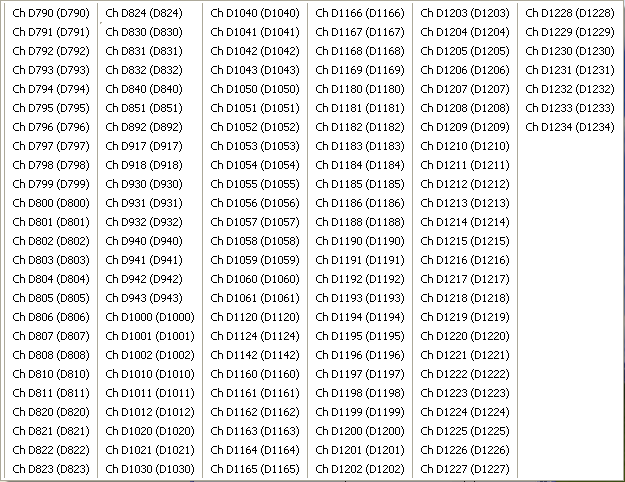
Click to enlarge.
The QAM channel scan turns up a couple hundred channels, many of which are unusable (i.e. encrypted). Out of the numerous channels detected, only about 35 are interesting to most people. All of the encrypted QAM channels can be deleted, as there is no way to watch them. For FusionHDTV, the encrypted channels are clearly indicated. For MyHD, any digital channel that shows a black screen with 0x0 as the resolution and at least a 64% signal rate is almost certainly encrypted.
As is typical of most cable lineups, the remaining channels consist of a lot of junk that you probably don't want, along with the interesting channels. While the analog channels are where you find them normally on your cable box, the digital channels are scattered about on sub-channels in no apparent order. If you get rid of the channels that you know you don't want, you'll probably have 50 or fewer digital channels left to sort through.
To determine the channel lineup, I set the TV to split-screen mode, with the Comcast cable box output on one side and the PC output on the other. (Dual monitors can accomplish this same thing, and you can also reference channel lists on TitanTV or some other site if you recognize the shows.) I chose to get rid of the shopping channels along with any channel that didn't display any content. For the remaining channels, the channel surfer in me had a workout, as I'd tune the card to a channel and then scan through the channels on the Comcast box to find a match. Once a match is found, at least with MyHD, you can label the channel as something more meaningful, like "104 - ABC HD". You might also consider writing them down on paper for future reference - this would definitely be useful when "training" TitanTV on the MyHD card.
While it takes a while, the ability to decode QAM is great for people like me. In fact, you can even connect this card to a standard cable signal and decode the HD as well as the free digital channels, without having anything more than a basic account. (This is assuming that the cable company doesn't put a filter on your line for analog-only subscriptions, which varies by cableco and area.) You might even find a few channels that don't normally show up, though that's subject to change over time. (Watching these "unauthorized" channels also seemed to be one of the factors leading to crashes with FusionHDTV. I could apparently get other subscribers' On Demand movies on at least five or six channels.) FCC regulations require cable companies at minimum to carry the free OTA content, though, so those at least will be available.
Originally published at https://www.anandtech.com/show/1887/htpc-ndash-tv-tuner-reviews (Wayback Machine).